
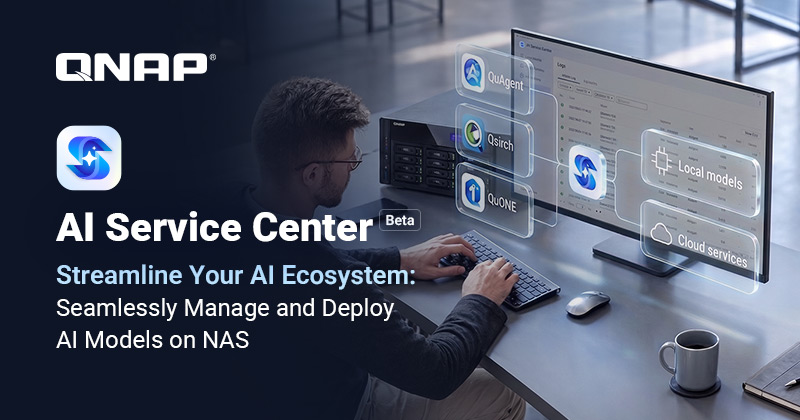
QNAP has launched AI Service Center in beta, a platform that centralizes on the NAS the management of the artificial intelligence models used by its applications, whether they run on the device itself or in the cloud through OpenAI, Azure OpenAI, Gemini and Claude. The Taiwanese manufacturer announced it on November 2. The idea is for the administrator to set up, once, which models are available, with which keys and with what spending limit, and have the NAS applications use them from that single point instead of each one connecting on its own.
QNAP AI Service Center in 20 seconds
- What it is: a central AI model manager for QNAP NAS devices, now in beta.
- What it connects to: QNAP-verified local models and services from OpenAI, Azure OpenAI, Gemini, Claude and compatible providers.
- What it controls: monthly budgets, alerts and a log of tokens, cost and latency for every call.
- Requirements: QTS or QuTS hero 6.1.0; local models require an x86 NAS with a compatible GPU.
The move addresses a problem that grows as NAS makers add AI features: each application asks for its own API key or its own model, and the administrator loses sight of the overall picture. At QNAP, the first beneficiaries are the QuAgent assistant and Qsirch semantic search, which will be able to use the configured models without requesting separate keys.
A single point for models, keys and spending
According to QNAP, AI Service Center is organized into four blocks. The local model library lets users choose from models the manufacturer has verified and assign them to the CPU, GPU, integrated graphics or NPU; the system downloads and loads them in the background. The cloud providers section connects to OpenAI, Azure OpenAI, Gemini, Claude and other services with an OpenAI-compatible API, always using the user’s own keys, which are stored only on the NAS, and lets administrators set a monthly budget and alert thresholds.
The third block is routing: applications register themselves when installed, and the administrator decides, from a single page, which model handles each capability and whether an application is allowed to reach the cloud at all. The fourth is the log, which records the date and time, application, model, capability, number of tokens, cost and latency for every call, with CSV export for audits.
Vivian Luo, QNAP product manager, sums it up in the announcement: “As more AI applications run on NAS devices, administrators need a clear view of which models are running, where the data is being sent, and how much is being spent.”
Local privacy or cloud power, by choice
The practical difference lies in where the data travels. With local models, requests and responses never leave the NAS, which matters when the AI is working on internal documents, as is the case with semantic search. With cloud services, content is sent to the chosen provider, and what QNAP offers is control over that transfer: which applications can do it, with which models, and up to what spending cap. It’s the same dilemma playing out on the PC, where local AI increasingly demands more memory and specific hardware.
The per-call log is perhaps the most useful part for a business. Knowing how many tokens each application consumes and how much it costs makes it possible to spot unexpected usage and allocate costs, something many organizations today only see on the provider’s monthly bill.
Requirements and what’s still unknown
AI Service Center requires QTS 6.1.0 or QuTS hero h6.1.0 or later. The cloud part works on NAS devices with x86 and ARM64 processors and doesn’t require a GPU. The local model library, however, is limited to x86 systems with a GPU that has passed QNAP’s compatibility testing, plus the corresponding runtime environment and model packages. That leaves much of the home and small-office NAS lineup, which doesn’t carry a graphics card, out of local AI.
The announcement also doesn’t clarify which specific models make up the verified library, which GPUs are certified, how much memory is needed, or whether the tool will cost anything once it leaves beta. Since this is a preliminary release, it’s worth testing before putting it into production. QNAP has spent months expanding its catalog for small and medium businesses, as with its new switches with 25GbE, and with this platform it’s trying to make the NAS the control point for AI in the office as well.
Frequently asked questions
What is QNAP AI Service Center?
A beta platform that centralizes on the NAS the management of local and cloud AI models used by QNAP’s applications, with control over keys, spending and a log of every call.
Which cloud AI services does it support?
OpenAI, Azure OpenAI, Gemini, Claude and other services with an OpenAI-compatible API, using the user’s own keys, which are stored only on the NAS.
Can I use local models on any QNAP NAS?
No. Local models require an x86 NAS with a compatible GPU verified by QNAP. The cloud part does work on x86 and ARM64 models without a GPU.
Which system version do I need?
QTS 6.1.0 or QuTS hero h6.1.0, or later versions.
Source: QNAP
This article is also available in Spanish: «QNAP centraliza en el NAS los modelos de IA locales y en la nube», on revistacloud.com.
