

FortiOS 7.2’s end of support, set for September 30, 2026, means administrators still running this branch need to plan their next move. Updating to FortiOS 7.4 can be a reasonable transition in certain environments, especially where SSL VPN is still in use, but the change is also a good opportunity to reconsider whether to stick with FortiGate or look at alternatives based on open software and technologies such as OPNsense, pfSense, OpenWrt, IPsec, OpenVPN, or WireGuard.
Migrating from FortiOS 7.2 in 20 seconds
- FortiOS 7.2 reaches end of support (EOS) on 09/30/2026.
- FortiOS 7.4 can be used as a transition, but it depends on the model and configuration.
- FortiOS 7.6.3 removes SSL VPN Tunnel Mode, and Fortinet recommends migrating to IPsec.
- Before updating, check Security Fabric, compatibility, and the official upgrade path.
- It can also be a good time to evaluate software-based firewalls and open source options.
The mistake would be treating this migration as a simple firmware update. A FortiGate typically brings together firewall, NAT, VPN, segmentation, routing, authentication, and, depending on the licenses in place, additional security functions.
That’s why, before choosing a version, it’s worth taking a real inventory of what the device does. It’s also worth separating two decisions that don’t necessarily have to be resolved together: what to do about FortiOS 7.2, and what firewall and remote access architecture the organization wants to run over the next few years.
First decision: 7.4 as a transition, or jump straight to 7.6
For a FortiGate that’s still using SSL VPN Tunnel Mode, updating directly to a recent FortiOS 7.6 release can introduce a significant change.
Fortinet documents that SSL VPN Tunnel Mode is no longer supported starting with FortiOS 7.6.3. After updating from an earlier version, the tunnel-mode configuration isn’t preserved, and that type of connection stops working.
The vendor recommends migrating beforehand to another remote-access system, such as IPsec VPN.
That opens up a staged migration, when the hardware and specific version support it:
7.2 → 7.4 → stabilize → migrate SSL VPN → IPsec → 7.6.x
The advantage is operational. The team can separate the firewall update from the remote-access migration and check what breaks after each change.
But 7.4 isn’t a universal waypoint.
SSL VPN availability also depends on the model. Fortinet documents, for example, that the FortiGate 90G/91G and lower-end models in the G series carry additional restrictions. On a 90G/91G, the feature can exist under FortiOS 7.4.7 and disappear in 7.4.8.
The 70G and its variants can use it on FortiOS 7.2, but lose support for it starting with FortiOS 7.4.8.
There are also limitations for some devices in the F family when moving to FortiOS 7.6.
That’s why the first rule in this guide is a simple one: don’t pick the version first and check the hardware afterward. Start from the exact model, the features in use, and the compatible versions.
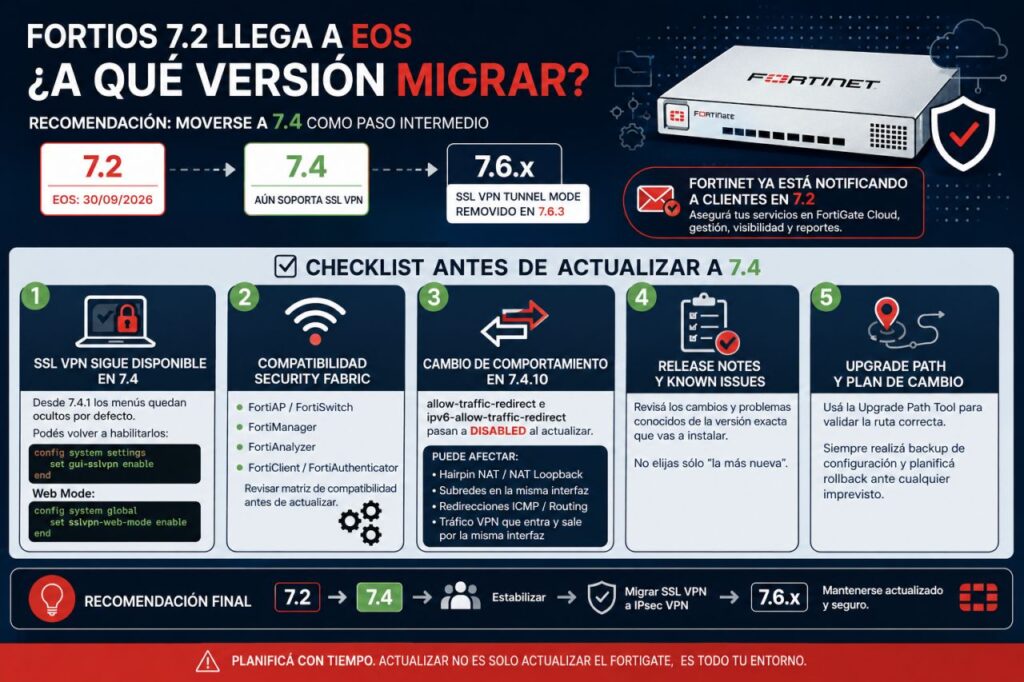
Checklist before updating FortiOS 7.2
| Check | What to review |
|---|---|
| FortiGate | Model and hardware revision |
| Firmware | Exact version installed |
| Upgrade Path | Official sequence to the target version |
| SSL VPN | Tunnel Mode, Web Mode, and users |
| IPsec | Existing tunnels and remote access |
| FortiClient | Deployed versions |
| Security Fabric | FortiAP, FortiSwitch, and other components |
| Management | FortiManager and FortiAnalyzer |
| NAT and routing | Hairpin NAT, loopback, and special routes |
| Release Notes | Changes and Known Issues |
| Backup | Configuration and recovery procedure |
| Testing | Services that need validating after the reboot |
There are also less visible changes that can cause problems.
In FortiOS 7.4.10, for example, allow-traffic-redirect and ipv6-allow-traffic-redirect get disabled during certain updates. This can affect Hairpin NAT configurations, NAT Loopback, and traffic that enters and exits through the same interface.
SSL VPN can also seem to disappear after updating to 7.4 when it’s actually just hidden in the GUI. Starting with FortiOS 7.4.1, Fortinet changed its default visibility.
All of this reinforces the need to read the Release Notes for the exact version you plan to install, not just the general highlights of FortiOS 7.4 or 7.6.
Second decision: maybe it’s not just about which FortiOS to install
A major refresh is also a chance to review the architecture.
FortiGate is an integrated security appliance. Hardware, FortiOS, security services, support, and Security Fabric components form a platform designed to work together, similar in spirit to the SASE approach behind Fortinet’s own FortiGate 1200G.
That brings advantages, especially for organizations that rely on advanced inspection, centralized management, SD-WAN, threat protection, and other Fortinet services.
But not every company needs that whole bundle.
A firewall that’s mainly doing NAT, VLANs, routing, L3/L4 rules, IPsec, and remote access opens up more options.
That’s where software-based alternatives come in, ones that can run on standard hardware, virtual machines, or certain appliances.
Well-known options include OPNsense, pfSense, and OpenWrt, though they aren’t interchangeable products and don’t automatically replace every FortiGate function.
OPNsense is particularly interesting for business networks and labs that want a FreeBSD-based firewall with web administration and routing, VPN, and high-availability features.
pfSense covers similar ground. Its documentation covers VLANs, NAT, Multi-WAN, high availability, and VPN through IPsec, OpenVPN, and WireGuard, among other features. It can also be deployed virtualized, including on Proxmox VE.
OpenWrt takes a different approach and is especially well known for routers and network devices, though it can be part of much broader architectures.
The comparison should be made on features and requirements, not just license cost.
| Need | FortiGate | OPNsense/pfSense | OpenWrt |
|---|---|---|---|
| Firewall and NAT | Yes | Yes | Yes |
| VLAN | Yes | Yes | Yes |
| IPsec | Yes | Yes | Available |
| OpenVPN | Depends on architecture | Yes | Available |
| WireGuard | Depends on platform/use | Yes | Available |
| Dedicated hardware | Yes | Optional | Optional |
| Virtualization | FortiGate-VM | Yes | Yes |
| Integrated security ecosystem | Extensive | Different/more modular | More modular |
| Centralized enterprise management | Fortinet | Depends on solution/edition | Requires more integration |
| Hardware freedom | Limited to the commercial model | High | High |
This shouldn’t be framed as “open source versus commercial firewall” either.
The practical difference is who integrates, tests, updates, and responds when something breaks.
A firewall built on open software can reduce vendor lock-in and let you use your own x86 hardware. But someone still has to handle hardware selection, redundancy, updates, monitoring, backups, support, and incident response.
Open source doesn’t mean cost-free infrastructure.
IPsec, OpenVPN, or WireGuard: the other change worth studying
The end of SSL VPN Tunnel Mode is also an opportunity to decouple remote access from the firewall vendor.
Fortinet proposes IPsec as an alternative for its customers, and it makes sense in many enterprise environments. Its main advantage is interoperability: it’s available across a huge range of firewalls, routers, and operating systems.
pfSense’s documentation, for example, generally considers IPsec the best choice for connections between different vendors, and notes specifically that it avoids being tied to a single firewall or VPN solution.
But there are two other well-known open alternatives.
OpenVPN has been used for years for remote access and site-to-site connections. It supports certificates and user authentication and has clients for numerous operating systems. On pfSense it can also be combined with specific rules, RADIUS, and certificate management.
WireGuard goes for a considerably smaller and simpler design. Its configuration uses key pairs and delivers good performance, but that simplicity also means fewer user-management features.
Netgate warns, for example, that WireGuard doesn’t include user authentication on its own, and that management can get more laborious as the number of peers grows significantly.
A basic comparison would look like this:
| Technology | Strength | Worth considering |
|---|---|---|
| IPsec/IKEv2 | Interoperability and enterprise clients | More complex configuration |
| OpenVPN | Maturity, certificates, and authentication | Requires a client |
| WireGuard | Simplicity and performance | External identity management |
| Proprietary SSL VPN | Vendor integration | Product and lifecycle dependency |
There’s no single right answer for every case.
For an organization with hundreds or thousands of employees, a corporate directory, multi-factor authentication, per-user policies, and managed devices, replacing FortiClient with WireGuard installed by hand on every laptop is hardly an equivalent migration.
At a small company with twenty admins, Linux servers, and very specific technical access needs, WireGuard can be far more appealing.
And for site-to-site connections between different vendors, IPsec remains a particularly reasonable choice.
The change is also a good moment to ask whether every user really needs a VPN with access to an entire network. For certain internal applications, it may be more appropriate to apply per-application access and Zero Trust Network Access (ZTNA) principles, shrinking the networks that remain reachable once a user has authenticated.
The goal shouldn’t be to replace a VPN just because its technology has aged, but to review what each user actually needs to reach, and from which device.
A possible migration strategy
For a company currently running FortiOS 7.2 and SSL VPN, there are at least three reasonable paths.
Staying entirely with Fortinet means following the compatible upgrade path, using 7.4 as a transition where appropriate, migrating SSL VPN to IPsec or the recommended alternative for the specific case, and then moving on to a supported branch.
Keeping FortiGate but decoupling the VPN lets you keep the firewall while remote access moves to an independent technology or platform. It’s a way to reduce the number of dependencies that will need migrating the next time the firewall’s lifecycle changes.
The third option is to evaluate replacing the firewall with software such as OPNsense or pfSense, especially if the features in use are mainly firewall, routing, VLAN, NAT, and VPN.
But that last option needs a serious proof of concept.
Importing twenty rules isn’t enough. You need to check real performance under the expected traffic, network interfaces, VLANs, high availability, dynamic routing if it exists, VPN, authentication, logging, monitoring, IDS/IPS if needed, updates, and the recovery procedure.
Operating cost also needs to be factored in. A license that disappears can reappear in the form of engineering hours.
FortiOS 7.2’s EOS is therefore a technical date, but it can be used for a much broader review. For some companies the answer will simply be updating their FortiGates. For others it will be the moment to separate VPN and firewall. And those using a relatively small slice of Fortinet’s capabilities have good reason to check how far open software alternatives can take them today before renewing the next generation of appliances.
Frequently asked questions
Is it mandatory to move from FortiOS 7.2 to FortiOS 7.4?
Not necessarily. The right path depends on the FortiGate, the source version, the features in use, and the target. Fortinet has an Upgrade Path Tool to determine the compatible sequence.
What alternatives exist to Fortinet’s SSL VPN?
IPsec/IKEv2 is the alternative Fortinet recommends for certain remote-access scenarios. Open technologies such as OpenVPN and WireGuard also exist, though their authentication, administration, and deployment characteristics differ.
Can OPNsense or pfSense replace a FortiGate?
It can, in certain environments, but there’s no automatic equivalence. You need to compare firewall, VPN, routing, high availability, traffic inspection, management, support, performance, and the security services the organization actually uses.
Is WireGuard better than IPsec for replacing SSL VPN?
It depends on the case. WireGuard stands out for simplicity and performance, while IPsec offers very broad interoperability and better options for certain enterprise deployments; WireGuard doesn’t include user authentication on its own.
Source: Open Security