
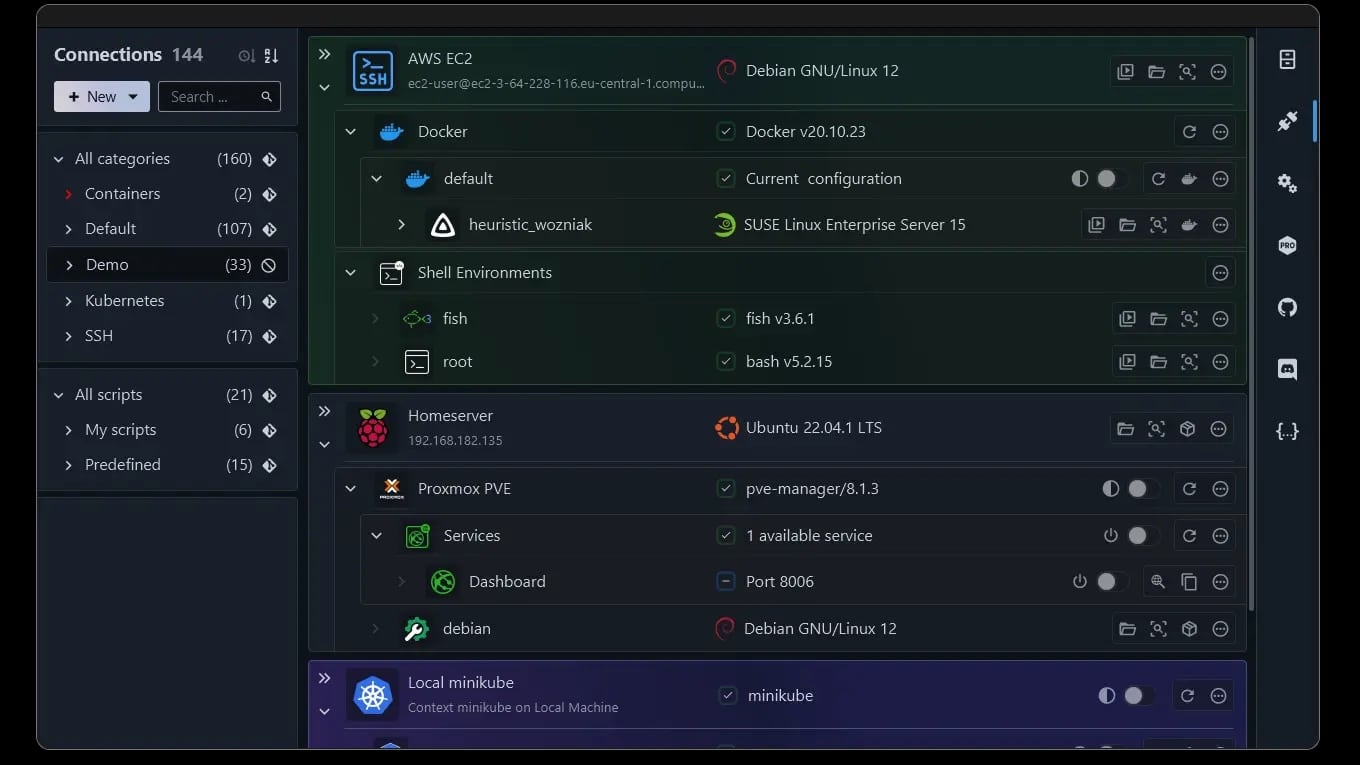
In almost any operations team, the same scene plays out: a dozen (or hundreds) of SSH connections scattered across bastion hosts, jump servers, virtual machines, containers, clusters, and Windows environments managed via history, notes, and tabs. In this context, XPipe is carving out a space with a rather unusual approach: it doesn’t aim to replace sysadmin tools but to unify them under a local “hub” to launch sessions, transfer files, open tunnels, and perform actions on heterogeneous infrastructure from a single interface.
The idea is straightforward: manage infrastructure connections and workflows from the desktop without installing agents or components on remote systems. XPipe relies on your command-line tools (for example, OpenSSH, Docker, kubectl, or virtualization tools) and orchestrates everything “on top,” connecting terminal, editor, browser, and RDP/VNC clients as parts of a unified operation.
What exactly is XPipe (and why isn’t it just “another SSH client”)
XPipe is defined as a “connection hub”: a central point to inventory and organize connections and launch them with a click from your preferred terminal, maintaining compatibility with existing SSH configurations, agents, jump servers, tunnels, advanced authentication, and more.
The difference lies in the approach. Instead of building an “all-in-one” tool to replace your toolbox, XPipe aims to connect existing installed tools:
- Terminal launcher: opens sessions in your usual emulator.
- Tunnel management: opens ports to your local machine for remote services, with automation tailored for daily use.
- Integrations: containers (Docker/Podman/LXD/incus), Kubernetes, VMs (Proxmox, VMware, Hyper-V, KVM), and environments like WSL or remote PowerShell/WinRM sessions.
- Quick actions: routine tasks like starting/stopping containers or context-aware access depending on the system type.
For a sysadmin, the promise isn’t “magic,” but reducing friction: fewer mental jumps, fewer loose scripts, less “where was that machine?”
The technical core: “shell-based” connections instead of rigid protocols
Many graphical server managers revolve around SFTP/SCP. It works… until it doesn’t: containers without SSH, restricted environments, systems where you can’t or don’t want to run an SFTP service, or sessions where elevated permissions are needed without opening another connection.
XPipe adopts a shell-based approach: it launches local processes (e.g., ssh user@host, docker exec, etc.) and communicates with them via stdin/stdout/stderr. In other words, it delegates connectivity to existing tools and adapts to what’s available at each destination.
This has two practical implications:
- No remote setup required: no “XPipe agent” to deploy on each host.
- Can handle challenging scenarios: for example, managing a container within a VM accessible only through a bastion host, maintaining an “attached connection” logic within the same experience.
A file manager designed for professionals (without permission battles)
Another area where XPipe seeks to stand out is the remote file browser. Instead of relying solely on SFTP/SCP, it only needs a shell and basic utilities in Linux/macOS (and PowerShell in Windows) to navigate and operate. According to its documentation, this also allows elevating operations within the same session when sudo is available, avoiding the classic “edited the file but can’t save it” dilemma that often requires workaround steps.
Moreover, XPipe follows the principle of “your tools first”: if you edit files with VS Code, Cursor, or another local editor, its workflow aims to integrate it rather than forcing editing within the product itself.
Tunnels and remote applications without opening ports “just because”
In real-world setups, half the risk and operational hassle come from exposing services just to access them. XPipe does the opposite: automatic tunneling to the desktop for remote services, and launching clients (RDP/VNC/X11 forwarding) using SSH as transport where applicable.
This is especially useful when working with:
- internal web dashboards (Prometheus, Grafana, storage UIs)
- service consoles inside containers
- ad-hoc Windows host management via RDP without exposing port 3389 to the world
Syncing “vault” with Git: connection inventory as code (almost)
One of XPipe’s most interesting moves is how it proposes backup and portability: instead of the typical “export/import configuration,” it advocates using Git as a native synchronization mechanism for the connections vault, with commits and change tracking.
This approach resonates well with technical teams because it:
- keeps a change history (“who modified this connection?”)
- enables environment replication across machines
- opens the door for collaboration (with permission nuances)
Security: local model, open-core, and vault encryption
Given the nature of what XPipe manages (hosts, users, keys, secrets), security is a must. Its documentation emphasizes a “rich client” model: data is stored and used locally and on user-controlled systems, with no mandatory external service receiving connection data.
It also states that XPipe is an open-core project, with the core available on GitHub under the Apache License 2.0, though some paid features are not open source.
If users choose to store secrets within XPipe, the encryption is described as using AES-128-GCM with key derivation based on passphrases (PBKDF with HMAC-SHA-256), along with options not to store secrets but to retrieve them from external managers or input them on demand. Support for smartcards and FIDO2 keys in authentication is also mentioned.
For enterprise environments, XPipe clarifies that connections depend on the security of your underlying tools (like your ssh), license validation via their API occurs only in licensed editions, and offline licenses are available for isolated setups.
Use cases where XPipe fits particularly well
For technical and systems profiles, XPipe isn’t necessarily “the universal tool,” but it suits several common scenarios:
- Daily management of large fleets: many connections, multiple jumps, mixed environments.
- Teams working primarily through terminal + editor: seeking organization and automation layered on familiar workflows.
- Hybrid infrastructure: Proxmox + containers + Kubernetes + standalone VMs—everything in one view.
- Bastion host operations: when the “path” is part of the problem (jump hosts, tunnels, indirect access).
- Serious homelab or lab environments: where inventory changes and order matter.
Plans and deployment: from Community to enterprise
The pricing page shows XPipe offering a Community free edition and various paid plans aimed at individuals and organizations—examples include “Homelab,” “Professional,” and “Enterprise,” with monthly per-user prices in USD at the time of review.
Additionally, XPipe promotes a Webtop: a browser-accessible desktop that can run in a container, designed to “bring your desktop” when away from your workstation (though the overall approach remains local-first).
Frequently Asked Questions
Does XPipe replace my SSH client or terminal?
Not necessarily. It’s designed as a “hub” that launches your connections using existing tools (e.g., OpenSSH and your terminal emulator).
Can XPipe be used to manage containers or VMs that don’t have SSH inside?
Yes. Its approach focuses on working “over the shell” and tools like docker exec, with integrations into container platforms and virtualization environments.
Is it safe to store passwords and keys in XPipe?
The documentation describes vault encryption with options to avoid storing secrets altogether (e.g., using external managers or inputting them during connection), plus support for hardware authentication devices like FIDO2/security keys.
How is connection inventory shared across multiple devices?
XPipe proposes syncing the vault via a remote Git repository, with sensitive data encrypted at rest when stored as secrets.