
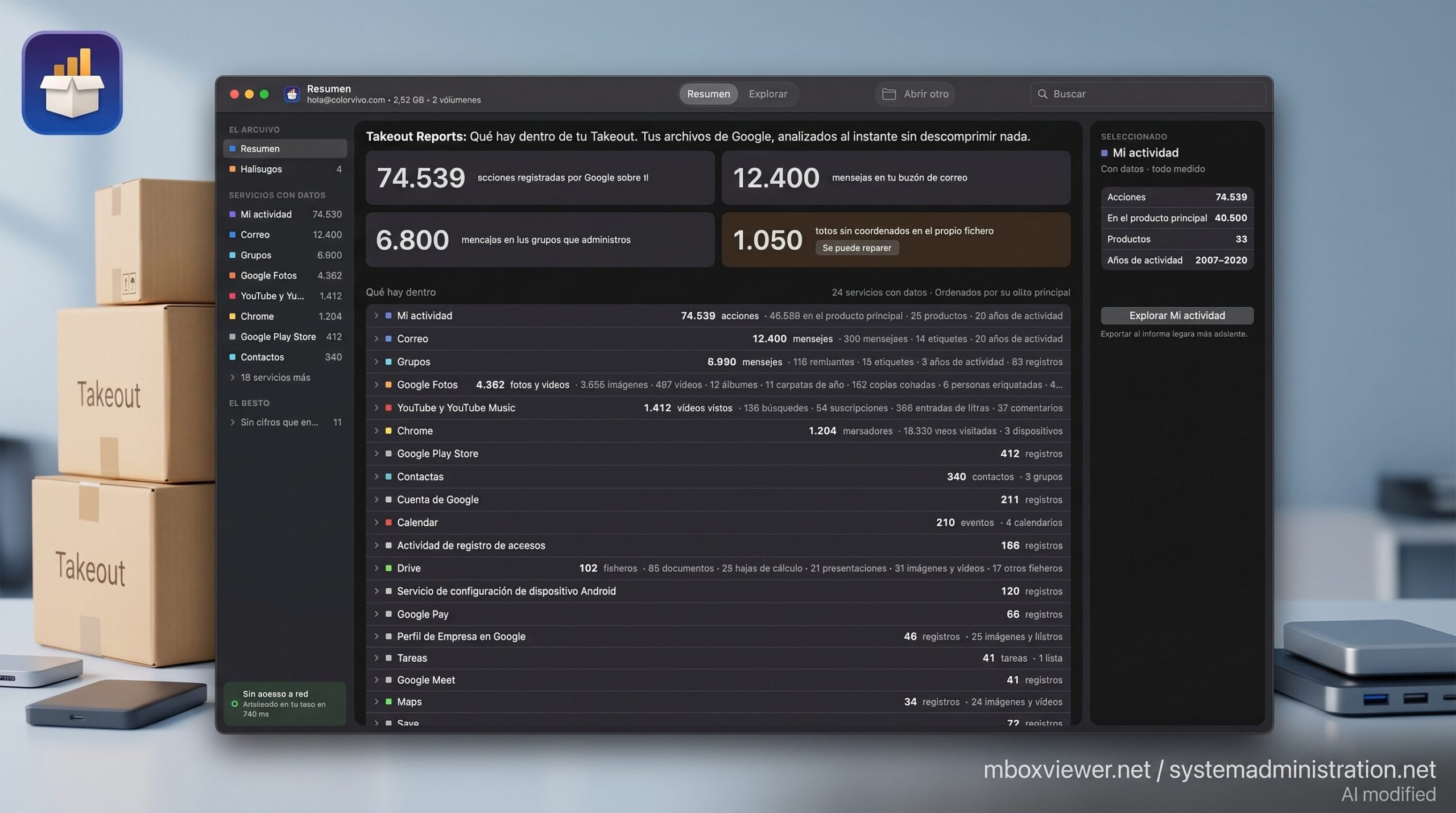
Google has long allowed users to download a copy of the data associated with their accounts through Google Takeout, but reviewing the result can be difficult: years of emails, photos, videos, contacts, calendars, and activity may end up spread across multiple compressed archives. Takeout Reports is a new free Mac application designed to analyze those exports and provide an understandable overview of their contents without requiring users to extract the files first.
Takeout Reports in 20 seconds
- Takeout Reports analyzes files downloaded through Google Takeout and shows what information they contain.
- It can count emails, photos, videos, contacts, calendar events, and activity records across different Google services.
- ZIP files can be read directly, avoiding the additional disk space normally required for extraction.
- Processing takes place locally on the Mac and, according to its developer, the application has no network access.
- It is free and requires macOS 14 or later.
The tool may be particularly useful for people who have spent many years using Gmail, Google Photos, Drive, Calendar, YouTube, Maps, or Chrome. Google Takeout makes it relatively easy to obtain a copy of that information, but the downloaded archive retains the structures and formats used by the different services, making it difficult to understand exactly what is inside.
Takeout Reports tries to solve that problem by creating an inventory of the digital information contained in the export. It does not connect directly to a Google account or discover additional information. It only analyzes files that the user has already requested and downloaded.
From Thousands of Files to Useful Numbers
Google Takeout allows users to select which products they want to include in an export. Someone may choose to download only their photos or request a much broader copy containing information from most of the Google services they have used.
The final size varies considerably between accounts.
A Google Photos library built up over many years can occupy hundreds of gigabytes. Gmail may contain thousands or tens of thousands of messages and attachments. Drive documents, contacts, Calendar appointments, YouTube information, and activity records can add even more data.
When an export becomes too large, Google can divide it into several archive files.
Takeout Reports is designed to analyze these downloads and present their different parts as a single logical collection. If it detects that one of the volumes is missing, it warns the user rather than presenting a potentially incomplete report as if the whole export were available.
The application also goes beyond simply counting files.
For Gmail, for example, it can report the number of messages, unique senders, Gmail labels, the years covered by the mailbox, and how many messages include attachments.
For Google Photos, it distinguishes between photos and videos and can identify albums, folders organized by year, edited copies, and other metadata included in the export. It can also report images for which it could not find information such as a date or coordinates.
The My Activity section can provide another perspective on the data accumulated over time. Takeout Reports counts the activity records found in the archive, shows which Google products account for most of them, and indicates how far back the available history goes.
It can also analyze data from services including Drive, Chrome, Contacts, Calendar, YouTube, Tasks, and Maps.
No Need to Extract a 200 GB Google Takeout Archive
One of the practical problems with a large Google Takeout export is not just downloading it, but finding enough free storage to work with it.
A 200 GB compressed archive may require a substantial amount of additional disk space when fully extracted.
Takeout Reports avoids that duplication because it reads files directly from inside the ZIP archive.
According to its developer, this means a 200 GB Takeout export could be analyzed even if the Mac only had 30 GB of free storage remaining, provided the original archive was already stored on a drive accessible to the computer.
The application supports ZIP and TGZ archives, as well as Google Takeout folders that have already been extracted.
It also includes a read-only explorer for navigating the export service by service and inspecting individual files without extracting them.
A user can, for example, examine the metadata JSON associated with a photograph, look at information from a Calendar event, or inspect an activity record.
The current version focuses on understanding and browsing the archive rather than modifying it.
A Different Way to See Years of Google Data
Beyond managing backups, Takeout Reports can provide a clearer picture of how much information has accumulated around a Google account.
That scale is not always obvious during everyday use.
Photos are viewed through Google Photos, messages through Gmail, videos through YouTube, and appointments through Calendar. Each application exposes only one part of the overall collection.
Google Takeout brings those different datasets together. Takeout Reports then attempts to turn the resulting collection of ZIP, MBOX, JSON, photos, and other files into a readable report.
Seeing that an account contains thousands of emails, years of photographs, or a large number of activity records can make the scale of the archive easier to understand.
This does not mean the application reveals everything Google knows about a person.
Takeout Reports can only analyze the information Google included in the requested export and the formats that the application is able to interpret. Its developer also says that when only part of a service can be measured, the application reports that limitation instead of presenting the figure as complete.
The Data Stays on the Mac
Privacy is particularly important for any application working with Google Takeout.
A complete export can contain private emails, family photographs, contacts, documents, locations, browsing information, and other personal records accumulated over many years.
Takeout Reports uses a local-processing approach.
According to Color Vivo Internet, the Spanish company behind the application, Takeout Reports does not have network-access permission. The archive therefore does not need to be uploaded to an external server for the report to be generated, and the application works in the same way with Wi-Fi switched off.
The developer also says the app contains no analytics or identifiers and does not require users to create an account.
On the Mac App Store, the developer declares that the application does not collect data. As with other App Store privacy labels, Apple notes that this information is provided by the developer.
For a utility designed to inspect what could effectively be a copy of years of personal digital activity, keeping the analysis on the user’s own computer is a relevant distinction.
What Happens to Gmail Messages?
Email presents a particular case within Google Takeout.
Google typically exports Gmail messages using the MBOX format, which can store a large collection of emails in a single mailbox file.
Takeout Reports can analyze these mailboxes and provide statistics about their contents. Users who then want to browse and read the individual messages can use Mbox Viewer, another application from the same developer.
Mbox Viewer specializes in opening MBOX and EML email files and is available for both macOS and Windows.
The two applications therefore serve different purposes.
Takeout Reports provides an overview of the entire Google export, while Mbox Viewer focuses specifically on browsing the email archives found within it.
Mbox Viewer is not required to generate the general Takeout Reports analysis.
Free Now, With Additional Features Planned
Takeout Reports is currently available free of charge. According to its developer, the complete report and archive-browsing features have no size or service limits.
Additional paid features are planned for the future.
These include searching across the entire archive, batch exports, and tools for repairing photo metadata. Those capabilities are not available in the current release and should therefore not be considered part of the application today.
Takeout Reports requires macOS 14 or later, supports both Apple Silicon and Intel-based Macs, and is available in 18 languages.
The application is also not affiliated with or endorsed by Google.
Users must first request their information through Google Takeout and download the resulting files. Takeout Reports only comes into the process afterwards.
That separation is important. The application does not need a Google login, the user’s password, or direct access to Gmail, Photos, Drive, or other services. Its job is simply to make sense of the copy that is already stored locally.
For anyone who has downloaded a Google Takeout archive only to end up staring at a collection of enormous ZIP files without knowing where to begin, that may be the missing part of the process.
Frequently Asked Questions
What is Takeout Reports?
Takeout Reports is a free Mac application that analyzes exports created with Google Takeout. It provides an overview of emails, photos, videos, contacts, calendars, activity records, and other information contained in the archive.
Do Google Takeout files need to be extracted first?
No. Takeout Reports can read ZIP and TGZ archives directly. It can also analyze a Takeout folder that has already been extracted.
Does Takeout Reports need access to a Google account?
No. It works with files that the user has already downloaded through Google Takeout and does not require Google account credentials.
Are Google Takeout files uploaded to the Internet?
According to the developer, no. Processing takes place locally, and the application does not have network-access permission.
