
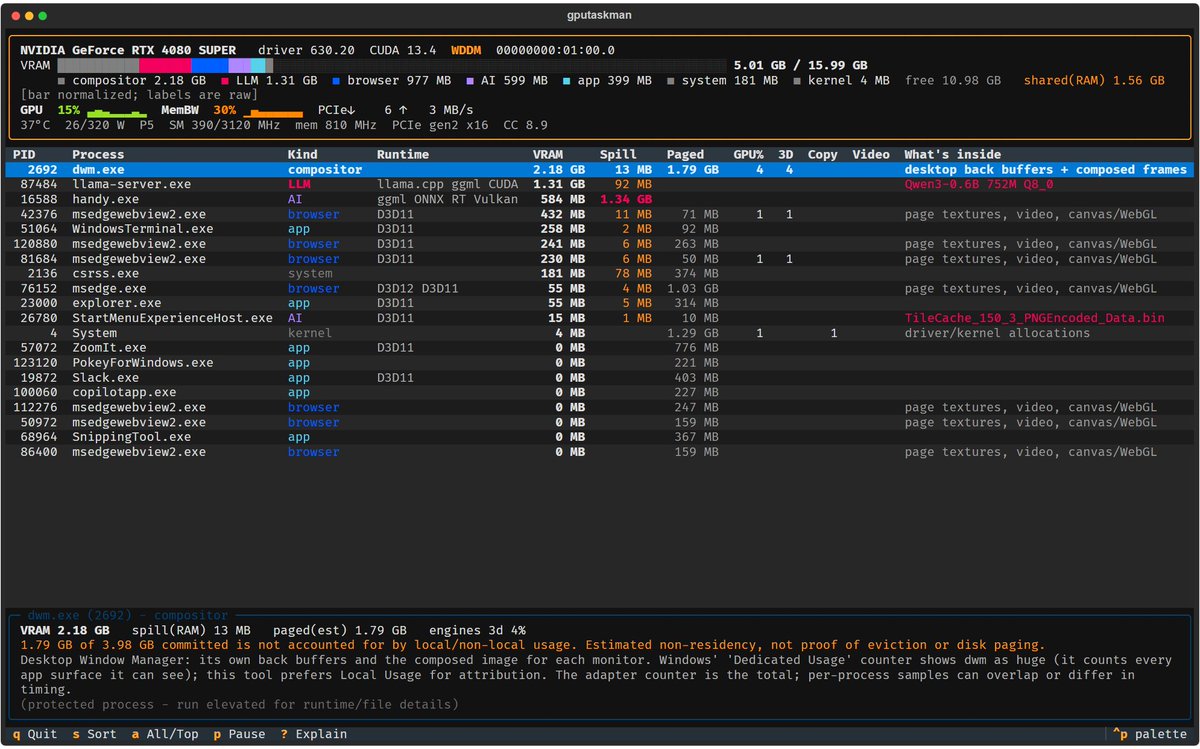
Scott Hanselman, Vice President and Technical Fellow at Microsoft and GitHub, has released GPU Taskman (gputaskman), a free, open-source terminal tool that shows which processes are using the GPU and its video memory (VRAM). He announced it on X on November 3, 2026, with a direct message: “I’m building a GPU Taskman to find out where my GPU memory is going. PRs welcome.” The latest version, 0.3.5, shipped on November 10.
GPU Taskman in 20 seconds
- Shows GPU usage, VRAM, temperature, power draw, and PCIe stats per process in the terminal.
- Detects local AI models from llama.cpp, Ollama, and LM Studio and estimates their memory footprint.
- Experimental, MIT-licensed, for Windows, Linux, WSL, and macOS.
Windows Task Manager already shows overall GPU usage, but when a browser, a game, and a local language model are all running at once, figuring out who’s really hogging the video memory gets complicated. GPU Taskman grew out of that need: Hanselman wanted to see where his GPU memory was going and turned it into an open contribution project on GitHub, in the shanselman/gputaskman repository.
What It Shows
According to Wccftech, the tool shows GPU usage, VRAM in use, temperature, power draw, clock speeds, memory activity, and PCIe stats, along with per-process consumption. It groups workloads into categories such as desktop composition, browsers, games, and AI applications, and also shows system memory accessible from the GPU. To do this, it combines operating-system counters with process metadata, model files, logs, and local APIs.
The part most built with 2026 in mind is local AI. GPU Taskman identifies models loaded in llama.cpp, Ollama, or LM Studio and shows their architecture, quantization, parameter count, size, and an estimate of the memory the KV cache needs. Some of those figures are estimates based on the model files, not direct GPU measurements. Version 0.3.5 added support for Intel GPUs on Linux, CPU and system memory monitoring, and more options for logging stats.
Platforms, Installation, and Limitations
It works with NVIDIA and AMD GPUs on Windows 10 and 11, as well as on Linux, WSL, and macOS with Apple Silicon, although available features vary by platform and hardware. It can be downloaded from the GitHub releases page, with portable builds for Windows that don’t require installing Python, or from PyPI. It’s MIT-licensed.
The author himself flags the limits. It’s experimental software, and some measurements still need validating across more configurations. Hanselman warns that system memory accessible by the GPU being in use doesn’t necessarily mean VRAM has overflowed, and that the tool can’t identify a game’s specific textures or know what resources have been evicted from memory. For anyone running models locally, pairing it with each inference engine’s own metrics is the sensible way to size a machine — as our guide on saving VRAM when running AI models locally shows.
Frequently Asked Questions
What is GPU Taskman?
An open-source terminal GPU monitor created by Scott Hanselman that shows which processes are using the GPU and VRAM.
What systems does it run on?
Windows 10 and 11 with NVIDIA and AMD GPUs, as well as Linux, WSL, and macOS with Apple Silicon, with features that vary by platform.
Does it work with local AI models?
Yes. It detects models from llama.cpp, Ollama, and LM Studio and estimates their memory usage, though some figures are approximations.
Sources:
This article was originally published in Spanish at revistacloud.com.
