
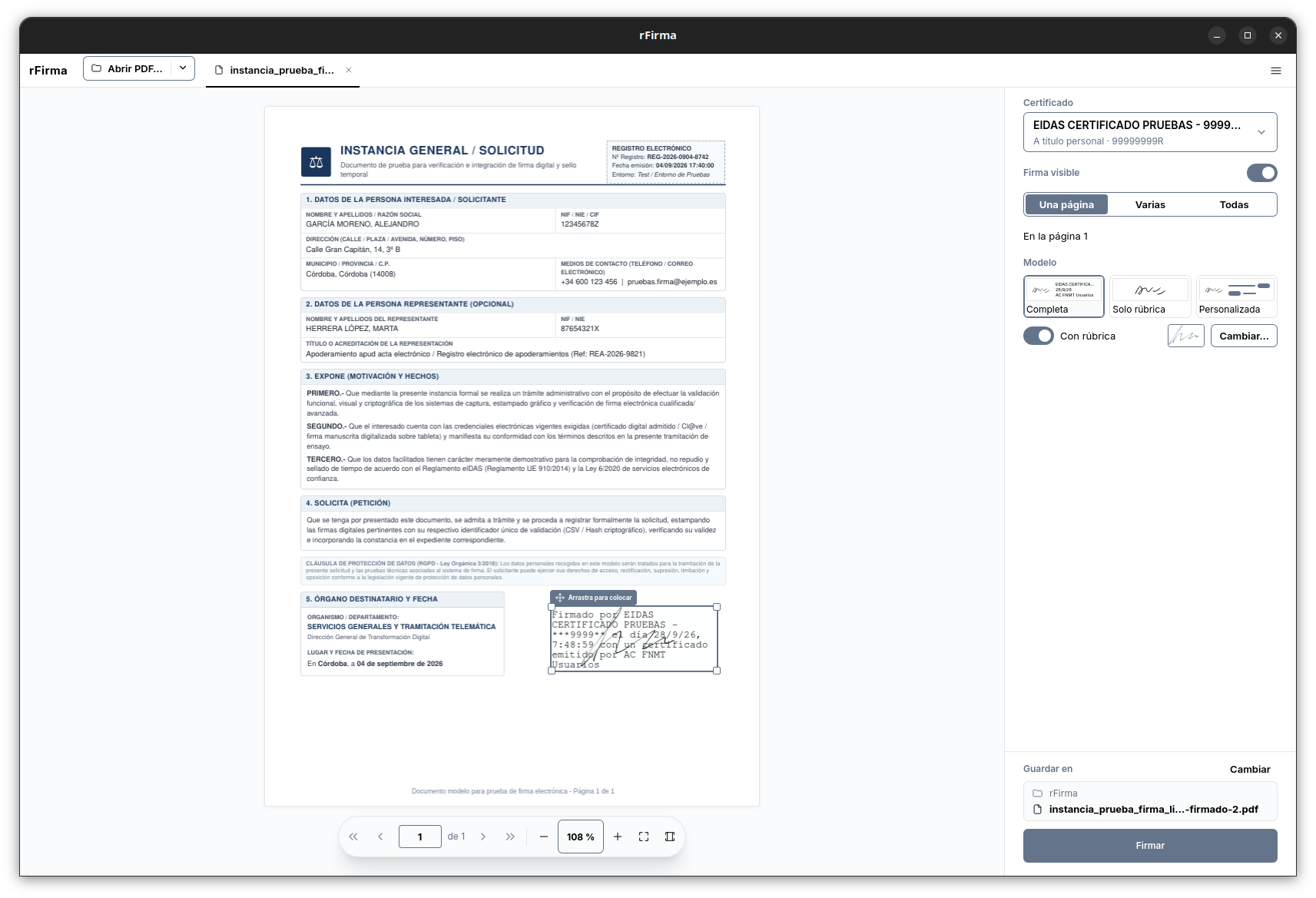
rFirma 0.12.0 extends its push to bring electronic signing to a lighter desktop with a Windows version that drops the Java requirement. The project, independent of the Spanish government, combines Rust, Tauri v2, React, and a cryptographic engine compiled with GraalVM Native Image to offer a native application capable of working with certificates stored on the system.
rFirma 0.12 in 20 seconds
- Version 0.12.0 adds Windows support and an installer.
- rFirma does not need Java installed to run.
- The interface uses React and Tauri v2, with Rust on the native side.
- The cryptographic engine comes from the @firma client ecosystem and is compiled as a native library.
- The project is independent of AutoFirma, the Spanish government, and the FNMT.
rFirma’s approach starts from a fairly specific idea: keep electronic signing capabilities compatible with AutoFirma while changing the application’s architecture. Instead of relying on Java on the user’s machine, the project packages a cryptographic engine compiled as native code and uses Rust to communicate with the operating system.
For a Windows user, the most visible change is in the installation. rFirma places the application, its cryptographic library, and the necessary dependencies inside the user’s own profile, without requiring administrator rights. It also registers the afirma:// protocol when no other application is already associated with it.
Rust, React, and GraalVM Replace the Java Dependency
rFirma’s architecture separates the interface and system integration from the part responsible for cryptographic operations.
The graphical interface is built with Tauri v2, Rust, React, and Vite. The Rust backend handles local communication with government electronic offices, the afirma:// protocol, and access to certificates stored on the machine.
The most distinctive part is the cryptographic engine. rFirma uses components from the @firma client and compiles them with GraalVM Native Image to produce a native library. The project uses that engine for operations involving formats such as CAdES, PAdES, XAdES, and FacturaE.
The result is an application that doesn’t need a separate Java installation. The engine ships together with rFirma and is loaded from within the application itself.
On Linux, the project already followed this architecture through Flatpak, .deb, and .rpm packages. With version 0.12.0, Windows now enters the picture with its own dedicated installer.
The project also claims the architecture significantly cuts startup time and memory usage compared with the reference it uses for AutoFirma. Those figures come from the project’s own specifications rather than from an independent test.
Windows Gets an Installer, Updates, and Certificate Access
Coming to Windows isn’t just a matter of recompiling the app. rFirma ships an installer designed to run without administrator privileges and uses the %LOCALAPPDATA% folder (in a subfolder named rfirma) to store its components.
Version 0.12.0 also adds integration with the Windows certificate store. The project further supports devices and stores compatible with PKCS#11, a standard used to interact with cryptographic modules and certain security devices.
Another addition in this version is the update system. rFirma can check for new versions from within the app itself and uses minisign signatures to verify the corresponding files. The project also publishes SHA-256 checksums so users can confirm that a downloaded installer matches the expected file.
There is, however, one quirk Windows users will run into during installation. The installer does not yet use Authenticode, Windows’ standard code-signing system. Because of that, SmartScreen may show a warning when the installer is run.
The project explains this and recommends checking the published SHA-256 checksum before proceeding with installation. It’s a meaningful difference from commercial applications that already have a trust chain recognized by Windows.
Not the Official AutoFirma
The resemblance to AutoFirma makes it especially important to distinguish between the two projects.
rFirma explicitly states that it has no relationship with the Spanish public administration. It is not an official product, it is not backed by the government, and it does not belong to the team that develops AutoFirma. References to AutoFirma and the FNMT (Spain’s royal mint and certificate authority) are used only to explain compatibility and technical context.
The relationship, then, is one of compatibility and technology reuse. The project uses components from the @firma client for the cryptographic side, but builds a different desktop application around them.
That approach lets rFirma keep much of the existing cryptographic logic in place while replacing the application layer. For the end user, the most obvious difference is that the required engine ships as native code instead of requiring a Java installation.
The project also remains open source, so its architecture and distribution mechanisms can be examined directly from the repository. The license stated by the project combines the terms of the original @firma client.
An Interesting Project for Electronic Signing on Linux and Windows
Version 0.12.0 turns Windows into a real platform within rFirma’s strategy. The project already had a Linux-oriented architecture and now adds an installer, certificate management, and updates for Microsoft’s operating system.
From a technical standpoint, the interesting part isn’t building yet another interface for signing documents, but rather decoupling the desktop experience from Java without abandoning the cryptographic engine from the @firma ecosystem — the same kind of digital-certificate infrastructure that underpins business identity more broadly.
That leaves an application built with modern desktop technologies, while signing operations continue to rely on a cryptographic base specific to the formats used by Spain’s electronic administration.
rFirma still has a way to go, and being an independent project means it can’t automatically be equated with official software. But version 0.12.0 marks a clear shift: the alternative is no longer limited to the Linux desktop and is starting to cover Windows too, with a native, Java-free application and its own update chain.
Frequently Asked Questions
What is rFirma?
rFirma is an open-source project that builds a native electronic-signing application compatible with the AutoFirma ecosystem. It uses Tauri, Rust, and React together with a cryptographic engine compiled with GraalVM Native Image.
Does rFirma need Java?
No. The cryptographic engine is compiled as native code and ships together with the application, so users don’t need to install Java to use rFirma.
Is rFirma an official government application?
No. It is an independent project and is not developed or backed by the Spanish public administration, the AutoFirma team, or the FNMT.
What does rFirma 0.12.0 add on Windows?
Version 0.12.0 adds Windows support, a per-user installer, access to the system certificate store, PKCS#11 support, and an in-app update mechanism.
