
In many organizations, the firewall is a critical piece… and, at the same time, one of the most difficult to explain. Over time, rules accumulate, exceptions appear, ports are opened for specific needs, and aliases are created that only the person who configured them understands. The result is familiar to any network administrator: a set of policies that work, yes, but that are complex to review, justify during an audit, or simply document for the next change.
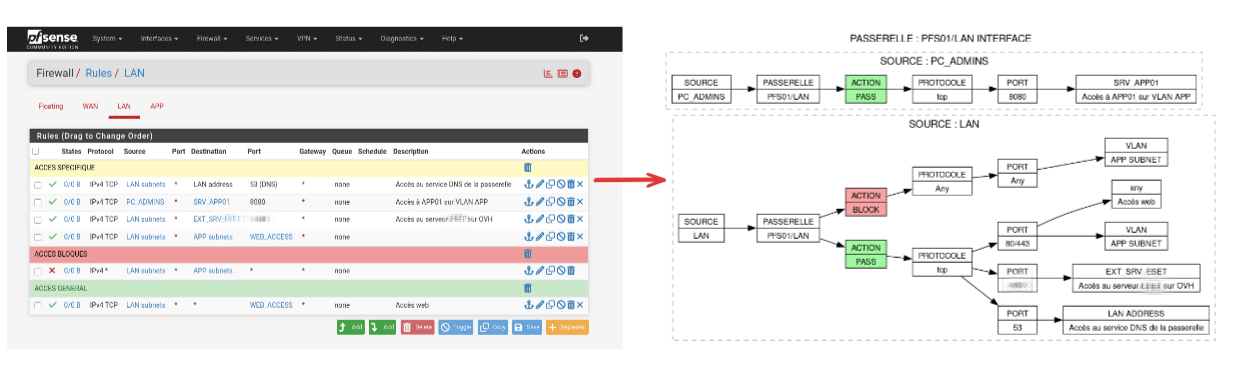
With this problem in mind, PyFRC2G is a Python package that proposes a straightforward idea: convert pfSense and OPNsense firewall rules into visual flow diagrams, generated automatically. The goal isn’t just “to make it look nice,” but to address two everyday needs: providing a comprehensible global view of the filtering policy and, additionally, being able to present control and governance evidence within compliance frameworks.
Unifying two highly used networking tools
PyFRC2G is described as a “unified” solution because it covers two common platforms in professional and small business environments: pfSense and OPNsense. The project avoids requiring different tools and processes for each. In its approach, the administrator configures access to the firewall’s API, and the system handles extracting rules, aliases, and interfaces to build a readable “map” of what is actually allowed or blocked.
This unification becomes especially relevant as infrastructure grows: a headquarters with OPNsense, a branch office with pfSense, lab environments, or even gradual migrations where both coexist. Documenting rules manually across different systems often becomes fragile; PyFRC2G aims to automate this part.
Diagrams, PDFs, and visual cues for each action
The core of the project is in its output format. PyFRC2G generates flow diagrams using Graphviz and produces A4 PDFs with one page per interface, as well as CSV files per interface. The tool also applies a color scheme to distinguish rule behaviors: green for PASS, red for BLOCK, and yellow for disabled rules. This seemingly aesthetic choice greatly reduces review time when comparing policies or preparing security meetings.

The tool also differentiates between VLANs/networks and destination hosts, covering scenarios that often complicate extraction in practice: floating rules, disabled rules, and various interface types. Within the PDF, diagrams can reflect source, interface, action, protocol, ports, destination, and comments from rules, making it easier to review coherence and identify “permanent exceptions” that should be revalidated.
Automation appreciated by many teams: detecting changes and regenerating only when needed
A practical feature of the project is its “generate only if there are changes” approach. PyFRC2G creates a temporary CSV with the rule set and calculates an MD5 hash to compare with the last version. If there are no differences, it skips regenerating diagrams and PDFs. This is important for two reasons: it reduces processing time with large rule sets and, more importantly, prevents cluttering documentation with unchanged versions.
This workflow fits well with scheduled tasks: you can run it periodically (e.g., nightly or after change windows) and generate an updated PDF only when real modifications have occurred.
Integration with GRC: when diagrams become “evidence”
PyFRC2G goes beyond the technical. Optionally, it includes integration with CISO Assistant, an open-source governance, risk, and compliance (GRC) platform, to automatically upload PDFs as evidence revisions. The “revision” aspect is key: the documentation explains that each upload creates a new revision, maintaining a history of firewall policy changes.
In audit scenarios, this history simplifies recurring conversations: when an access was granted, what changed after an incident, or whether periodic review controls are in place. Internally, it helps make rule management a traceable process rather than an art.
Requirements and deployment: what’s needed for operation (and what’s worth watching)
The project has clear requirements: Python 3.7 or higher and Graphviz installed on the system, plus dependencies like requests, graphviz, and reportlab. For firewall access, PyFRC2G relies on APIs:
- For pfSense, it requires installing an unofficial REST API package and generating a token.
- For OPNsense, it asks to create API credentials (key and secret) for the relevant user.
The tool also features automatic interface detection in OPNsense, trying to query interface endpoints and, if unsuccessful, inferring interfaces from rules; if that fails, manual configuration is possible.
One detail the project emphasizes in troubleshooting is that API connections might ignore SSL errors (mentions verify=False). This can be useful in labs or internal networks with self-signed certificates but should be treated as a “risk zone”: in sensitive environments, it’s best to ensure valid certificates and restrict API access by IP, network, and permissions.
From script to modular package: the leap to version 2.0
The PyFRC2G documentation highlights a major change in version 2.0: it adopts a modular architecture with separate components for configuration, API client, diagram generation, utilities, and CISO Assistant integration. It also emphasizes that code, comments, and messages are in English, aiming for maintainability and extensibility.
Practically, this opens two paths: running it as a command-line tool or integrating it as a module within custom workflows—useful for teams that already automate inventories, backups, or compliance pipelines.
A small project with a very concrete goal
PyFRC2G does not aim to reinvent the firewall nor replace rule management tools. Its focus is more specific: turning a complex reality—the filtering policies—into a format that can be explained, reviewed, and archived. And in networking, that’s often the difference between “it works” and “it’s under control.”
Frequently Asked Questions
How to generate a PDF with pfSense rule diagrams for a security audit?
The tool extracts rules via API, creates a CSV, and produces an A4 PDF with diagrams per interface, designed specifically for documentation and compliance evidence.
Can OPNsense rules be converted into flow diagrams with automatic interface detection?
Yes. PyFRC2G includes auto-detection of interfaces in OPNsense and, if it fails, allows specifying them manually.
What are the advantages of visualizing firewall rules with Graphviz compared to exporting rules as text?
The visual approach makes it easier to review origins, destinations, ports, and actions (PASS/BLOCK) at a glance, plus it highlights disabled rules, speeding up technical reviews and audits.
How to maintain a change history of rules as evidence in a GRC system?
PyFRC2G supports optional integration with CISO Assistant to upload PDFs as evidence revisions, keeping a versioned record of policy changes.
Source: PyFRC2G Repository.