
Proxmox VE 9.2 is now available, bringing a new feature that directly addresses one of the most common challenges in virtualized environments: making better use of cluster resources without turning each adjustment into a manual intervention. The new version, officially announced on May 21, 2026, introduces Dynamic Load Balancer, improvements in SDN networking, CPU profile management from the web interface, and new options for operating high availability during maintenance tasks.
This update strengthens Proxmox VE’s position as an increasingly mature open source alternative for businesses, advanced labs, service providers, and organizations seeking to reduce reliance on proprietary virtualization platforms. The key is not just running virtual machines or containers—something Proxmox already handles well—but managing environments where loads fluctuate, nodes don’t always perform equally, and availability can no longer rely solely on constant administrator attention.
A Dynamic Balancer for More Balanced Clusters
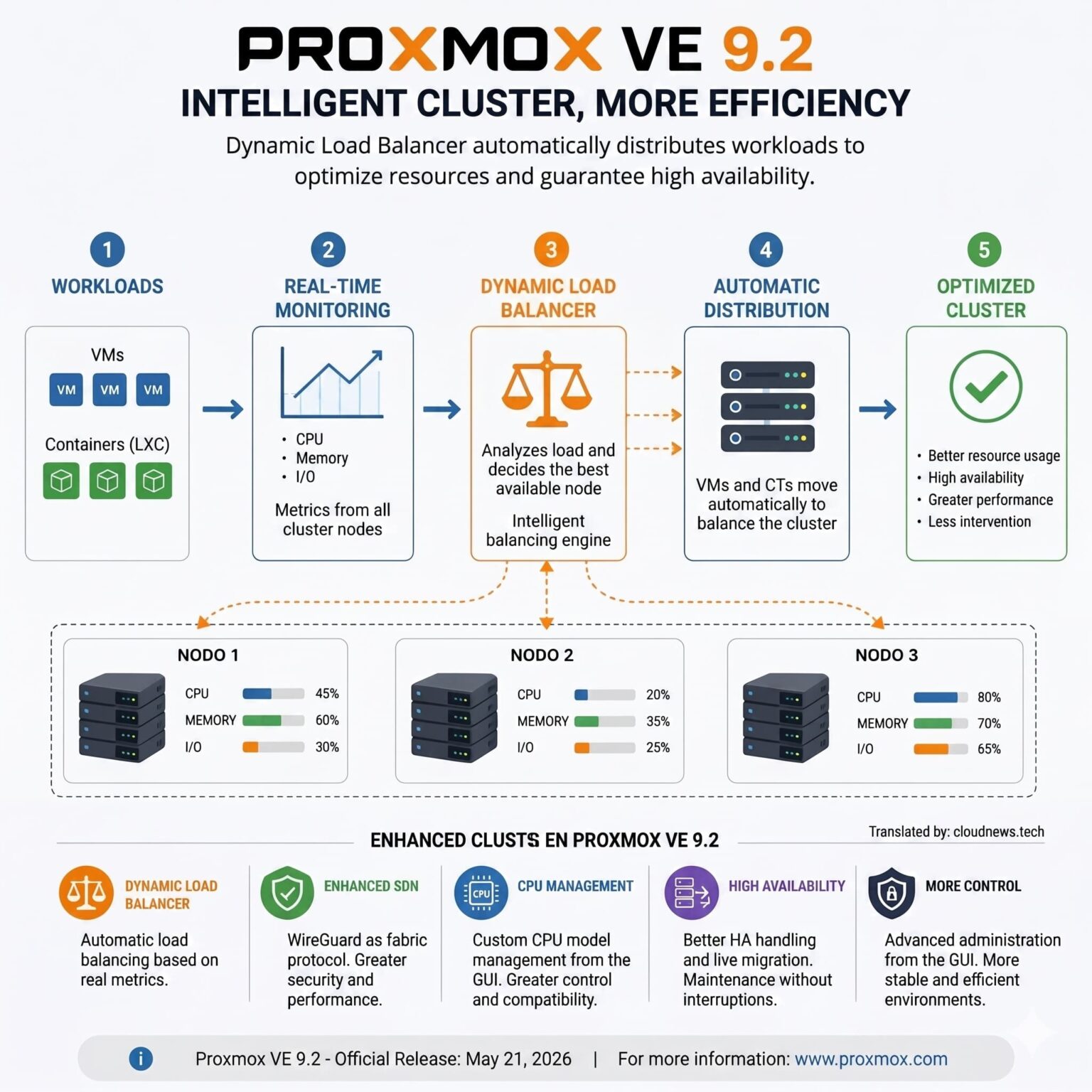
The standout feature of Proxmox VE 9.2 is the Dynamic Load Balancer. Its function is simple to explain, though complex to implement properly: it monitors the actual state of the cluster and makes load placement decisions based on more information. Instead of treating all nodes as static components, the system incorporates resource utilization metrics and workload data to improve distribution within the cluster.
This matters because many virtualized environments tend to grow unevenly. One node might become more loaded than another due to decisions made months ago, point migrations, specific application needs, or just accumulated changes. Meanwhile, other servers have available capacity. The result is well-known: suboptimal resource utilization, increased risk during demand spikes, and more manual work for the technical team.
The new balancer integrates with the Cluster Resource Scheduler and operates dynamically. According to Proxmox, it can automatically migrate HA-managed workloads to reduce imbalances between nodes, while respecting HA rules defined by administrators. This nuance is important: it’s not about moving any machine at any moment, but about applying decisions within a controlled framework that aligns with cluster policies.
For medium to large enterprises, this improvement can streamline repetitive operations and help maintain a more stable infrastructure. For infrastructure providers or internal IT departments, the benefit lies in making the cluster behave more intelligently without sacrificing administrative control.
| New in Proxmox VE 9.2 | Practical Benefits |
|---|---|
| Dynamic Load Balancer | More efficient HA load distribution across cluster nodes |
| SDN with WireGuard | More options for software-defined networks and secure tunnels |
| BGP/EVPN Filters | Greater control over route redistribution |
| CPU Models from GUI | Simplified management of CPU compatibility and profiles |
| HA Arm/Disarm | Planned maintenance with reduced risk of unintended actions |
| UEFI 2023 Certificates | Better support for modern Microsoft and Windows scenarios |
SDN, WireGuard, and More Network Control
The second significant area involves software-defined networking. Proxmox VE 9.2 extends its SDN stack with native support for WireGuard and BGP as fabric protocols. It also introduces more precise filtering for BGP/EVPN via route maps and prefix lists, along with improvements such as route redistribution for OSPF fabrics, new options for EVPN controllers, and support for underlay IPv6 in EVPN setups.
These enhancements are especially relevant for advanced environments. In simple setups, networking might seem secondary. But in real clusters—with multiple VLANs, segments, client networks, tunnels, storage networks, or site-to-site connections—networking becomes one of the most delicate parts of the platform.
WireGuard offers a more modern and efficient way to establish secure tunnels. BGP and EVPN are common in complex network architectures, especially when automation of route advertising, traffic separation, and more data-center-like designs are needed. Not all companies will need these capabilities right away, but having them brings Proxmox closer to demanding enterprise use cases.
Management of custom CPU models has also been improved, allowing administrators to create, edit, and delete profiles directly from the Datacenter section, with visibility into supported flags on cluster nodes. This helps identify compatibility issues before they manifest during migrations or deployments with specific requirements.
High Availability and an Updated Technical Foundation
Proxmox VE 9.2 also introduces the HA arm/disarm feature, designed for planned maintenance. It allows temporarily suspending the cluster-wide high availability stack to prevent undesired actions—such as fencing—during certain administrative tasks. Once reactivated, HA resources retain their states and are re-positioned as appropriate.
While less flashy than a new load balancer, this feature can be very useful in production environments. When managing high-availability infrastructure, maintenance isn’t just about powering down, updating, and restarting. It’s critical to avoid system operations being misinterpreted as failures. Better controls reduce risks and facilitate more organized maintenance windows.
The update also refreshes the technical stack. Proxmox VE 9.2 leverages Debian 13.5 “Trixie” and incorporates Linux kernel 7.0 as the new default stable kernel, along with QEMU 11.0, LXC 7.0, and ZFS 2.4. For storage, Proxmox sets Ceph Tentacle 20.2.1 as the default stable version, with Ceph Squid 19.2.3 still available as an option.
For users migrating from Proxmox VE 8, planning is recommended. Proxmox indicates that upgrading from the latest Proxmox VE 8 release to branch 9 can be done via apt following official documentation. It also notes that Proxmox VE 8.4 will receive security updates and critical fixes until August 2026, providing sufficient time to plan migrations without rush.
Ceph upgrades require special attention. Proxmox warns that upgrading a cluster from Proxmox VE 8.4 with Ceph Reef to Proxmox VE 9.2 with Ceph Squid or Tentacle involves multiple steps: first migrating from Reef to Squid while still on Proxmox VE 8.4; then upgrading Proxmox VE from 8.4 to 9.2; and finally migrating Ceph from Squid to Tentacle if needed. It’s advisable to test, document, and conduct these operations within well-defined maintenance windows.
Proxmox VE 9.2 doesn’t change the core nature of the platform but improves several components crucial for serious use: load balancing, networking, CPU profiles, high availability, and the underlying stack. For a robust home lab, it’s an attractive version thanks to its new features. For organizations, the value lies in continued capabilities typically associated with traditional commercial solutions.
The most notable takeaway is that open source virtualization is entering a more demanding phase. It’s no longer enough to simply provide a functioning alternative to proprietary platforms. Improvements must include daily operations, reducing manual intervention, better integration with modern networks, and easier cluster maintenance. Proxmox VE 9.2 moves in that direction.
Frequently Asked Questions
What is the main new feature in Proxmox VE 9.2?
The most notable addition is the Dynamic Load Balancer, which helps distribute HA workloads more effectively across cluster nodes using real resource metrics and integration with the cluster scheduler.
Does Proxmox VE 9.2 automatically move all virtual machines?
Not exactly. According to Proxmox, the balancer can automatically migrate workloads managed by HA to reduce imbalances, but it respects the HA rules set by the administrator.
What network improvements does it include?
Proxmox VE 9.2 extends its SDN stack with native support for WireGuard and BGP protocols, along with route filtering via route maps and prefix lists for BGP/EVPN.
Should I update from Proxmox VE 8.4 immediately?
It depends on your environment. Since Proxmox VE 8.4 maintains security support and critical fixes until August 2026, planning and testing the migration is advisable before deploying in production.
