
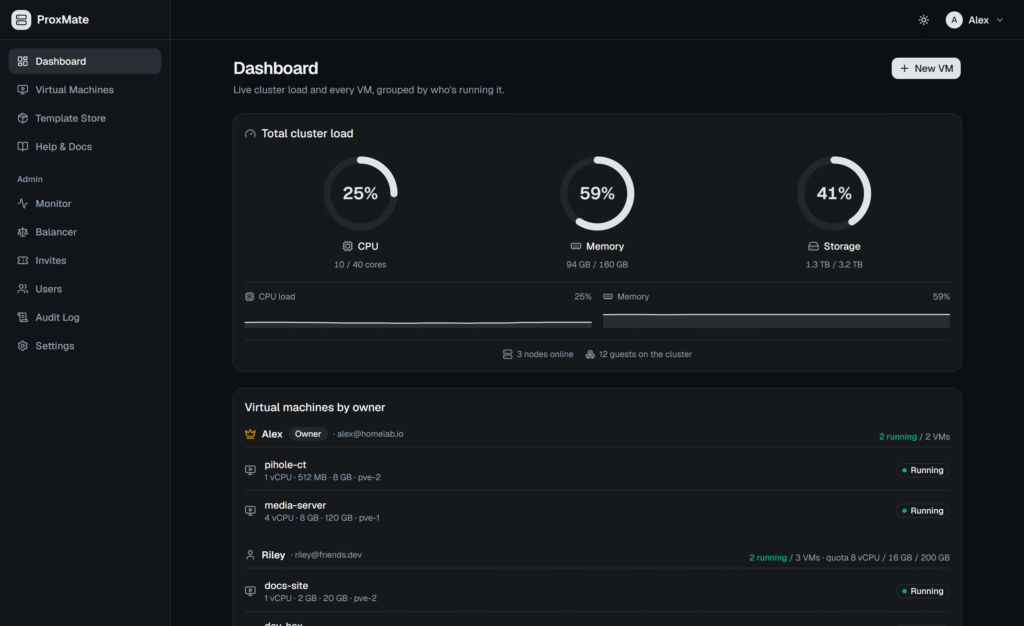
Proxmox VE keeps gaining ground as a virtualization platform, but sharing a cluster among developers, departments, students, or small teams runs into a problem: giving someone access to the Proxmox admin panel usually hands over far more visibility and control than they need. ProxMate tackles this by putting a self-hosted web portal over the cluster, so each user manages only their own virtual machines and containers, with quotas, console access, backups, and user isolation.
ProxMate in 20 seconds
- ProxMate adds a multi-user portal on top of an existing Proxmox VE cluster.
- Each user gets CPU, RAM, and storage quotas and manages their own VMs and LXC containers.
- It includes a web console, snapshots, backups, monitoring, migration, and firewall rules.
- It’s self-hosted, and its Community Edition uses an AGPLv3 license.
- You can install it via Docker or by following a runbook prepared for Claude Code.
The idea deliberately echoes services like DigitalOcean: the administrator keeps control of the infrastructure while giving users a much simpler interface to consume resources. The project describes ProxMate as a DigitalOcean-style web UI built on top of an existing Proxmox setup.
That puts it in an interesting spot between the traditional hypervisor panel and a full cloud platform. ProxMate doesn’t replace Proxmox VE and isn’t another hypervisor. It uses the API to turn its resources into a service that several users can share.
ProxMate is released as an open-source project and can also be seen in its official GitHub repository.
From Proxmox to a small private cloud
One of its core features is the invitation system.
The administrator can grant access with limits on CPU, memory, and storage. Once in, the user can create their own VMs and LXC containers without reaching the full Proxmox admin panel.
Machines can be deployed from ISO images, templates, or cloud images. The project currently ships 20 pre-made images, 16 for x86-64 and four for ARM64, per its documentation. It also lets you provide an SSH key during deployment so the machine is ready for remote access.
Many typical infrastructure operations are supported, including:
- Power on, shut down, and restart;
- Resizing and rebuilding;
- Snapshots and scheduled backups;
- Tags and batch operations;
- Scheduled power on/off;
- Migration between nodes;
- Graphical console via noVNC and text console;
- GPU passthrough and PCI device requests;
- Automatic VM distribution across available nodes.
You can also share a VM with another user at three permission levels: Viewer, Operator, and Manager. None of them can delete, rebuild, migrate, or re-share the machine.
This fits advanced homelabs, labs, small internal infrastructure providers, development teams, and educational centers that already use Proxmox but don’t want to give each user full admin credentials.
ProxMate also offers EDU and Pro/Business editions. Its lead developer, Brandon Jewell, is currently looking for Proxmox users interested in testing these versions before release. Per the project, the Community Edition will stay free and open source.
Installing ProxMate
The project provides an installer for Linux machines. The recommended process stands out because it deliberately avoids the usual curl | sudo bash.
First, download the installer:
curl -fsSL https://raw.githubusercontent.com/r0073d-l053r/ProxMate/main/install.sh -o install.sh
Next, review it:
less install.sh
And only then run it:
bash install.sh
This is more than a matter of style.
ProxMate has to store credentials to talk to the cluster’s API, so blindly running a script downloaded from the internet isn’t a good idea. The installer checks dependencies like Docker, Docker Compose v2, Git, curl, and OpenSSL, generates an ENCRYPTION_KEY, creates the configuration, and builds the containers.
You then enter the Proxmox token through the web wizard rather than as a command-line argument, so it doesn’t accidentally end up in the shell’s history.
Building the system needs about 4 GB of RAM and 5 GB of storage. The installer supports Debian, Ubuntu, Fedora, RHEL, CentOS, Rocky Linux, openSUSE, and Alpine, plus a specific procedure for Arch Linux.
There’s also a fairly unusual alternative for 2026.
The repository includes DEPLOY_WITH_CLAUDE.md, a runbook written for a scheduler agent to follow deployment instructions. You can hand it to Claude Code and ask it to run the ProxMate install procedure.
That doesn’t mean the agent should have unrestricted production access. The procedure is intentionally built to pause and ask for confirmation before certain operations.
Security in a multi-user portal
How well ProxMate works depends a lot on that extra layer not becoming a way into the rest of the cluster.
Its architecture keeps the Proxmox credentials on the server. The user’s browser never receives the token directly; all API operations go through ProxMate’s authenticated backend.
The project also includes TOTP for two-step authentication, WebAuthn passkeys, and the option to use an external provider through OpenID Connect (OIDC). Sessions use httpOnly and SameSite=Lax cookies, and actions that change data include protection against Cross-Site Request Forgery (CSRF).
But there’s one key point every administrator should review carefully before deploying.
User isolation also depends on the Proxmox cluster’s firewall being properly enabled.
ProxMate configures network interfaces for new VMs with firewalls and creates rules to keep a user’s VM from reaching the private RFC1918 networks used by the infrastructure and other guests. It explicitly warns that VM-level rules don’t provide the intended isolation if the cluster firewall stays off.
For setups that need deeper separation, the documentation suggests considering independent bridges or VLANs per tenant, or using Proxmox’s Software Defined Networking (SDN).
The token used to connect to Proxmox also deserves attention.
It can be tempting to use root@pam during testing, but the documentation recommends creating a dedicated user and role with only the needed permissions. Some operations, like changing certain data center firewall settings, may need higher privileges and should be evaluated separately.
ProxMate encrypts secrets like the Proxmox token and SMTP/SSO credentials with AES-256-GCM using the ENCRYPTION_KEY. That key has to stay stable and be kept off the server itself; losing both the host and the key makes the secrets in backups unusable.
More than a pretty panel for Proxmox
The project is also starting to add functions beyond basic provisioning.
ProxMate IDE, still in beta, can run a development environment inside a VM based on VS Code/code-server, with OpenCode as a programming agent. The admin controls which models are available, and the environment stays within the user’s assigned machine.
It includes real-time monitoring, audit logging, Prometheus metrics, node drain for maintenance, and a memory balancer conceptually similar to a simple DRS.
Its MateStates system adds scheduled backups, VM policies, retention, and restore. ProxMate also runs nightly backups of its own database.
The repository also declares 718 backend tests for critical areas like quotas, permissions, firewall rules, VM placement, backups, migrations, cloud-init, and protection against Server-Side Request Forgery (SSRF). Continuous integration checks frontend functionality, Playwright tests, Docker image builds, CodeQL, Trivy, and SBOM generation.
All of this makes ProxMate more than an alternative dashboard.
The Proxmox ecosystem is expanding its own management tools too. Proxmox keeps Datacenter Manager to oversee infrastructure from a higher layer, with its own backend and API. ProxMate tackles a different problem: handing part of that infrastructure directly to end users without giving away the hypervisor keys.
That’s probably its main appeal.
A company could reserve 8 vCPUs, 16 GB of RAM, and 200 GB for a developer; a university lab could split capacity among students; or a homelab administrator could let family and friends create servers without explaining how the whole Proxmox panel works.
It doesn’t automatically turn Proxmox VE into a competitor to AWS, Azure, or an OpenStack platform. And it doesn’t remove the administrator’s need to manage networking, storage, security, high availability, or capacity.
What it offers is a self-service layer that feels much closer to a small private cloud, with Proxmox underneath and the full infrastructure under the owner’s control.
That could be especially useful now, as more organizations weigh Proxmox for workloads they used to run on other virtualization platforms.
Frequently Asked Questions
What is ProxMate?
ProxMate is a self-hosted web portal installed on an existing Proxmox VE cluster. It delivers VMs and containers to different users with separate quotas and permissions, without giving them full administrative access to Proxmox.
Does ProxMate replace Proxmox VE?
No. Proxmox still runs the virtual machines, containers, networks, and storage. ProxMate uses its API and adds an extra layer of management and self-service.
Is ProxMate free and open source?
The Community Edition is published under the GNU Affero General Public License v3.0 (AGPLv3). The project follows an open core model, with EDU and commercial editions offering extra features.
Is it safe to expose ProxMate to the internet?
The project includes multiple security measures, but a public deployment needs extra configuration: HTTPS, minimal permissions for the Proxmox token, the cluster firewall, 2FA or SSO, and not exposing the Proxmox admin interface directly, as its documentation recommends.
