

Choosing between NAS and SAN might seem like a purely technical decision, but it actually impacts application performance, data management approaches, growth costs, and business continuity. Setting up a shared repository for users is different from providing low-latency storage for a database, a virtualization cluster, or a video editing platform.
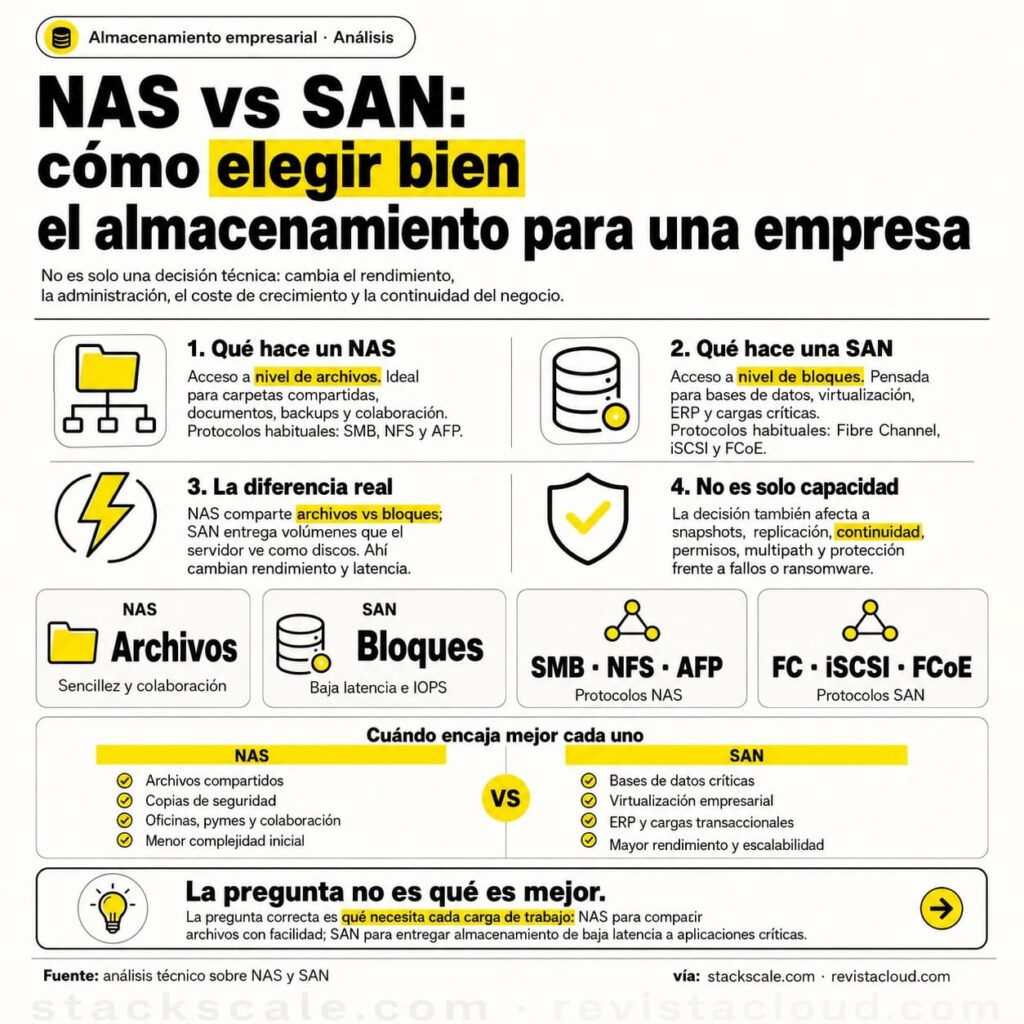
The key difference is straightforward: a NAS provides file-level storage, while a SAN offers block-level storage. In other words, NAS behaves like a network-shared folder; SAN presents volumes that servers see as if they were directly attached disks. From there, protocols, management, performance expectations, and use cases change.
What is a NAS and when does it make sense
NAS stands for Network Attached Storage. In practice, it’s typically a dedicated system that connects to the LAN and allows multiple users, servers, or applications to access shared folders via protocols like SMB, NFS, or AFP.
Its main advantage is simplicity. A NAS can be deployed relatively quickly, integrated with user permissions, folder structures by department, serve as a document repository, host backups, or centralize work files. That’s why it’s widely used in small and medium-sized businesses, creative studios, offices, educational environments, and departments that need to share information without building complex storage architectures.
| Characteristic | NAS |
|---|---|
| Access Type | File-level |
| Common Protocols | SMB, NFS, AFP |
| Network Used | Typically the existing LAN |
| Management | Simpler |
| Typical Uses | Shared files, backups, documents, multimedia |
| Strength | Ease of use and collaboration |
| Typical Limitation | Less predictable performance under heavy loads |
A NAS is a good choice when users need to open, save, share, or version files. It also suits environments where devices do not want to manage LUNs, zoning, multipathing, block cabling, or dedicated storage networks. Often, simply assigning permissions, creating shared resources, and defining a backup policy is enough.
This doesn’t mean a NAS is a “small” or unprofessional solution. There are advanced enterprise NAS systems with high availability, replication, snapshots, integration with company directories, tiering, encryption, and ransomware protection. The distinction isn’t about NAS being domestic and SAN being enterprise—it’s about the access layer: files vs. blocks.
What is a SAN and why is it used for critical workloads
SAN stands for Storage Area Network. It’s designed to provide block-level storage to servers over a specialized network, usually separated from the user LAN. It can operate over Fibre Channel, iSCSI, FCoE, or other technologies, with Fibre Channel and iSCSI being the most common in enterprise environments.
In a SAN, the server receives a volume of storage and treats it as a disk. It’s then the operating system, hypervisor, or cluster that creates the filesystem, manages access, and controls how data is written to these blocks. This makes SANs especially suitable for databases, virtualization, ERP, transactional loads, high availability systems, and applications requiring low latency and high IOPS.
| Characteristic | SAN |
| Access Type | Block level |
| Common Protocols | Fibre Channel, iSCSI, FCoE |
| Network | Dedicated or separated storage network |
| Management | More specialized |
| Typical Uses | Databases, virtualization, ERP, professional video |
| Strength | Performance, low latency, scalability |
| Typical Limitation | Higher complexity and initial cost |
SANs are usually chosen when performance and consistency matter more than simplicity. For example, in virtualization, multiple hosts may need shared storage to move VMs, enable high availability, or run clusters. For databases, block access allows optimized writes, reads, caching, and latency control directly.
But a SAN isn’t magic. It requires design. Planning switches, redundant paths, controllers, multipathing, volume presentation, security, segmentation, snapshots, replication, and monitoring are essential. A poorly designed SAN can be costly and problematic, while a well-designed SAN can support applications for years without downtime.
Key difference: files vs. blocks
The clearest way to understand the difference is by looking at who manages the filesystem. In a NAS, the NAS device itself manages the filesystem and shares it over the network. Clients access folders and files. In a SAN, the storage array delivers raw blocks to the server, which then decides how to format and use them.
| Question | NAS | SAN |
| What does the user or server see? | Shared folders and files | Disks or block volumes |
| Who manages the filesystem? | The NAS device | The server, hypervisor, or cluster |
| Is sharing easy among users? | Yes | Not directly, except with clustering systems |
| Is it suitable for demanding databases? | Depends on the case | Usually better |
| Is it suitable for departmental folders? | Yes | |
| Does it require a dedicated network? | Not always | Highly recommended |
This point prevents many errors. A SAN LUN shouldn’t be mounted simultaneously on multiple servers unless the filesystem supports concurrent access. If two servers write to the same volume without coordination, data corruption may occur. For sharing files among many users, NAS tends to be more natural. For providing disks to servers or hypervisors, SANs usually fit better.
In modern environments, the boundaries are blurred. Some systems offer both NAS and SAN in the same platform. Hyperconverged solutions abstract storage. Software-defined storage can provide blocks, files, and objects. Cloud services also deliver block volumes, file shares, and object storage as separate options. Yet, the fundamental logic remains the same.
Performance, latency, and cost: finding the balance
Storage system performance depends not only on whether it’s NAS or SAN. Disks, SSDs, cache, controllers, network, protocols, I/O queues, block size, read/write patterns, user count, snapshots, encryption, and replication all influence results. Generally, SANs tend to offer better latency and more predictable performance for heavy block workloads.
NAS systems are usually simpler and cheaper for file sharing but may struggle under workloads that don’t suit their nature. For example, a basic NAS hosting many virtual machines with I/O-intensive workloads can work in test or small environments, but may not be suitable for critical production. Conversely, a SAN might be overkill and add unnecessary complexity for simple shared folders.
| Use case | Most common option |
| Shared folder for office | NAS |
| Simple backups | NAS |
| Shared multimedia repository | NAS |
| Critical databases | SAN |
| Enterprise virtualization | SAN or hyperconverged storage |
| Collaborative video editing | Advanced NAS or SAN, depending on latency and throughput |
| ERP or transactional apps | SAN |
| Massive unstructured data storage | NAS or object storage |
Total cost must also be considered—not just purchase price. A NAS may be cheaper to deploy but could require more systems, management, and permission planning at scale. A SAN might have a higher initial cost but offer better consolidation, performance, and availability for critical workloads. The right choice depends on workload requirements, not just the technology name.
Security and continuity: capacity isn’t everything
Often, companies buy storage thinking in terabytes. That’s a mistake. Capacity is only part of the picture. It’s essential to ask how data is protected, how quickly it can be restored, what happens if a controller fails, how volumes are replicated, what snapshots exist, and ransomware protections.
In NAS, security revolves around file permissions, Active Directory or LDAP integration, snapshots, quotas, encryption, and access auditing. In SAN, focus is on zoning, LUN masking, multipathing, network isolation, iSCSI authentication, snapshots, and inter-system replication.
| Area | NAS | SAN |
| Access control | Users, groups, file permissions | Hosts, LUN masking, zoning, authentication |
| Protection | Snapshots, backups, quotas, antivirus/ransomware protection | Snapshots, clones, replication, block consistency |
| Continuity | NAS high availability and replication | |
| Common risks | Misconfigured permissions or share exposure | Incorrect LUN presentation or multipath errors |
Continuity also depends on architecture. A single-controller NAS might be a single point of failure if not redundant. Similarly, a SAN without redundant paths or controllers doesn’t provide real high availability. Technology alone doesn’t replace architecture planning.
NAS and SAN in virtualization, backup, and private cloud
In virtualization environments, the choice requires careful thought. Many hypervisors work with NAS via NFS or SMB, and with SAN via iSCSI or Fibre Channel. The decision depends on cluster size, VM count, I/O patterns, hot migration, snapshots, backups, and budget.
For labs, small environments, or moderate workloads, a well-configured NAS might suffice. For production platforms with many VMs, databases, and strict latency needs, SAN or software-defined storage could be more appropriate. In private clouds, architecture must allow growth, multi-tenancy, network segregation, and maintenance without downtime.
For backups, NAS is commonly used as a repository, especially with snapshots, deduplication, or secondary storage. But it’s important not to make NAS backups the sole destination or leave permissions wide open. To defend against ransomware, immutable copies, credential separation, external replicas, and regular restore tests are essential.
How to decide without oversimplifying
The right question isn’t “which is better: NAS or SAN.” Instead, it’s “what does this workload need?” If sharing files easily is a priority, NAS is natural. If providing low-latency storage to servers is crucial, SAN usually fits better. If both are needed, combining technologies is also possible.
| Need | Recommendation |
| Sharing files among users | NAS |
| Centralizing documents and permissions | NAS |
| Storing critical VMs | SAN or virtualization-optimized storage |
| Running demanding databases | SAN |
| Scalability with simple management | Enterprise NAS |
| Segregating storage traffic from LAN | SAN |
| Reducing initial cost and complexity | NAS |
| Prioritizing low latency and IOPS | SAN |
Additionally, think three years ahead. A small NAS may meet immediate needs but fall short as the company grows. A SAN might be overkill initially but offers ROI if supporting critical loads. The decision should consider current performance, expected growth, technical expertise, budget, continuity needs, and backup strategies.
NAS and SAN are not enemies—they’re solutions for different problems. NAS offers simplicity, collaboration, and file access. SAN provides performance, low latency, and block-level storage for enterprise applications. The best choice isn’t just about the most powerful technology but the one that aligns with how data is used, protected, and recovered.
FAQs
What is the main difference between NAS and SAN?
NAS provides file-level access using protocols like SMB or NFS. SAN offers block-level access via Fibre Channel, iSCSI, or FCoE.
What’s better for a small or medium-sized business?
For sharing files, documents, and backups, NAS is usually simpler and more cost-effective. If the business runs virtualization or critical databases, SAN or equivalent solutions may be needed.
Is a SAN always faster than a NAS?
Not necessarily. It depends on hardware, network, disks, protocol, and workload. Generally, SANs tend to offer better latency and more predictable performance for block-heavy workloads.
Can I use NAS for virtual machines?
Yes, many environments use NFS or SMB for virtualization. However, for high-performance or critical workloads, consider latency, IOPS, redundancy, snapshots, and hypervisor support.
