
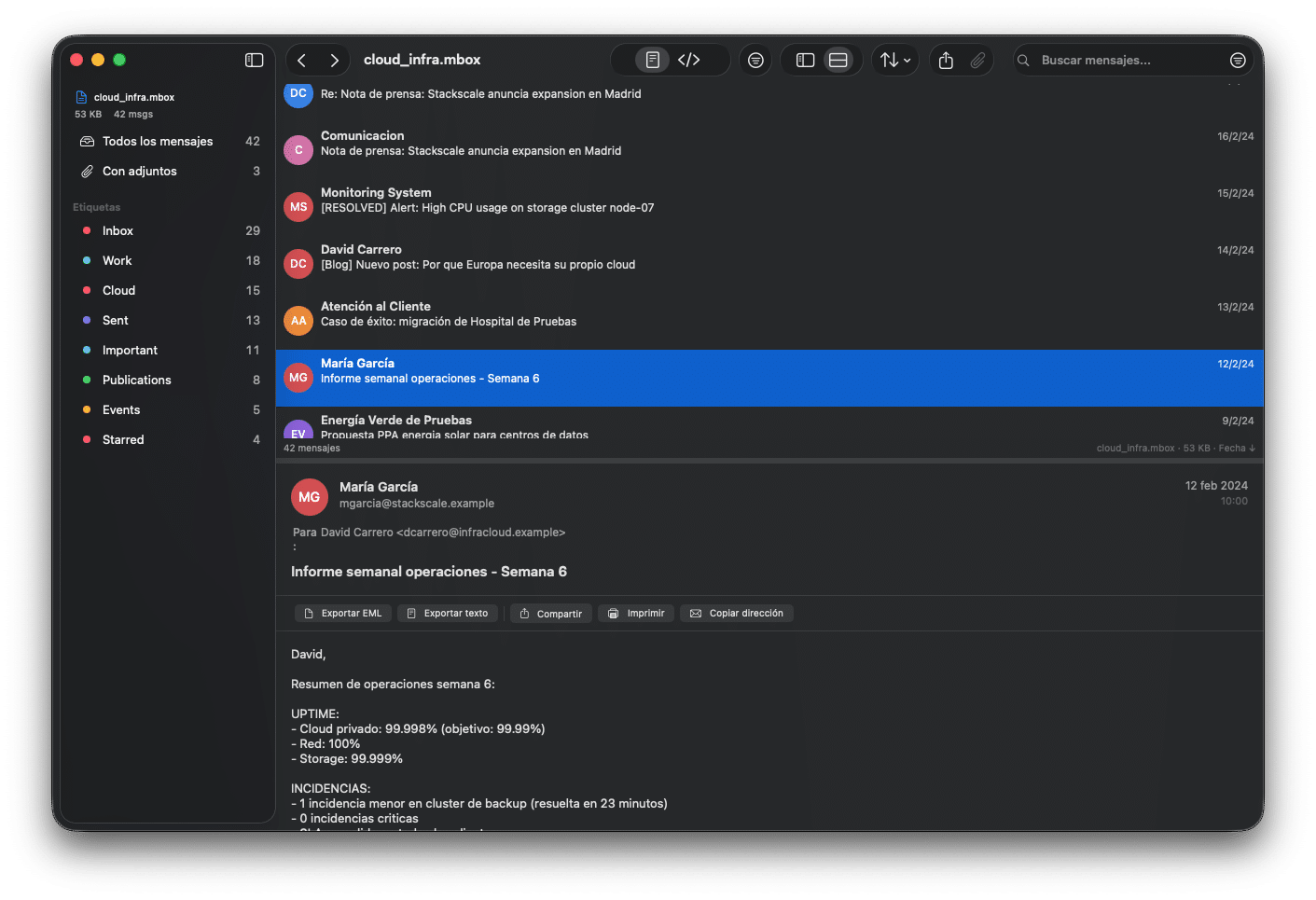
Email archives rarely feel like a product category worth getting excited about—until someone needs to retrieve a contract from 2017, prove an audit trail, or search through years of customer communications after a mailbox migration. That is precisely the problem Mbox Viewer is aiming to solve: turning bulky MBOX exports (especially those generated by Google Takeout) into something that can be browsed and searched locally, quickly, and without the usual friction of heavyweight mail clients.
Positioned as a native macOS application (compatible with macOS 14 Sonoma and later, and distributed as a Universal Binary for both Apple Silicon and Intel), Mbox Viewer targets a familiar pain point: large MBOX files that crash, freeze, or take forever to open in many generic readers. The project’s pitch is direct—stream the archive instead of loading it into memory, index it once, and then make subsequent opens effectively instant.
A native macOS approach to “Gmail, but offline”
At its core, Mbox Viewer is built around an offline workflow: export Gmail via Google Takeout, unzip the archive, and open the resulting MBOX (or EML) files locally. For users who want their mailbox available without an internet connection—or who simply prefer not to keep sensitive archives inside a cloud UI—this “local-first” angle is the main draw.
The app’s design leans into the Gmail reality of labels and large datasets. It automatically reads Gmail labels from Takeout, allowing navigation by label with message counts, and supports exporting subsets (for example, exporting a single label as a standalone MBOX to create smaller, focused archives). It also includes conversation grouping using the JWZ threading algorithm—an approach long used in mail clients to reconstruct reply chains into readable threads.
Streaming and indexing: the performance story
What separates modern archive tools from the “viewer” utilities of the past is rarely a single feature—it is the underlying I/O strategy. Mbox Viewer emphasizes a streaming parser with a 1 MB buffer, designed to handle archives that scale from megabytes to tens of gigabytes without ingesting the entire file into RAM. Instead, it creates a binary index on first open and validates integrity via SHA-256, with the stated goal that re-opening an already indexed archive takes under one second regardless of file size.
The product materials go further, offering concrete examples that will resonate with anyone who has dealt with Takeout archives: opening a 50 GB file in under five minutes and then re-opening it in under one second, along with indicative RAM usage figures that remain well below what many mail clients demand for similar tasks.
This matters because MBOX is deceptively simple: it is “just text,” but it becomes unwieldy when it contains hundreds of thousands of messages, attachments, and mixed encodings. A tool that indexes once and stays responsive changes the day-to-day reality for sysadmins, consultants, and power users who need to investigate an archive without importing it into a mail client.
Search, export, and practical workflows
Mbox Viewer puts significant focus on search—because search is what makes an archive usable. It supports fielded queries (sender, recipient, subject, body, date), attachment filters, label filters, boolean operators, negation, exact phrases, and size constraints. In other words, it aims to behave less like a basic file viewer and more like a purpose-built investigative interface for mail.
On the export side, the app supports exporting messages to EML, CSV, and plain text, extracting attachments in bulk, and merging multiple MBOX files with deduplication. These are the details that often decide whether a tool is merely “nice to have” or becomes the default option for real work—especially when teams need to carve out evidence for a legal request, rebuild a mailbox after a migration, or simply keep a durable offline record.
Privacy positioning is also explicit: the processing is local, with no telemetry and no data leaving the device. That stance aligns with a growing preference in the productivity-software world for offline-first tools that keep sensitive datasets out of third-party platforms wherever possible.
The open-source angle: mboxShell for terminal workflows
Alongside the macOS GUI, the ecosystem includes an open-source terminal tool called mboxShell, written in Rust and released under the MIT license. The project positions mboxShell as a fast, cross-platform MBOX viewer for Linux, macOS, and Windows—useful for server-side investigations, scripted workflows, audits, and migrations where a GUI is either impractical or undesirable.
Its feature set mirrors many of the same core ideas: streaming I/O with a 1 MB buffer, persistent indexing (creating a .mboxshell.idx file for fast subsequent opens), Gmail label detection via X-Gmail-Labels, conversation threading (JWZ), advanced search operators, and flexible export (EML/CSV/plain text) with attachment extraction. The emphasis on a single, dependency-light binary is a particularly sysadmin-friendly detail—especially when dealing with locked-down environments or ephemeral analysis hosts.
Notably, the Mbox Viewer site explicitly states that the macOS app is based on this open-source terminal tool—an approach that can appeal to technical audiences who value transparent foundations and reproducible parsing logic.
Pricing and release posture
Mbox Viewer is currently presented in an “early access / coming soon” posture, with a free tier limited to archives up to 500 MB and paid options that remove file-size limits. The licensing model lists three device activations per purchase and notes that VAT is included, with payments handled via Lemon Squeezy.
For the broader market, this positions Mbox Viewer as a specialized utility: not trying to replace an email client, but trying to solve the “I have a massive MBOX and I need answers” scenario with a native experience that does not buckle under scale.
FAQs
What is the safest way to keep an offline backup of Gmail for long-term retention?
Exporting via Google Takeout to MBOX is a common approach because it produces a portable archive that can be stored offline and opened later without relying on a live account.
Why do large MBOX files crash traditional viewers or mail clients?
Many tools attempt to load too much of the archive into memory, struggle with huge attachment-heavy datasets, or lack indexing strategies optimized for tens of gigabytes.
Can Gmail labels be preserved when working with a Takeout MBOX backup?
Some tools can read Gmail label metadata included in Takeout exports (often via label headers) and present it as folders/filters for browsing.
When is a terminal-based MBOX tool preferable to a GUI app?
For audits, migrations, automation, remote servers, or quick investigations over SSH, terminal workflows are often faster and easier to integrate into existing sysadmin tooling.