
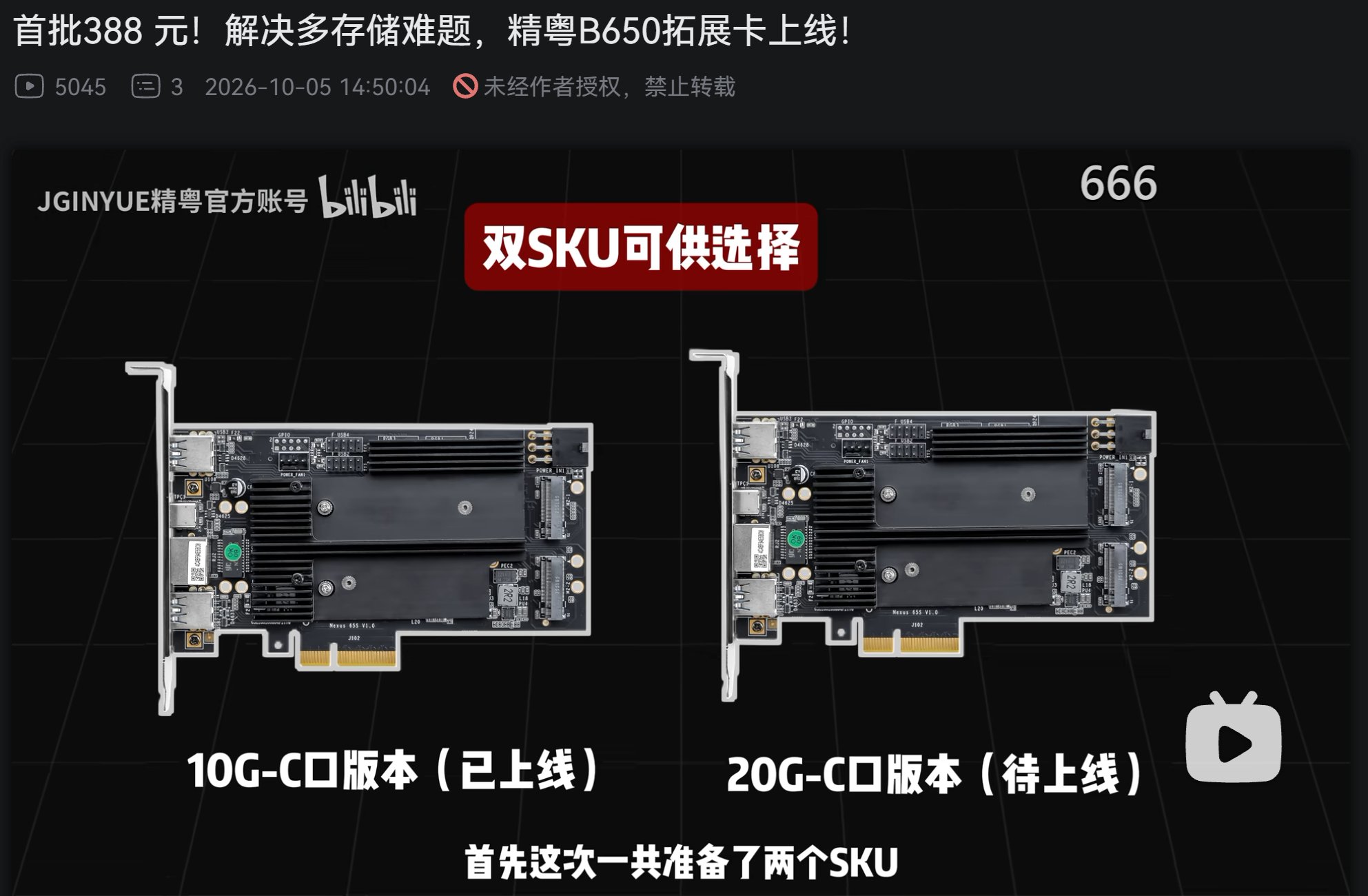
JGINYUE has launched a PCIe expansion card that brings the AMD B650 chipset to an add-in card for PCs, adding four M.2 slots, 10 Gbps USB-C, two USB 3.0 ports, and 2.5 Gb Ethernet. The announced price is 388 yuan, about $58, and the company is also preparing a second version with 20 Gbps USB-C.
Key facts about the JGINYUE B650 AIC in 30 seconds
- The card uses the AMD B650 chipset and installs in a PCIe slot.
- It includes four M.2 slots for NVMe SSDs.
- The current version adds a 10 Gbps USB-C port, two USB-A USB 3.0 ports, and 2.5 Gb Ethernet.
- It includes an auxiliary 6-pin PCIe power connector and a 4-pin fan connector.
- It costs 388 yuan, about $58, and a second variant with 20 Gbps USB-C is on the way.
The product is unusual because it turns part of the connectivity tied to the B650 chipset into a standalone card. Instead of changing the motherboard to add more storage and ports, this solution lets you use an available PCIe slot to expand the system’s capabilities.
JGINYUE had already shown preliminary versions of this card, and has now unveiled the retail version with a few changes. The most visible is the addition of a fan connector and two mounting points for installing a 40 mm fan directly on the PCB.
Four M.2 Slots on a PCIe Card
The main draw for many users is the four M.2 slots for NVMe SSDs. The card lets you concentrate several storage drives on a single expansion card, which is especially useful on systems with few M.2 slots available on the motherboard.
The information provided doesn’t specify in detail how the PCIe lanes are allocated among the four slots, or the maximum performance each SSD can reach. Because of that, the number of slots shouldn’t automatically be read as four drives running at maximum speed at the same time.
That detail will matter especially for workstations, home servers, or systems used to store large amounts of data.
The card is positioned as a way to add connectivity and storage, not as a replacement for a full B650 motherboard. The design itself lets you add functions to an existing system, as long as it has a compatible PCIe slot and physical room to install the card.
10 Gbps USB-C and 2.5 Gb Ethernet
Besides the four M.2 slots, the JGINYUE B650 AIC includes a 10 Gbps USB Type-C port.
The card also has two USB 3.0 Type-A ports and a 2.5 Gb network connection based on the 8125BG controller identified on the card itself.
JGINYUE has also announced a second variant equipped with 20 Gbps USB-C. The company hasn’t detailed exactly when this version will arrive or what it will cost.
That leaves two distinct configurations: the 10 Gbps version already unveiled for 388 yuan, and a future variant with a faster USB-C connection.
For a PC that already has enough USB ports but lacks fast connections or additional M.2 storage, the combination could be especially appealing.
The 6-Pin Connector Has a Specific Purpose
One of the card’s more eye-catching elements is the 6-pin PCIe power connector.
At first glance, it might seem mainly intended to power the four NVMe drives. However, JGINYUE has explained that its main function is to provide auxiliary power for the USB connectivity.
The company recommends connecting this cable even when the card is used only with M.2 drives.
That explanation suggests the extra power provides enough margin for the set of devices connected to the card. This could be especially relevant when several SSDs and USB devices are used at the same time.
The available information doesn’t give detailed figures on the maximum draw of each component or the exact power distribution between the M.2 slots and the external ports, so no further conclusions about power consumption should be drawn.
It Also Supports a 40 mm Fan
The retail version includes a 4-pin fan connector that doesn’t offer speed control, according to information published by JGINYUE.
The card also includes two mounting points that let you install a 40 mm fan directly on the PCB.
The fan isn’t included, so users need to buy it separately.
This option makes particular sense in configurations with several NVMe drives. High-performance SSDs can generate quite a bit of heat during sustained operations, and the cooling available on an expansion card can end up mattering.
However, the source doesn’t provide thermal measurements that would let anyone quantify how much the temperature improves with that fan. For now, its presence should be understood as an additional cooling option, not a guarantee of any particular thermal performance.
An Interesting Solution for Systems With Few Expansion Lanes
The JGINYUE B650 AIC stands out mainly for how many functions it packs into a relatively small card.
For 388 yuan, roughly $58 at the announced price, it offers four M.2 slots, 10 Gbps USB-C, two USB-A ports, 2.5 Gb Ethernet, and the option to add active cooling.
But the real usefulness will depend on the motherboard it’s installed in.
A card like this doesn’t magically create new, maximum-speed PCIe lanes. The available performance depends on how the card is connected to the system, the lanes the platform provides, and how JGINYUE has internally designed the resource allocation.
That will be one of the things to check in independent tests once the card reaches more users.
The product is especially interesting for compact workstations, home servers, and systems that need more NVMe storage without replacing the motherboard.
The future 20 Gbps USB-C version could make the proposition even more appealing for anyone who needs to move large amounts of data to external devices.
For now, the 10 Gbps version has an announced price of 388 yuan and represents an unconventional way to expand a PCIe-based PC without changing the entire platform.
Frequently Asked Questions
How much does the JGINYUE B650 AIC cost?
JGINYUE has announced a price of 388 yuan, equivalent to about $58 based on the given reference.
How many M.2 SSDs does it support?
The card includes four M.2 slots for NVMe SSDs. The available information doesn’t specify the maximum simultaneous performance of all four.
What is the 6-pin PCIe connector for?
According to JGINYUE, it mainly provides auxiliary power for the USB connectivity. The company recommends connecting it even when the card is used only with M.2 drives.
Does it include the 40 mm fan?
No. The card includes a 4-pin fan connector and two mounting points for installing a 40 mm fan, but the fan is sold separately.
