
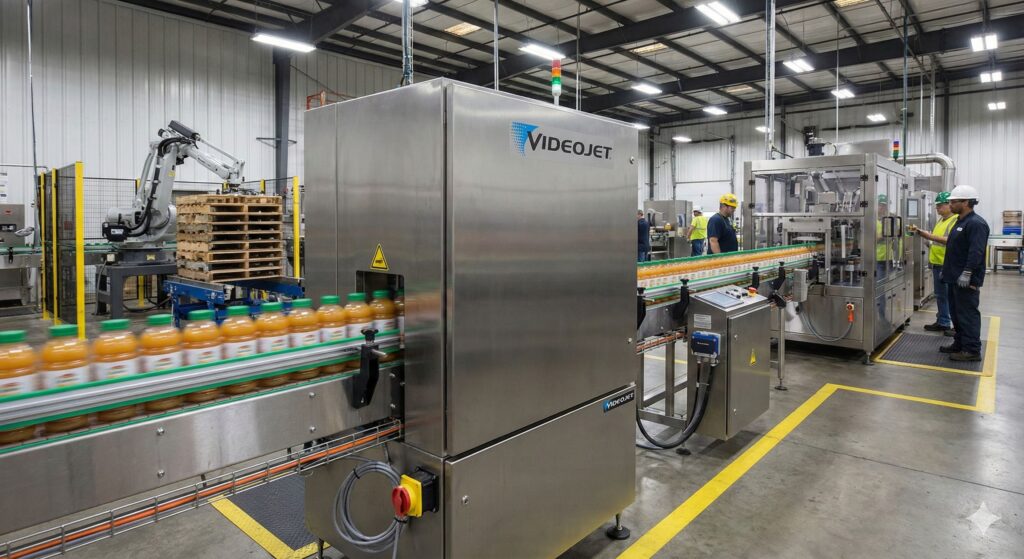
In almost all production lines, logistics centers, and warehouses around the world, there is a discreet protagonist without whom nothing would work with the same precision: the industrial printer. Unlike desktop printers used at home or in offices, these devices are designed to work nonstop, withstand harsh environments, and maintain consistent print quality even during 24/7 shifts.
The function may seem simple — printing text, codes, or images — but on a practical level, it impacts batch traceability, food safety, warehouse logistics, or accurate billing for thousands of customers. That’s why industrial printers have become a strategic component within industry, retail, and logistics sectors.
What exactly is an industrial printer?
An industrial printer is a rugged device built to handle large volumes of work continuously and accurately. They are not designed for just a few sheets a day but for thousands of labels, packaging, or documents in a single shift.
Their casings are typically metal, internal components are reinforced, and the feeding system is prepared to operate in environments with dust, vibrations, temperature changes, or humidity. Where a desktop printer might fail or quickly saturate, an industrial printer is specifically designed for such conditions.
Types of industrial printers and when to use them
There is no single “industrial printer.” Depending on technology and application, several main types can be distinguished.
Continuous Inkjet (CIJ) printers
CIJ printers excel at marking and coding on moving products. They are installed on fast production lines, such as food, beverages, pharmaceuticals, or consumer packaging.
They can print expiration dates, batch numbers, alphanumeric codes, or small logos on containers that keep moving — bottles, cans, plastic or glass packaging. Ink is projected in microscopic drops controlled electronically, allowing high-speed marking without physical contact.
Specialized brands like Videojet have developed CIJ systems that integrate directly into the production line and communicate with other machines to ensure each product is correctly marked.
Thermal transfer and direct thermal printers
These are the main players in label printing, barcode printing, wristbands, and tickets.
- Thermal transfer: uses a ribbon between the thermal printhead and the support. It allows printing on plastic labels, synthetic materials, and substrates designed to withstand cold, heat, friction, or chemicals. It’s the usual choice for warehouse labeling, logistics, chemical industry, healthcare, or cold storage traceability.
- Direct thermal: prints by directly heating heat-sensitive paper. Ideal for short-term applications, like receipts, shipping labels that don’t need to last years, or queue tickets.
Brands like Zebra Technologies and BIXOLON have established themselves as references in these solutions for warehouses, retail, and logistics chains. Equipment from Brother, Toshiba, or Dymo are also common in environments combining high volumes and robustness levels.
Industrial laser printers
Although laser technology is often associated with office printers, it also has a place in industrial environments. Laser printers are used when high volumes of high-quality text and graphics are required: invoices, delivery notes, internal documentation, reports, or legal documents.
In these scenarios, manufacturers such as HP (e.g., LaserJet Pro in advanced configurations), Canon, or Epson offer machines capable of printing thousands of pages monthly with a low cost per page and a higher workload certification than typical home printers.
Industrial 3D printers
Additive manufacturing has moved beyond prototype labs to become a real production tool. Industrial 3D printers enable the creation of:
- Functional prototypes in a matter of hours.
- Custom production tools and fixtures.
- Final parts using technical materials (resins, composites, advanced filaments).
Models like the Ultimaker S5 and S7 are used professionally for their reliability and wide material compatibility. Formlabs, with units like the Form 4, has gained a strong position in high-detail resins. For large-format and demanding applications, devices such as the Stratasys F900 are employed in aerospace and automotive sectors where precision and material certification are critical.
Large-format printers and plotters
When the need is to print blueprints, signage, banners, or labels, large-format printers and plotters come into play. These machines can work on flexible roll materials (vinyl, photographic paper, fabrics) or rigid panels, depending on the technology.
In this field, HP is one of the most well-known brands, with plotters like the HP DesignJet T650 suited for technical drawings, engineering, and signage. Canon and Epson also offer extensive large-format ranges for signage, professional photography, and point-of-sale advertising.
Common brands and solutions by application type
While brand choice always depends on the project, clear market patterns exist:
- Labeling and coding: Zebra, Videojet, BIXOLON, Brother, Toshiba, and Dymo are common in production lines, warehouses, and logistics.
- Industrial 3D printing: Ultimaker, Formlabs, and Stratasys are known for their professional focus and support for industrial materials.
- General and large-format printing: HP, Canon, and Epson have built a robust ecosystem around professional and industrial printing, including equipment, consumables, and services.
Beyond the brand, it’s essential to have a support network, spare parts, and technical service to ensure the printer doesn’t become a bottleneck when it encounters issues.
Key factors to consider when choosing an industrial printer
Before investing in an industrial printer, it’s advisable to evaluate several factors:
- Print volume: printing a few hundred labels daily is different from handling tens of thousands. Industrial printers are designed for intensive duty cycles, but each model has its recommended capacity.
- Working environment: dust, humidity, vibrations, temperature, or chemicals can influence the type of printer and the protection level of its enclosure.
- Compatible materials: plastic labels, special papers, films, 3D resins, vinyl, or rigid panels. Each technology works best with certain materials; choosing correctly avoids adhesion, readability, or durability issues.
- Connectivity and software: integration with ERP, WMS, MES systems, barcode or QR code generation, central management of printers. The digital aspect is as important as the hardware.
- Total Cost of Ownership (TCO): while initial investment might be higher than desk printers, the cost per print is usually lower thanks to efficiency, durability, and industrial consumables. Only considering purchase price is a common mistake.
Frequently Asked Questions about Industrial Printers
1. What are the practical differences between an industrial printer and a desktop one?
Industrial printers are designed to operate for many hours daily, with high volumes and more demanding environments. They feature reinforced mechanics, more durable components, and typically offer a lower cost per print when working at scale. Desktop printers are optimized for sporadic use and more controlled conditions.
2. Which industrial printer is best for labels and barcode printing in warehouses?
For logistics or product labels and pallet tags, thermal transfer printers are the most common choice. They provide good durability, compatibility with resistant materials, and high-quality barcode printing. Brands like Zebra, BIXOLON, Brother, or Toshiba are frequently referenced in such applications.
3. When does it make sense to invest in an industrial 3D printer instead of a desktop model?
An industrial 3D printer is worthwhile when functional parts, high-precision prototypes, certified technical materials, or large internal production volumes are needed. They tend to offer greater reliability, repeatability, and better workflow integration for professional environments compared to hobbyist units.
4. What should I consider to calculate the actual cost of an industrial printer?
Beyond the purchase price, consider expenses for consumables (ink, ribbon, paper, resins, filaments), preventive maintenance, potential downtime due to malfunctions, and expected lifespan. Assessing total cost of ownership relative to workload helps identify the most cost-effective solution over the medium and long term.