
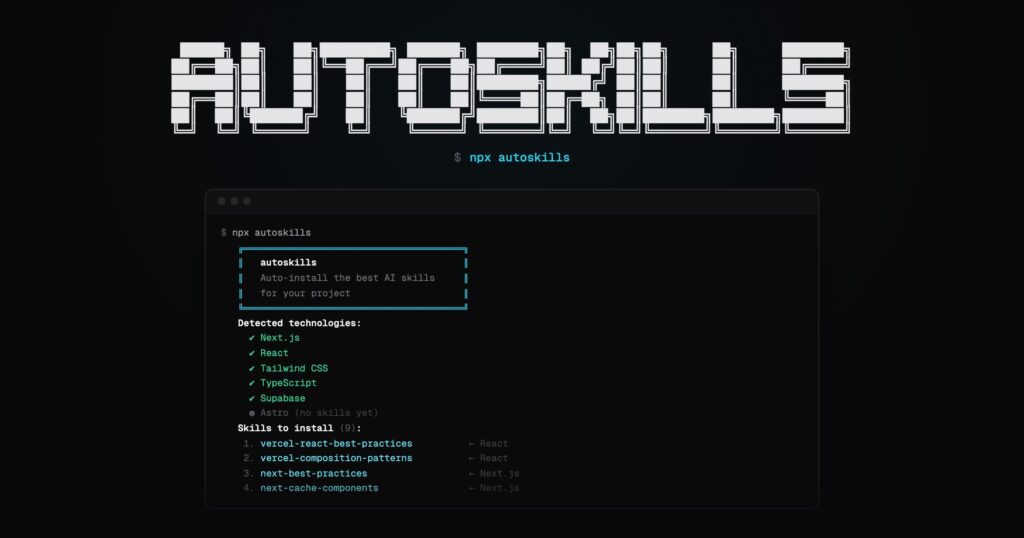
The idea may sound like a developer’s magic trick, but it exists and is already gaining significant traction on GitHub. It’s called autoskills, and its proposal is as straightforward as it is bold: run npx autoskills at the root of a project so the tool can inspect the tech stack, cross-reference it with a skills registry, and automatically prepare the most suitable capabilities for the AI agent in use. Published by midudev, the project is presented with a direct motto: “One command. Your entire AI skill stack. Installed.”
Behind this hook lies a deeper trend. The so-called agent skills are establishing themselves as a way to provide reusable context to assistants like Claude Code, Cursor, Gemini CLI, Codex, or OpenCode. Instead of repeating instructions over and over in each conversation, these skills package knowledge, workflows, and specific resources so the agent can load them when relevant. Anthropic describes skills as modular capabilities that extend Claude with instructions, metadata, and optional resources; Gemini CLI defines them similarly, as self-contained experience packages focused on specialized expertise.
In this context, autoskills doesn’t invent the concept but aims to solve one of its most practical issues: the time and friction involved in deciding what to install for each project. According to its official documentation, the tool reads package.json, Gradle files, and various configuration files to “fingerprint” the stack. Based on this, it installs the best-fitting skills via skills.sh, the open directory of agent skills. If it detects the target is Claude Code, it also generates a CLAUDE.md file summarizing the installed skills inside .claude/skills.
What it actually does and why it’s catching attention
The genius of autoskills is that it automates a layer that was previously quite manual. Its official website outlines the process in three steps: run the command, detect the stack from package.json and configuration files, and install the suitable skills from skills.sh. It also offers several handy options, such as --dry-run to preview what would be installed without making changes, -y to skip confirmations, and -a, --agent to limit the installation to specific agents like cursor or claude-code.
The supported technologies are broad and cover much of modern development. Autoskills’ website lists frameworks and tools like React, Next.js, Vue, Astro, Angular, Svelte, Tailwind CSS, Expo, Bun, Deno, Supabase, Cloudflare, Vercel, Playwright, Prisma, Stripe, Hono, NestJS, Tauri, Electron, Flutter, Spring Boot, and WordPress, among many others. Not every technology is equally covered — some install several well-defined skills, others acknowledge that no skills are available yet. Nonetheless, the approach already spans dozens of technologies and offers a very practical mapping: real project dependencies matched with ready-to-use knowledge for an agent.
This fit explains part of the interest. In projects with multiple layers — frontend, backend, database, deployment, testing — manually choosing suitable skills can become just another task in the initial setup. autoskills tries to condense that work into a single command, turning skills from an informal prompt collection into something more like an operational dependency. The parallel with package managers isn’t accidental: skills.sh is marketed as “The Open Agent Skills Ecosystem,” and Vercel Labs’ official npx skills CLI already allows searching, installing, listing, updating, and removing skills for over 40 different agents.
It’s not all as simple as the slogan suggests
That said, it’s worth tempering the promotional enthusiasm. autoskills makes installation easier but doesn’t automatically turn an agent into an expert in every technology. What it does is detect the stack and link it to a curated catalog of existing skills. The final quality depends on the maturity of those skills, whether the project is well-identified, and whether the target agent effectively leverages that format. The ecosystem itself continues to evolve rapidly, expanding its coverage and capabilities.
An important licensing nuance is also worth noting. Although many describe it as “open source,” autoskills’ repository states it is distributed under CC BY-NC 4.0, a Creative Commons license with a non-commercial clause. This makes it distinct from the more common free software licenses like MIT or Apache 2.0 and warrants careful review of permitted uses—especially in enterprise environments or commercial products. This is a relevant detail because enthusiasm around the project might lead to assumptions of broader openness than what the license actually grants.
Another practical requirement to consider is Node.js 22 or higher. For some developers, this isn’t an issue, but organizations with conservative environments or legacy setups might face a minor, though tangible, barrier. Additionally, the effectiveness of automatic detection in monorepos, non-standard configurations, or stacks with less common tools is still evolving. The repository shows recent support for monorepos, Kotlin Multiplatform, Android, and Java/Spring Boot, indicating ongoing coverage expansion.
Despite these nuances, autoskills addresses a real need. Code agents are moving beyond simple chats with terminal access to become more specialized tools, and skills are a clear way to make that specialization reusable. If installing these capabilities can be automated and contextualized, starting a project with AI could be significantly smoother. It may not be “the only command you need,” but it’s certainly one of the most promising ideas to emerge in this new layer of development tools for agents.
Frequently Asked Questions
What exactly does autoskills do when run on a project?
According to its documentation, it analyzes package.json, Gradle files, and other config files to detect the tech stack, and then installs the most suitable skills from skills.sh. If the target agent is Claude Code, it also creates a CLAUDE.md file summarizing the installed skills.
Is autoskills truly open source software?
The code is hosted on GitHub, but the repository states it is distributed under CC BY-NC 4.0, a non-commercial license. Therefore, it’s important to review the licensing terms carefully before using in certain contexts.
Which technologies does autoskills detect as of April 2026?
It supports dozens of technologies, including React, Next.js, Vue, Astro, Angular, Svelte, Tailwind CSS, Bun, Deno, Supabase, Prisma, Playwright, Stripe, Cloudflare, Vercel, NestJS, Spring Boot, WordPress, Flutter, Electron, and Tauri. Coverage varies, with some being well-supported and others still lacking dedicated skills.
Is anything else needed before running npx autoskills?
Yes, at minimum, the environment must meet the project’s requirement: Node.js 22 or higher. You can also use --dry-run to preview the installation without making changes.
