

For years, running Artificial Intelligence locally on a Windows PC has been, for many users, a hurdle race: installing drivers, battling with Python versions, resolving framework dependencies, adjusting environment variables, and finally discovering that something isn’t compatible and having to start over. AMD argues that this “entry cost” has hindered creators, students, and developers who want to test models, generate images, or prototype applications without relying on the cloud.
Based on that premise, the company has introduced AMD Software: Adrenalin Edition™ AI Bundle, an optional feature integrated into the AMD Software: Adrenalin Edition app designed to radically simplify setting up a local AI environment. The concept boils down to a simple idea: check a box during installation or update and let the software prepare the necessary stack to get started.
A “bulk” installer to avoid dependency chaos
The move addresses a real and common problem: even experienced users often spend time on tasks that don’t add direct value to the end goal (training, inference, creation, or experimentation). AMD describes the traditional process on Windows as a fragile, dispersed sequence — drivers, Python environments, frameworks, and libraries — where each version change can break the flow.
The AI Bundle practically works as a centralized installer with curated tools aimed at two main use cases: creative generative AI (especially images) and local language model work. The company positions it as a “clean” environment, designed to avoid dependency searches or manual configurations that often take hours.
Plus, AMD sees this as a step to normalize a trend: running models locally to reduce cloud costs, maintain greater control over the environment, and accelerate iterations—particularly in early prototyping phases.
What exactly does the AI Bundle include?
AMD details the package contents as a set of “essential” components to start building and executing AI loads on compatible hardware. The list includes well-known names for anyone who has tinkered with local AI over the past year:
- PyTorch on Windows, integrated within Adrenalin as a core piece for creating, training, or running models.
- ComfyUI, aimed at visual workflows for image generation and creative pipelines, accelerated via PyTorch on AMD’s ROCm platform.
- Ollama, for running language models locally from CLI or application integrations.
- LM Studio, a “ready-to-use” application for downloading, running, and fine-tuning model parameters.
- Amuse, a text-to-image app to run optimized models for AMD locally.
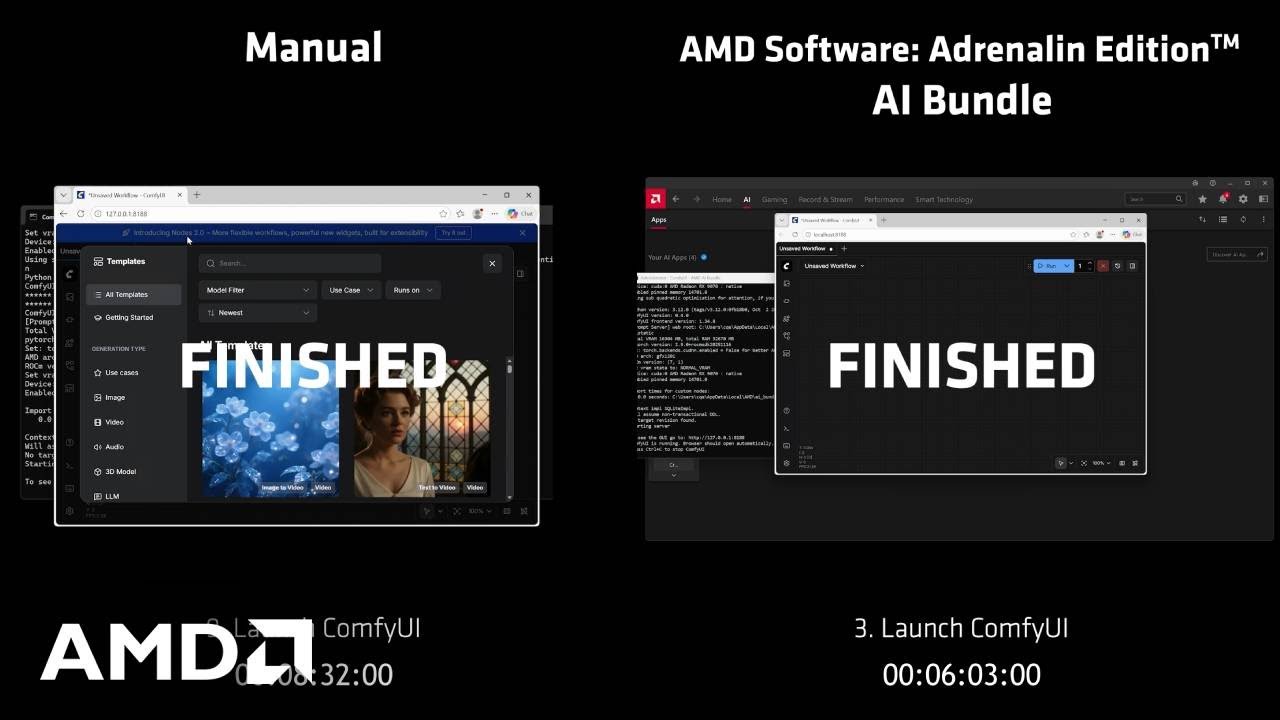
Clear intent is evident: instead of forcing users to choose among scattered guides, repositories, and scripts, the manufacturer offers a curated “package” to make first contact quick and frictionless.
Who is it for and what hardware can use it?
AMD positions the AI Bundle for three profiles: creators exploring image generation and visual workflows, developers seeking a reliable local environment for inference and prototyping, and students/researchers needing a predictable setup for experimentation without external service dependency.
As for access, AMD limits it to specific platforms: AMD Radeon RX 7700 Series GPUs or higher and processors Ryzen AI 300, Ryzen AI 400, or Ryzen AI Max. Activation is offered as an option during the installation or update of AMD Software: Adrenalin Edition.
This is notable because it reveals a secondary message: the package isn’t just software; it’s also a mechanism to promote current hardware value (GPU and, in some systems, NPU) at a time when local AI is becoming a buying argument.
Beyond “one click”: standardizing local AI as a platform experience
In the short term, the AI Bundle’s appeal is clear: save time and avoid the “hell” of configurations. But, in a broader perspective, it also aims at something more ambitious: turning local AI into a platform experience, with an official entry point and less uncertainty about what works and what doesn’t.
AMD complements the announcement with references to its support ecosystem, including documentation and specific updates like the PyTorch on Windows Edition release notes, and invites users to its AMD AI Developer Program for deeper technical resources and community engagement.
The market interpretation is twofold. On one side, democratizing access to tools many already used—albeit with manual installation and maintenance. On the other, solidifying a rising trend: local AI doesn’t have to be an “artisan” project for advanced users; it can become a standard workflow for creating, testing, and deploying—especially when rapid iteration and environment control are priorities.
If the approach works as promised, the real benefit may be less flashy than a benchmark but more impactful daily: making Windows AI projects no longer system chores, but creative tasks again.
Frequently Asked Questions
What is the AMD Adrenalin Edition AI Bundle and what is it for?
It is an optional feature integrated into AMD Software: Adrenalin Edition that installs, in one process, a set of tools to start working with local AI on Windows without manual configurations.
What AI tools does AMD’s AI Bundle include?
It includes PyTorch on Windows, ComfyUI, Ollama, LM Studio, and Amuse, focusing on both creative generation (images) and running language models locally.
What hardware requirements does the Adrenalin AI Bundle have?
AMD indicates compatibility with Radeon RX 7700 Series or higher GPUs and processors such as Ryzen AI 300, Ryzen AI 400, and Ryzen AI Max, activated via the installation or update of Adrenalin.
Why might running AI locally on a PC be more efficient than using the cloud?
It allows faster iteration without recurring cloud costs during testing phases, maintains control over the environment, and enables greater autonomy; AMD presents it as a useful approach for prototyping, creation, and experimentation.
via: amd