
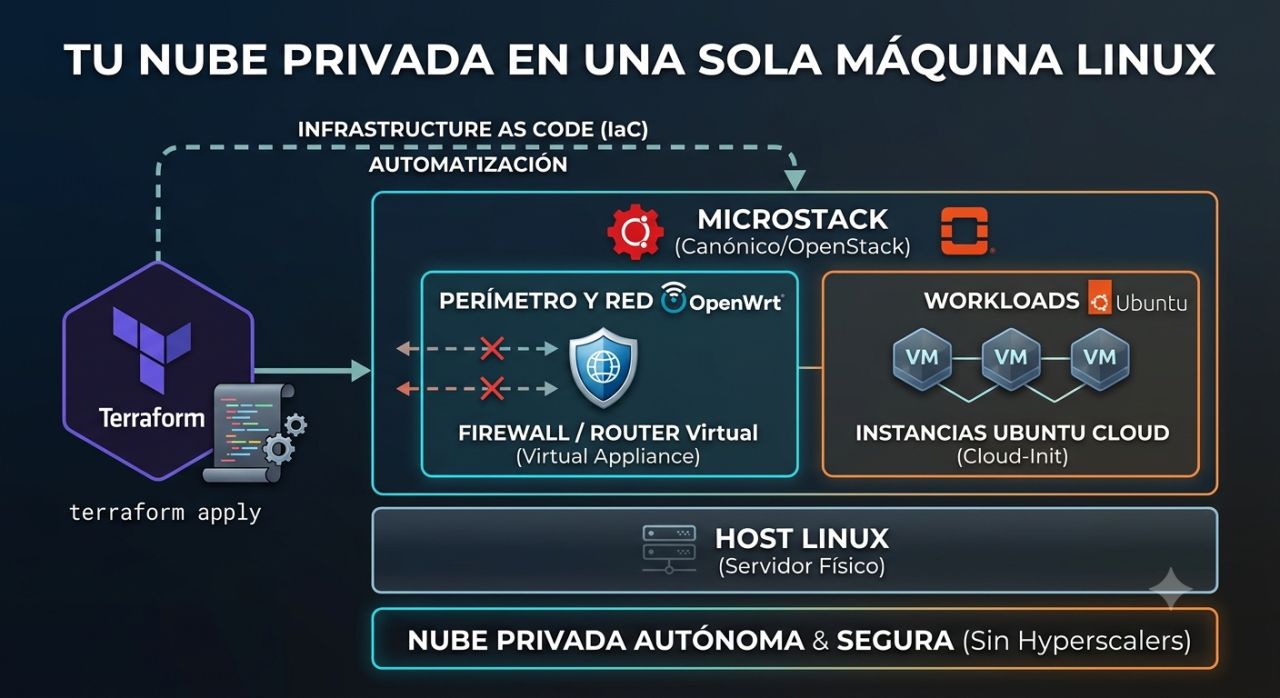
Yes, it is possible to set up a fairly complete private cloud laboratory on a single Linux machine. Canonical allows deploying Canonical OpenStack with Sunbeam, an evolution of the MicroStack project, which consolidates control, compute, and storage roles onto a single node. When combined with Terraform, Ubuntu Cloud images, and a virtual firewall like OpenWrt, the result is a very useful environment for learning OpenStack, testing automation, and reproducing cloud architectures without hiring infrastructure from hyperscalers.
The key points of a private OpenStack cloud in 20 seconds
- Canonical enables deploying OpenStack on a single server for labs and learning.
- The same node can assume control, compute, and storage roles.
- Terraform can automate networks, routers, security rules, and instances via the OpenStack provider.
- OpenWrt can run as a virtual appliance to experiment with routing and segmentation.
- A single-node design works for labs but does not provide the resilience of a production cloud.
This idea is especially interesting for sysadmins, students, and developers wanting to understand what actually happens behind services like EC2 or Azure Virtual Machines. Instead of just creating a virtual machine from a public panel, they can build networks, manage images, assign addresses, define security rules, and automate everything via code.
However, there is an important terminological update. Although MicroStack remains a well-known name, Canonical’s current documentation refers to the product as Canonical OpenStack, deployed via the sunbeam command. Canonical actually maintains an official tutorial for setting up the entire environment on a single machine.
What can really fit inside a single machine
A lab like this reproduces much of the core components of an IaaS cloud.
The architecture can be outlined as follows:
| Layer | Technology | Function |
|---|---|---|
| Physical host | Ubuntu Server/Desktop | Base server |
| Virtualization | KVM | Running virtual machines |
| Cloud management | Canonical OpenStack / Sunbeam | Resource management |
| Compute | Nova | Instance lifecycle |
| Networking | Neutron | Networks, subnets, routers |
| Images | Glance | OS images |
| Identity | Keystone | User, project, and permission management |
| Storage | MicroCeph | Storage backend |
| Automation | Terraform | Infrastructure as Code |
| Optional firewall | OpenWrt | Routing and virtual perimeter |
| VM configuration | cloud-init | Initial provisioning |
In a typical deployment, these components would be spread across different nodes. In a lab, they are intentionally consolidated to reduce cost and physical complexity.
Canonical’s basic tutorial recommends a minimum of 4 x86-64 cores, 16 GB of RAM, 100 GB of SSD storage, and an additional unformatted disk for MicroCeph. It also supports running the lab inside a virtual machine, though with a performance trade-off.
For comfortably working with multiple VMs, significantly more memory is advisable. The 16 GB recommended is a starting point; 32 or 64 GB offers more freedom for experimentation.
Installation: Sunbeam takes the stage now
The current installation begins with Canonical’s openstack snap package:
sudo snap install openstackThis package includes sunbeam, the tool that abstracts much of the complexity involved in deploying OpenStack.
Next, prepare the node:
sunbeam prepare-node-script --bootstrap | bash -x
newgrp snap_daemon
Then initialize it, assigning the three main roles on the same server:
sunbeam cluster bootstrap --role control,compute,storageAlternatively, in the simplified tutorial, you can accept defaults:
sunbeam cluster bootstrap --accept-defaults --role control,compute,storageSunbeam deploys various components underneath, including Kubernetes for control plane functions, Juju, the OpenStack hypervisor, and MicroCeph for storage.
Afterward, configure the environment:
sunbeam configure --accept-defaults --openrc demo-openrcAnd verify it works by launching a first instance:
sunbeam launch ubuntu --name testThis provides a small, functional cloud on a single server.
Terraform turns the lab into reproducible infrastructure
The next step is likely the most interesting: stop creating resources manually.
There is an OpenStack provider for Terraform that enables managing many platform services via code, from Nova and Neutron to Cinder, Glance, and Keystone.
A basic configuration could start like this:
terraform {
  required_providers {
    openstack = {
      source = "terraform-provider-openstack/openstack"
    }
  }
}

provider "openstack" {
  cloud = "lab"
}
From there, resources such as networks can be declared:
resource "openstack_networking_network_v2" "lab" {
  name = "lab-network"
}
A subnet:
resource "openstack_networking_subnet_v2" "lab" {
  name       = "lab-subnet"
  network_id = openstack_networking_network_v2.lab.id
  cidr       = "10.10.10.0/24"
  ip_version = 4
}
And finally, instances:
resource "openstack_compute_instance_v2" "server" {
  name        = "ubuntu-lab"
  image_name  = "ubuntu"
  flavor_name = "m1.small"

  network {
    uuid = openstack_networking_network_v2.lab.id
  }
}
The real advantage appears as the lab grows. Networks, machines, rules, and dependencies are no longer just manually configured; they are now described in version-controlled files.
A:
terraform applycan rebuild the environment.
This approach brings the lab much closer to how real cloud infrastructure is managed.
Adding OpenWrt as a virtual firewall
Another interesting possibility involves deploying OpenWrt as a virtual machine within the environment itself.
OpenWrt can run on x86 and is documented for virtualized operation with QEMU/KVM, making it suitable for experimenting with network appliances.
A simple architecture might use two virtual interfaces:
Internet / external network
        |
     OpenWrt
        |
   Private OpenStack network
        |
  VM1   VM2   VM3
OpenWrt can then handle routing, NAT, firewall policies, or additional services.
This setup enables testing scenarios that are harder to reproduce with a basic VM setup: multiple tenant networks, virtual routers, project isolation, or ingress/egress rules.
However, OpenStack already provides Neutron for networking and security groups. OpenWrt is not necessary to build the cloud. Its utility lies in transforming the lab into a richer environment for experimenting with network appliances within the infrastructure itself.
cloud-init automates another manual task
Ubuntu Cloud images are prepared to work with cloud-init, so a VM can automatically receive its configuration during the first boot.
For example:
#cloud-config
packages:
  - nginx

runcmd:
  - systemctl enable --now nginx
Terraform can deliver this content via user_data.
This allows moving from:
create a VM → SSH in → install packages → modify config
to:
terraform apply → VM created and configured
For Infrastructure as Code labs, this difference is significant. Terraform describes the infrastructure, and cloud-init handles initial guest system configuration.
What this lab teaches better than an AWS account
Building such a cloud helps understand concepts deliberately hidden by major cloud providers behind managed services.
When creating an AWS EC2 instance, you don’t need to know Nova, Neutron, or KVM.
But here, yes.
The administrator can see how they interrelate:
Terraform
   ↓
OpenStack API
   ↓
Nova ─────────→ KVM
   ↓
Neutron ──────→ Networking
   ↓
Glance ───────→ Images
   ↓
Ceph ─────────→ Storage
It also allows you to provoke errors.
A wrong route, overly restrictive security rule, or poorly defined external network immediately reveals which layer is failing.
From a training perspective, that experience has great value.
A single server doesn’t turn the lab into a production cloud
This is a key caution.
Running OpenStack on a single server does not mean that this architecture should be used as a general design for production.
Canonical’s own tutorial states that the simplified deployment is intended for learning. For production environments, different procedures are recommended, and the cluster can be expanded with additional nodes.
In a single machine, there is a single point of failure:
Host failure
     ↓
Compute failure
     ↓
Storage failure
     ↓
Control plane failure
     ↓
Entire cloud failure
There is no real high availability of hardware, and live migration to another hypervisor isn’t possible if only one exists.
A production private cloud usually separates functions, has multiple compute and storage nodes with redundancy, independent networks, and high-availability mechanisms.
Therefore, the correct term is private cloud all-in-one lab.
And that’s precisely what it’s especially good for.
From a node to a real cloud
The advantage is that the concepts learned are not lost as you scale up.
Canonical OpenStack allows adding new machines to the cluster later on and separating control, compute, and storage roles.
The lab can evolve from:
1 server
Control + Compute + Storage
to:
Control nodes
     |
Compute nodes
     |
Storage nodes
     |
Separate networks
Terraform can continue managing resources nearly with the same logic.
This is probably the biggest advantage of this experiment. With the price of a single Linux server with enough RAM, you can build a platform to learn KVM, OpenStack, Ceph, virtual networking, cloud-init, and Terraform working together.
It doesn’t replace AWS, Azure, or Google Cloud, nor does it intend to. Nor does it automatically transform a single machine into a fault-tolerant enterprise infrastructure.
But it does enable understanding what building a private cloud truly entails before expanding to multiple servers.
Frequently Asked Questions
Can full OpenStack be installed on a single server?
Yes. Canonical provides an official procedure to run Canonical OpenStack with control, compute, and storage roles on a single machine, specifically aimed at learning and experimentation.
Does MicroStack still exist?
The MicroStack name is still associated with the project, but Canonical’s current documentation primarily uses Canonical OpenStack and Sunbeam for installation and operation.
Can Terraform manage OpenStack?
Yes. The OpenStack provider for Terraform enables managing resources like Nova, Neutron, Cinder, Glance, and Keystone, among others.
Is using a single node recommended for production?
Not for resilient architecture. A single server consolidates all services and is a single point of failure. For production, multi-node deployments, storage redundancy, network separation, and high availability should be considered.
