
Whenever a company begins developing AI-based applications, the same question arises: Do we need GPUs?
The answer is almost never so straightforward.
In reality, the choice isn’t about selecting the most powerful processor but rather which one best fits the type of work to be performed. A modern AI server typically combines various types of chips because each addresses a different problem.
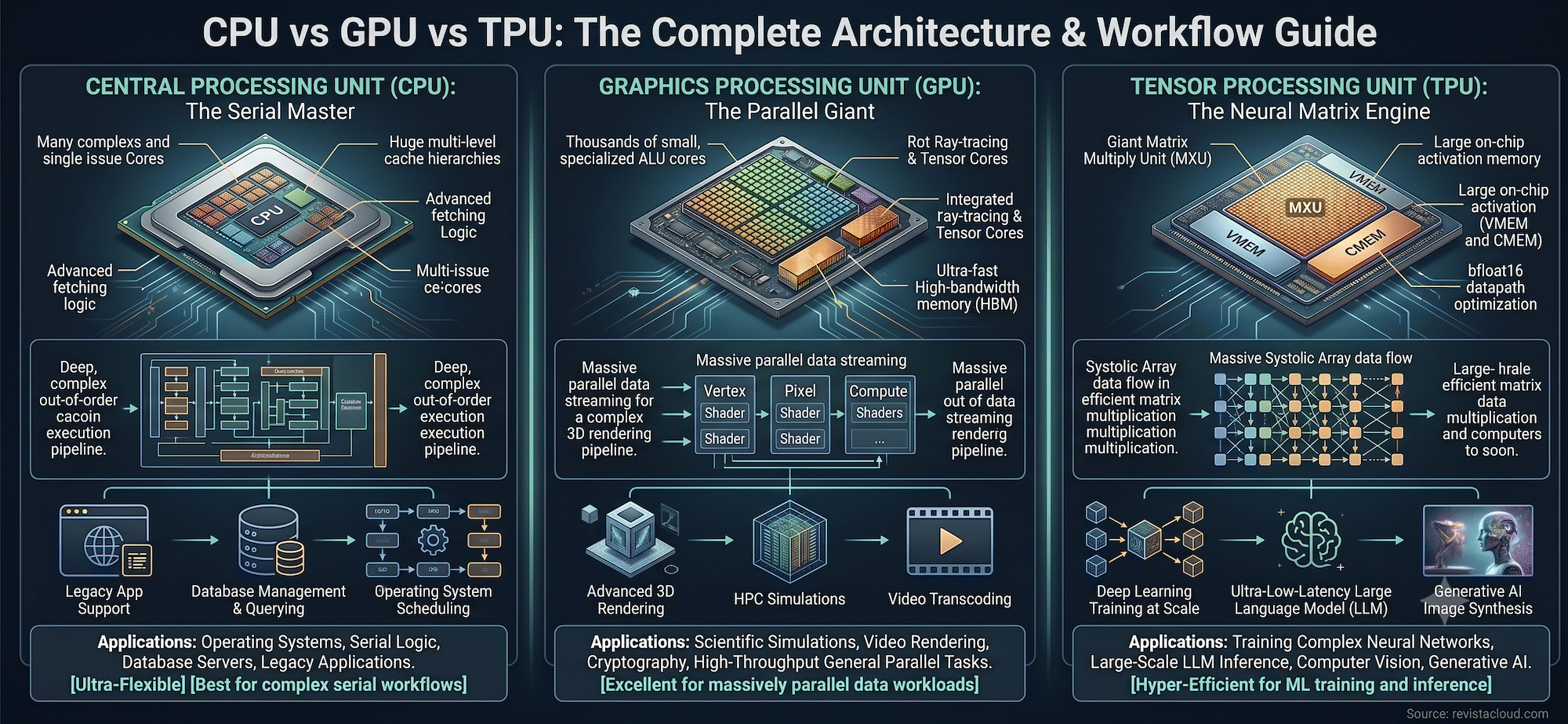
While the CPU continues to serve as the brain coordinating the system, GPUs dominate model training, and TPUs aim to maximize efficiency when the entire workload revolves around machine learning.
The key points of CPU, GPU, and TPU in 20 seconds
- CPUs, GPUs, and TPUs are not exactly competing; they are designed for different workloads.
- The CPU remains essential for business logic, databases, and orchestration.
- The GPU is currently the most widely used option for training and inference of AI models.
- TPUs prioritize maximum efficiency in highly specific machine learning workloads.
- Choosing the right hardware can reduce both the cost and the runtime of an application.
The surge in generative AI has led many companies to automatically associate AI with NVIDIA GPUs. However, the reality of a data center is much more complex. A service based on language models requires general-purpose processors, accelerators, memory, storage, and high-speed networks working in harmony.
That’s why it’s more helpful to understand the role each architecture plays rather than trying to establish an absolute winner.
CPU: the brain that continues coordinating the entire infrastructure
CPUs (Central Processing Units) remain the most versatile component of any server.
They are designed to execute a few tasks at a time but with a significant capacity for decision-making, managing interruptions, accessing memory, and executing complex instructions.
In an AI infrastructure, they are responsible for:
- Serving APIs.
- Running databases.
- Coordinating agents.
- Managing Kubernetes or Proxmox.
- Executing business logic.
- Preprocessing data before sending it to GPUs.
Although they can run AI models, doing so on CPUs tends to be inefficient when dealing with millions or billions of matrix operations.
Their strength is not speed in AI.
It’s flexibility.
GPU: the balance between performance and versatility
GPUs were born for rendering graphics, but eventually became the de facto standard for artificial intelligence.
The reason is simple.
While a CPU has few very powerful cores, a GPU incorporates thousands of cores capable of executing the same operation simultaneously over vast amounts of data.
This parallelism perfectly matches the matrix multiplications performed by neural networks.
Today, almost all training of large models is done on GPUs.
A growing part also involves inference.
Moreover, they offer another significant advantage: relative flexibility.
The same GPU can train a model, serve inference, run scientific simulations, render videos, or accelerate HPC calculations.
This versatility explains why GPUs continue to be the preferred choice in most AI data centers.
TPU: maximum efficiency when AI is the entire workload
TPUs (Tensor Processing Units) follow a completely different philosophy.
Instead of being general-purpose processors, they are ASICs specifically developed to accelerate tensor operations.
This allows them to deliver very high energy efficiency when running machine learning models.
In exchange, they sacrifice much of the flexibility that characterizes both CPUs and GPUs.
They are not intended to run any application.
Their goal is to accelerate AI models.
Google was a pioneer in this architecture for powering its own services and currently uses various generations of TPUs for both training and inference.
The latest versions even separate these scenarios, optimizing some for maximum training performance and others for reduced latency once the model is in production.
Quick comparison
| CPU | GPU | TPU |
|---|---|---|
| Maximum flexibility | High parallelism | Extreme specialization |
| Business logic | AI training | Large-scale AI |
| Databases | Inference | Mass inference |
| APIs | HPC | TensorFlow/JAX |
| Low efficiency in AI | General balance | Maximum energy efficiency |
And what about NPUs?
In the last two years, a fourth category has emerged, gaining increasing prominence: NPU (Neural Processing Unit).
Companies like Intel, AMD, Qualcomm, Apple, and Microsoft are already integrating these accelerators into personal computers and mobile devices.
Their function is not to train large models like GPUs but to perform local inference with very low power consumption.
They are responsible for features like automatic subtitles, personal assistants, noise reduction, image generation, or real-time translation without constantly relying on the cloud.
All signs indicate that NPUs will become a common component of personal computing, while GPUs and TPUs will continue to dominate large data centers.
On-premises or cloud?
After choosing the accelerator, another equally important decision is where to run the workload.
| On-premises | Cloud |
|---|---|
| High initial investment | No initial investment |
| Lower long-term cost | Pay-as-you-go |
| Ideal for constant workloads | Ideal for variable projects |
| Greater data control | Immediate scalability |
| Own hardware | Managed hardware |
There’s no one-size-fits-all answer.
Organizations running inference 24/7 often find owning infrastructure more cost-effective over time.
Conversely, those experimenting with different models or with irregular demand tend to prefer cloud services to avoid high upfront costs and to scale expenses according to actual use.
The choice is no longer about selecting the most powerful chip
As AI becomes integrated into more applications, infrastructure also becomes more specialized.
A CPU remains essential for system coordination.
GPUs continue to be the most versatile accelerators for training and deploying models.
TPUs offer maximum efficiency when the entire workload revolves around machine learning.
And the new NPUs are beginning to bring AI directly onto user devices.
The question should no longer be which processor is best, but rather what combination of processors each workload truly needs. The answer depends on inference volume, latency requirements, budget, and flexibility demands for each project.
Frequently Asked Questions
What is the difference between a CPU and a GPU?
The CPU is designed to execute a few complex tasks very efficiently, while the GPU can perform thousands of operations in parallel, which is especially useful for AI and graphics.
What is a TPU used for?
TPUs are accelerators specialized in tensor operations. They are mainly used for training and inference of machine learning models with high energy efficiency.
Do GPUs replace CPUs in AI?
No. Both components work together. The CPU coordinates the system, and the GPU accelerates AI calculations.
What is an NPU?
An NPU is an AI accelerator integrated into computers and mobile devices, designed to run models locally with very low power consumption.
