
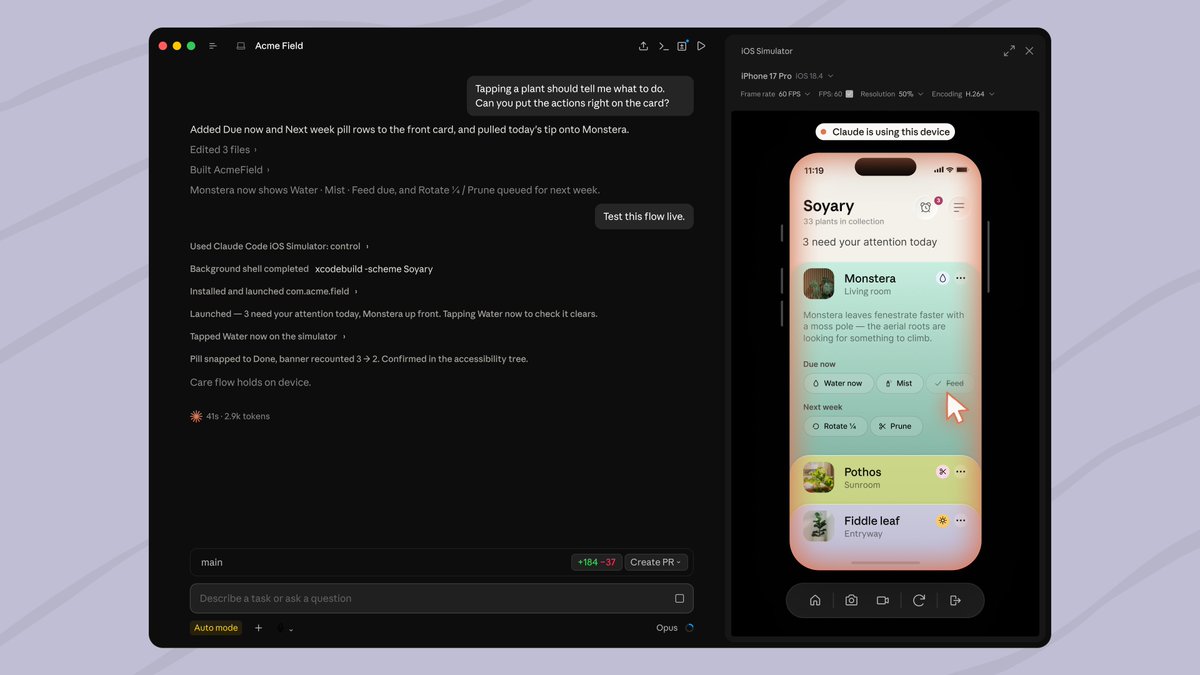
Anthropic continues expanding Claude Code’s capabilities with a feature that brings the assistant closer to a much more autonomous development workflow. Starting this week, Claude Code Desktop can compile an iOS application, run it directly in Apple’s simulator, interact with the interface, and verify if the changes work correctly—all within the conversation itself without needing to switch constantly between the editor and Xcode.
The key features of Claude Code for iOS in 30 seconds
- Claude Code can launch applications in Xcode’s official iOS simulator.
- The assistant can interact with the interface to validate the changes it makes.
- The simulator appears integrated within the Claude Code Desktop window.
- This feature is available in public beta for macOS and requires Xcode.
- It represents a significant step toward assistants capable of writing, executing, and verifying code continuously.
Until recently, most coding assistants stopped at generating code. Developers still had to compile the app, open the simulator, visually check results, and return to the editor if errors appeared.
With this update, Anthropic reduces part of that manual cycle.
When the user asks Claude to review a feature or check a new screen, the assistant can automatically compile using Xcode, install the app on a virtual device, and navigate the interface to ensure the behavior matches expectations.
From copilot to agent that also tests software
This feature is part of an ongoing evolution seen in nearly all programming assistants.
GitHub Copilot, Gemini CLI, OpenAI Codex, and Claude Code have shifted from solely completing lines of code to becoming agents capable of performing full development tasks.
The difference is notable.
They no longer just suggest functions; they can also modify multiple files, compile the project, interpret errors from the compiler, and repeat the process until a solution is found.
With support for the iOS simulator, Claude adds a visual layer as well.
After running the application, it can press buttons, navigate between screens, read displayed content, and use that information to decide if further modifications are needed.
In practice, the model now has a cycle much more akin to that of a human developer: writes code, observes the result, corrects issues, and rechecks the app.
Simulator integrated within Claude Code
This new feature is exclusively available in Claude Code Desktop for macOS.
When Claude runs a compatible application with the iOS simulator, a panel appears next to the conversation showing the virtual device in real-time.
This is not just a video feed.
The simulator is fully interactive. Developers can use it while Claude works, switch devices, take screenshots, record the session, or manually browse the app.
Anthropic explains that this integration directly uses Apple’s official simulator tools, so Claude doesn’t need to control the desktop via visual automation functions like Computer Use.
This allows the developer to continue using other applications on the computer without interference from Claude.
Each conversation maintains its own environment
One of the most interesting aspects is session isolation.
Each conversation can have its own simulator instance, preserving the app’s state even if the user switches to another Claude Code session.
This makes it easier to work on multiple features simultaneously without restarting the testing environment constantly.
It’s also possible to select different iPhone or iPad models to verify behavior across various screen sizes.
The current limit is four simulators per session.
AI begins to close the development cycle
The addition of the simulator is a significant step because it brings Claude Code closer to the concept of an autonomous development agent.
Until now, the usual workflow depended on several separate tools:
- The assistant wrote the code.
- Xcode compiled the application.
- The developer checked the result.
- If an error occurred, the process started over.
Now, some of these steps are automated.
Claude can detect a compilation failure, fix it, regenerate the app, open it in the simulator, and visually review the result before even responding to the user.
While it doesn’t replace unit tests, integration testing, or manual validation before publishing, it considerably reduces the time spent on verifying small interface changes or simple functional errors.
Available only for macOS
This new feature depends entirely on Xcode’s official simulator.
Therefore, it only works on macOS and local Claude Code Desktop sessions.
It is not available for cloud sessions, SSH connections, or physical devices.
Anthropic also notes that screenshots taken during verification are part of the conversation and fall under the service’s data retention policies, so it is recommended not to use personal accounts or sensitive information during testing.
A growing focus on complete agents
Support for the iOS simulator illustrates the direction in which AI-assisted development tools are headed.
The competition is no longer just about generating better code, but about reducing the number of manual tasks a developer needs to perform between changes.
Compile, run, navigate the interface, detect errors, and validate results are increasingly part of the same automated workflow.
As these assistants integrate compilers, browsers, simulators, terminals, and debugging tools, the line between a programming copilot and a true development agent will continue to blur.
Frequently Asked Questions
What can Claude Code do with the iOS simulator?
It can compile the app, install it, run it in the simulator, interact with the interface, and visually verify that changes work correctly.
Does it require Xcode?
Yes. Claude uses Apple’s official simulator, so Xcode must be installed on macOS.
Can it test real iPhones?
No. Currently, it can only control simulated devices via Apple’s iOS simulator.
Which plans include this feature?
It is available in public beta for Claude Code Desktop for Pro, Max, and Team plans. It is not yet part of the Enterprise plan.
