

Free Wi-Fi at hotels, airports, coffee shops, or shared workspaces remains a highly appealing convenience for users and mobile professionals. It allows saving data, connecting quickly, and maintaining some level of work continuity outside the office. But it also introduces a risk that is often underestimated: losing control over the channel through which information travels.
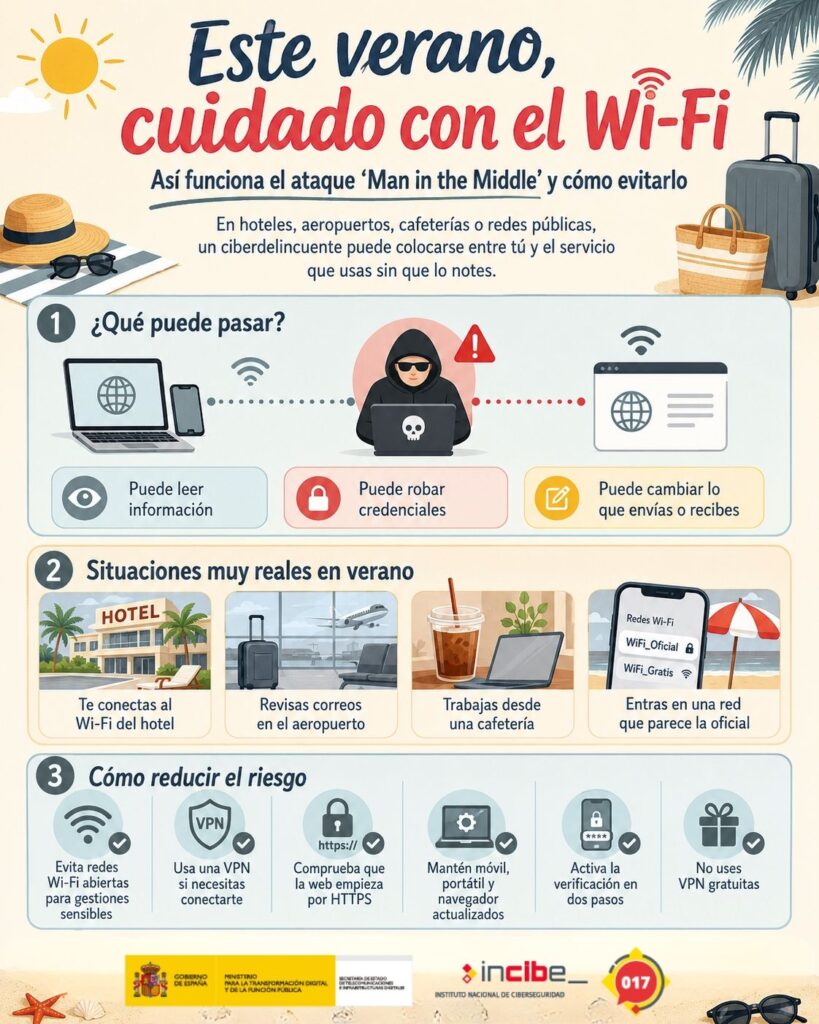
One of the most well-known scenarios is a Man in the Middle attack, or MITM, where an attacker manages to position themselves between the victim’s device and the legitimate service they’re trying to access. From that position, they can observe, capture, or modify communications without necessarily alerting the user to a visible failure. The page loads, the app responds, and the connection appears normal. This appearance of normalcy is, precisely, part of the problem.
What happens in a Man in the Middle attack
In normal communication, the user’s device establishes a connection with a server: a website, an email service, a corporate app, or a banking platform. In an MITM attack, the attacker manages to insert themselves into that flow. They can do this by controlling a fake Wi-Fi network, manipulating name resolution, exploiting weak settings on a local network, or attacking outdated devices and browsers.
In public networks, the simplest case is a malicious access point. The attacker creates a network with a name similar to the legitimate one at the hotel, airport, or café. The user connects thinking they are using the official Wi-Fi, but in reality, their traffic passes through infrastructure controlled by a third party.
There are also more advanced techniques on local networks, such as ARP spoofing attacks, DNS manipulation, or attempts to degrade secure connections. In poorly segmented corporate environments, an attacker who gains access to the LAN may try to redirect internal traffic, capture credentials, or interfere in communications between devices and services.
The goal can vary. Sometimes, it’s to read information. Other times, it’s to steal credentials, capture session cookies, alter responses, redirect users to fake pages, or modify in-transit content. When the victim works with corporate accounts, the impact can go far beyond the affected device.
Why HTTPS helps but doesn’t solve everything
Using HTTPS has greatly reduced exposure to classic MITM attacks. When a website uses TLS properly, the communication between browser and server is encrypted and authenticated. This makes it harder for a third party to read or modify the content.
But HTTPS does not eliminate all risks. If the user ignores certificate warnings, installs untrusted profiles, accesses fake domains, or uses applications that do not correctly validate certificates, attackers can still find opportunities. Additionally, encryption does not protect against a well-crafted phishing page if the victim voluntarily enters their credentials on a fake site.
Therefore, the advice shouldn’t be limited to “look for the padlock.” You need to verify that the domain is correct, that the website begins with https://, that there are no browser warnings, and that sensitive data isn’t entered on pages accessed through suspicious links.
In the business scope, protection must go beyond the browser. Internal applications, APIs, email clients, corporate VPNs, and SaaS tools should strictly validate certificates and avoid configurations that accept insecure connections for convenience.
Practical measures for users and companies
For mobile users, the first line of defense is to avoid public networks for sensitive operations. Online banking, professional email access, admin panels, signing documents, or exchanging confidential information should be done via mobile data, trusted networks, or reliable VPNs.
A VPN doesn’t convert an insecure network into a secure one, but it significantly reduces exposure by encrypting traffic between the device and the service’s exit point. Be sure to avoid dubious free VPNs. If the VPN provider isn’t trustworthy, the problem shifts from the public network to the provider itself.
It is also advisable to disable automatic connection to open networks, forget networks no longer used, keep operating systems and browsers up to date, activate two-factor authentication, and use password managers. Password managers help detect fake domains, as they won’t autofill credentials if the URL doesn’t match the legitimate site.
For companies, the approach must be broader. It’s not enough to warn employees to be careful. They should be provided with corporate VPNs, multi-factor authentication, conditional access policies, up-to-date EDR solutions, secure device configurations, and clear training on the use of public networks.
Additionally, businesses offering Wi-Fi to clients should separate guest networks from internal networks. The public network should not have visibility over management systems, POS systems, printers, servers, or administrative equipment. Segmentation, client isolation, WPA2 or WPA3, strong passwords, and proper router configuration reduce basic risks.
The weakest link remains overtrust
Man in the Middle attacks exploit a trust that users often give too quickly. Trusting that the hotel’s network name is correct. Believing a page that loads is legitimate. Thinking that a browser alert isn’t important. And trusting that a free connection won’t have hidden costs.
During summer, this trust increases because people do more spontaneous things. Work from other locations, connect more devices outside the home, and combine personal and professional uses. This mix offers attackers more opportunities.
MITM isn’t a new threat, but it remains relevant because it exploits a recurrent behavior: users connecting to uncontrolled networks to perform sensitive tasks. The solution involves reducing that risk surface, applying end-to-end encryption whenever possible, and treating every public network as untrusted.
Cybersecurity in mobility starts before opening an email or visiting a website. It begins with choosing the network carefully.
Frequently Asked Questions
What is a Man in the Middle attack?
It’s an attack where a third party positions themselves between the user and the legitimate service to intercept, read, or modify communication without necessarily being detected by the victim.
Does HTTPS prevent MITM attacks?
It greatly reduces the risk if properly implemented and if the user doesn’t ignore security warnings. However, it doesn’t protect against fake networks, phishing, fraudulent domains, or poor app practices.
What should companies do to mitigate risk?
Use corporate VPNs, multi-factor authentication, updated devices, network segmentation, conditional access, employee training, and clear separation between internal and guest networks.
