
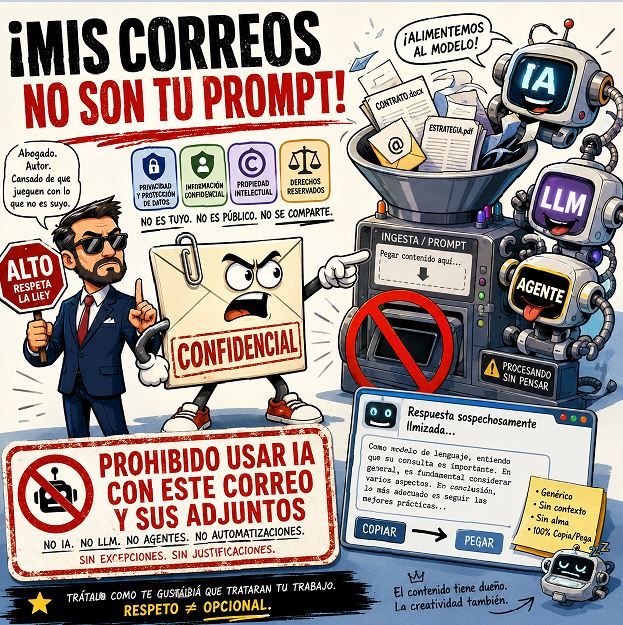
Prohibiting the use of AI in a footer message on an email has some necessary gesture behind it and some weak defense. Necessary because the issue exists: more and more messages, attachments, contracts, proposals, reports, and internal documents are ending up processed by AI assistants. Weak because AI no longer always appears as an external website where someone copies and pastes text. Many times, it is embedded within the email itself, in the document editor, the corporate search engine, or in the automatic meeting summary.
The debate opened by Iñaki Jauregui Navarro on LinkedIn points to a real concern: what happens when we send confidential information and the recipient processes it with ChatGPT, Claude, Copilot, Gemini, or any other similar tool? Adding a prohibition clause at the end of the email can serve as a warning. It may even have value in certain professional contexts. But it’s important not to confuse a warning with a control measure.
The disclaimer warns, but doesn’t control
Email footers have been accumulating phrases about confidentiality, data protection, unintended recipients, and legal liability for years. The problem is that hardly anyone reads them carefully. When the legal block is repeated in every message, the recipient treats it as administrative noise.
Adding an explicit prohibition on AI use can discourage someone who was about to copy the email into an external tool. It can make someone think twice before pasting a contract into a public chatbot. And it can help establish that the sender does not authorize certain uses of the content.
But its actual effectiveness has clear limits. If a person acts negligently, it’s unlikely that a footer will change their behavior. And if the AI processing occurs within the recipient’s own corporate platform, there might not even be a conscious decision to “use AI”.
That is the key change. In many companies, Microsoft 365 Copilot or Gemini for Google Workspace are not standalone tools but integrated functions within the work environment. They can summarize threads, help draft responses, search documents, analyze meetings, or cross-reference accessible information. Microsoft affirms that prompts, responses, and data available via Microsoft Graph in Microsoft 365 Copilot are not used to train their foundational models; Google states that Gemini data in Workspace is not used to train models without customer permission. That nuance reduces fears of training, but does not eliminate internal data processing to deliver the service.
The risk isn’t just copy and paste
Many internal policies still view AI as if it were an external website. The employee opens a tab, pastes some text, asks for a summary, and copies the response. That use exists and should be regulated, but it’s no longer the only scenario.
The most difficult risk to manage is silent or integrated processing. An email might be indexed for semantic search, summarized within the thread, used to generate a suggested reply, or appear as context in a subsequent query by the user. The information doesn’t necessarily leave the corporate environment, but it passes through automated systems that must be governed.
The difference between “training” and “processing” matters. When a provider says they don’t train their models with company data, that doesn’t mean the data isn’t read, analyzed, or temporarily used to generate responses. Summarizing a thread requires processing it. Suggesting an answer involves interpreting the content. Searching for related documents entails indexing or retrieving information.
From a legal and operational standpoint, the relevant question isn’t just “Is AI being used?” but “What data is being processed, for what purpose, under what contract, with what permissions, with what records, and with what control mechanisms?” The Spanish Agency for Data Protection has emphasized that using AI systems for processing personal data requires understanding the technology, risk analysis, and informed decisions by responsible parties and data processors.
What a responsible company should do
The first practical step is to accept that AI is already part of the job. Banning it outright might sound decisive, but rarely works if employees already have it in their daily tools. It’s better to classify uses, data, and risks.
An organization should distinguish between public information, internal information, confidential data, personal data, highly sensitive data, trade secrets, and client documentation. Not everything requires the same level of protection. Neither do all AI tools offer the same guarantees.
The second step is to review environment configuration. In Microsoft 365, Google Workspace, or other suites, buying licenses and leaving default settings isn’t enough. You must decide which users have access, what repositories the assistant can query, what data is excluded, what logs are retained, and what controls are in place to audit misuse.
The third is to separate approved and non-approved tools. Using a corporate-approved AI within the company’s tenant is one thing; pasting client data into a personal chatbot account is quite another. Internal policies should explain this clearly, with real examples: what’s allowed, what’s not, and what to do if in doubt.
The fourth is to train teams. Many leaks aren’t due to bad intentions, but to convenience. Someone uploads an Excel to get a summary, pastes a contract to extract risks, or copies a client’s email to craft a more polite reply. Without clear guidance, errors will occur.
The fifth is to review contracts with suppliers. Handling data with AI can’t rely solely on generic commercial promises. Privacy terms, data location, sub-processors, retention, training, auditing, security, responsibilities, and exclusion mechanisms must be scrutinized.
What senders of sensitive information should do
The sender shouldn’t rely solely on the footer. If the information is sensitive, they should act before sending. This might include requesting explicit confirmation that the recipient won’t use external AI tools, sending documents through secure channels, encrypting attachments, limiting permissions, including confidentiality disclaimers, or adding specific clauses in contracts and NDAs.
It’s also wise to reduce what’s sent. Often, more data than necessary is shared. If an anonymized version, an excerpt, or a document devoid of personal data suffices, that should be the preferred option. Minimization is not just a data protection obligation; it’s also good sense.
In stable professional relationships, the best approach isn’t to hide a prohibition at the end of each email, but to establish clear rules. For example: no external AI tools with received documentation; only approved corporate environments; avoid sharing personal data unless necessary; don’t reuse attachments for training; and report any incidents or misuse.
The EU AI Regulation also introduces a framework that will require many organizations to better organize their systems, functions, and responsibilities. Its phased application includes obligations on literacy, general-purpose models, high-risk systems, and transparency, among other areas.
The email footer still has a role—as a warning, a reminder, or an indicator that information should not be processed without oversight. But true protection lies in internal policies, platform configurations, contractual agreements, training, and the ability to audit what data has been processed by AI.
AI has not broken email. It has exposed a weakness that already existed: many companies don’t precisely know what happens to the information they receive, who can access it, or what tools process it. The disclaimer can open the conversation. The solution begins when that conversation leads to effective data governance.
Frequently Asked Questions
Does it make sense to add an anti-AI clause in the email footer?
Yes, as a warning and deterrent. But it shouldn’t be considered a sufficient barrier to prevent automatic processing or integrations within corporate platforms.
Is the main issue that AI trains on my emails?
Not only that. Training is a concrete risk, but internal processing—such as summarizing, indexing, searching, generating responses, classification, or info retrieval—is equally significant.
What’s more effective than a disclaimer?
Establishing clear AI usage policies, reviewing platform configurations, limiting permissions, training employees, and including specific clauses when sharing sensitive data.
Image via LinkedIn. And via Abogados Contratos.
