
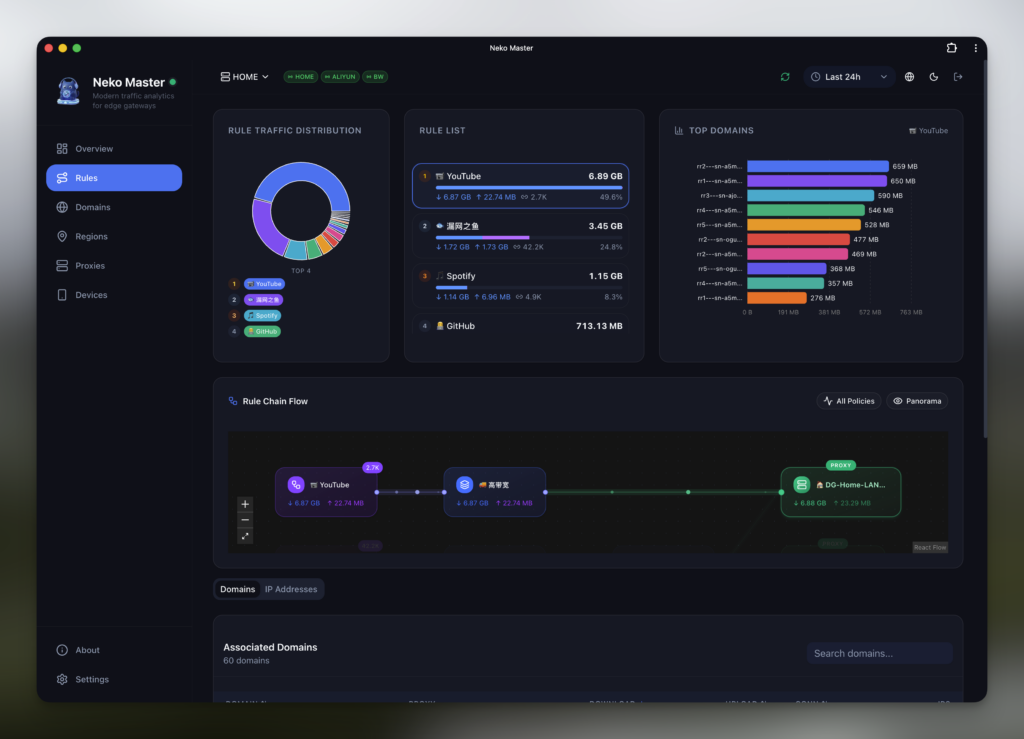
Neko Master is one of those projects born to address a very specific need: understanding what’s happening on a local network without setting up a heavy monitoring stack or relying on external services. Its proposal is a modern dashboard to visualize and analyze network traffic in real time, designed for local gateway environments and with support for multiple backends.
The project, published on GitHub by foru17 under an MIT license, defines itself as a traffic analysis and visualization tool. Its creators make an important clarification: it does not offer network access, proxy subscriptions, or connectivity between networks. It only collects data from the user’s network environment and presents it in an organized manner to facilitate observation, auditing, and analysis.
The idea fits especially well in environments with OpenClash, Clash/Mihomo, or Surge, where a gateway already manages traffic and rules, but there isn’t always a comfortable interface to see trends, domains, IPs, nodes, connections, and real-time behavior.
What Neko Master offers
The main promise of Neko Master is visibility. The panel allows users to monitor traffic with real-time updates via WebSocket, analyze trends over 30-minute, 1-hour, or 24-hour windows, review consumption by domain, look up associated IPs, view ASN and geolocation info, and analyze traffic distribution across proxy nodes.
It also includes support for PWA mode, light and dark themes, language switching between English and Chinese, and the ability to monitor multiple backend instances simultaneously. This last feature is especially relevant for advanced users or small distributed networks who don’t want to be limited to a single gateway.
| Function | Practical Use |
|---|---|
| Real-time Monitoring | View connections and traffic with low latency |
| Domain Analysis | Detect which services consume the most traffic |
| IP Analysis | Query ASN, location, and associated domains |
| Proxy Statistics | Measure traffic and connections per node |
| Multi-backend Support | Monitor multiple instances from a single panel |
| PWA & Dark Mode | Use the dashboard as a lightweight desktop app |
The design isn’t intended to replace enterprise observability tools, SIEM solutions, or NetFlow. Its value lies in providing a clear visual layer for users managing their own network, home labs, personal gateways, routers with OpenWrt, or small environments where quick insight is important.
Deployment with Docker and agent mode
Neko Master offers several installation options. The recommended method is Docker Compose, with minimal configuration exposing port 3000 for the web interface. For real-time WebSocket experience, port 3002 can also be exposed and routed via reverse proxy or tunnel. If WebSocket isn’t available, the app can fallback automatically to polling HTTP every few seconds.
The project also allows starting with docker run, installing via a one-command script, or running from source code with pnpm. For production deployments, the documentation advises setting a COOKIE_SECRET variable with a secure, randomly generated string of at least 32 bytes, persisting data volumes, and avoiding unnecessary exposure of internal ports.
Agent mode is one of the most interesting parts. It’s used when you want a central Neko Master dashboard with several remote devices collecting data near each gateway. The agent can be installed on OpenWrt, Linux, or macOS, gathering local info and reporting it back to the panel. The advantage is that the panel doesn’t need to connect directly to each gateway, simplifying setups with multiple locations or more closed networks.
For Clash/Mihomo gateways, the system can use WebSocket for real-time data. In Surge v5 or higher, data collection is via HTTP polling, with an estimated delay of about two seconds, according to the project documentation.
SQLite by default and ClickHouse for large volumes
Neko Master defaults to using SQLite for storage. For most users, this makes sense: it’s simple, doesn’t require running an external database, and allows storing configuration, metadata, and stats without complicating deployment.
For large data volumes, optional integration with ClickHouse is available. The documentation recommends it when managing hundreds of thousands of domains or IPs, when quick aggregation over long periods is needed, or when separating historical traffic data from configuration data.
ClickHouse operates with dual writing: SQLite continues to store configuration and metadata, while ClickHouse handles statistical traffic data. Read sources can be configured as SQLite, ClickHouse, or auto. There’s also a gradual migration path: initially writing to both systems with reads from SQLite, then switching to auto or ClickHouse reads, and eventually, if desired, shifting fully to ClickHouse with automatic fallback if it becomes unavailable.
This approach makes sense because it doesn’t force all users to deploy ClickHouse immediately. Users focused solely on a local panel can stay with SQLite, and those with heavy historical analysis needs have an upgrade path.
Reverse proxy, security, and project limits
The documentation recommends serving web and WebSocket through the same domain using routes: / pointing to port 3000 and /_cm_ws to port 3002. Examples include Nginx and Cloudflare Tunnel, with warnings about common mistakes such as misrouting WebSocket paths or conflicting static file routes in Next.js.
Regarding security, Neko Master supports authentication to protect panel data. The project advises setting a COOKIE_SECRET, not enabling FORCE_ACCESS_CONTROL_OFF except in recovery mode, and using SHOWCASE_SITE_MODE only in public demos with restricted operations.
It’s important to emphasize what Neko Master isn’t: it’s not a proxy service, doesn’t sell node access, doesn’t create inter-network connectivity, and doesn’t replace organizational security controls. It’s a visualization and analysis tool for data collected within the user’s environment. Clarifying this helps avoid misunderstandings, especially since many components connect with gateways commonly used in proxy configurations.
A useful tool for advanced home networks and small labs
The architecture includes a Next.js web app, a collector service in Node.js with Fastify and WebSocket, an agent in Go, storage with SQLite and optional ClickHouse, and a shared package of types and utilities. The frontend uses Next.js 16, React 19, TypeScript, Tailwind CSS, shadcn/ui, Recharts, and next-intl.
This combination positions it as a very specific category: not a command-line utility nor a heavy enterprise dashboard, but a modern web app for technical users who want a comfortable way to observe traffic. It can be useful for small network admins, openWrt enthusiasts, Clash/Mihomo or Surge users, home labs, and teams needing a quick visual overview of gateway behavior.
The optional support for ClickHouse and remote agent demonstrates the project’s aim to go beyond a simple panel. It’s also good that the documentation covers installation, ports, variables, reverse proxy, authentication, token recovery, backups, architecture, and troubleshooting.
As always, network tools should be adopted carefully. It’s wise to review what data is collected, how it’s protected, who accesses the panel, what ports are exposed, and whether the gateway allows container or agent connections. Visibility is valuable, but a poorly secured panel could reveal sensitive browsing habits, queried domains, nodes used, and traffic patterns.
Neko Master addresses a real need: making network traffic understandable without requiring users to set up complex stacks. For advanced home networks and small technical environments, it can be a very practical tool. Its main appeal lies in straightforward deployment, modern interface, real-time updates, multi-gateway support, and a scalable path to ClickHouse as data grows.
Frequently Asked Questions
What is Neko Master?
Neko Master is an open-source dashboard for visualizing and analyzing real-time network traffic in local gateway environments.
Does it work as a proxy or internet access service?
No. The project clarifies it does not provide proxy services, subscriptions, or inter-network connectivity. It only analyzes data from the user’s environment.
Which gateways does it support?
Documentation mentions support for Clash/Mihomo via WebSocket in real time and Surge v5+ via HTTP polling.
Can it be used with multiple gateways?
Yes. Neko Master supports multiple backends and also agent mode for data collection from remote devices.
Is ClickHouse required?
No. SQLite is the default storage. ClickHouse is optional and intended for large volumes or more intensive historical queries.
