
AMD has found an unusual way to improve the performance of its Ryzen Threadripper processors: fix software issues that weren’t making good use of so many cores. The company collaborated with the HandBrake project to address two threading bottlenecks that limited scaling on high-core-count processors, especially in Ryzen Threadripper and Ryzen Threadripper PRO systems.
The results are impressive. According to tests published by AMD, the improvements introduced in HandBrake 1.11.0 and later versions can increase transcoding performance by up to 215% on a Ryzen Threadripper 7980X and up to 181% on a Ryzen Threadripper PRO 9995WX. In practice, some jobs run more than three times faster than previous versions without users needing to change their workflow.
This news matters because HandBrake is one of the most widely used tools for converting, compressing, and optimizing videos. Creators, administrators, video professionals, home users, and teams that need to process large volumes of content into different formats rely on it. It also highlights something often forgotten: having many cores is not very useful if the application can’t efficiently distribute the workload.
The problem wasn’t hardware, but how the workload was distributed
Threadripper processors are designed for heavy workloads: rendering, compiling, simulation, video editing, transcoding, or professional workflows that can be broken into many parallel tasks. But this parallelism doesn’t happen automatically. Software needs to generate enough work, assign it properly, and avoid coordination overhead between threads that consumes more time than the actual computing.
During testing, AMD discovered that HandBrake didn’t scale correctly in some scenarios. Instead of better utilizing available resources, performance could decline as CPU availability increased, with losses of up to 60% in certain loads. This issue was particularly noticeable in lower-resolution tasks like 720p, where scheduling overhead can outweigh the actual processing time.
AMD identified two main issues. The first was a limitation when working with more than 64 logical processors. In CPUs with many cores and threads, HandBrake was inefficient at managing all available resources. The second was dividing work into too small tasks, which caused excessive coordination, leaving the CPU spending too much time organizing jobs rather than transcoding video.
| Detected Issue | Effect in HandBrake | Applied Solution |
|---|---|---|
| Limited scaling above 64 logical processors | CPU resources were underutilized | Improved thread management on high-core CPUs |
| Too small tasks | Increased scheduling overhead | Better workload distribution for transcoding |
| Greater impact on lighter loads | Performance drops in 720p and quick scenarios | More efficient jobs with less unnecessary coordination |
| Inefficient resource utilization | Lower performance despite more cores | More cores working on useful tasks |
The improvements came not through private patches or special versions. AMD contributed the changes upstream to the HandBrake project, where they were accepted, so users can benefit from the official releases.
Threadripper 7980X: up to 215% boost in specific workloads
For the Ryzen Threadripper 7980X, a 64-core, 128-thread HEDT processor, AMD compared HandBrake CLI 1.11.1 to HandBrake CLI 1.6.1. The choice of the older version as a baseline was deliberate: AMD wanted to isolate the impact of threading improvements and avoid mixing them with later changes to AMF presets related to encoding quality used in the Radeon RX 9070 XT in the testing system.
The highest improvement appears in Perfume H.264 720p, which jumps from 342 FPS to 1,078 FPS—a 215% increase. LG_8K HEVC 8-bit 4320p also stands out, climbing from 53 FPS to 161 FPS—a 203% increase. In other scenarios, gains are smaller but still significant, just from a software update alone.
| Workload on Ryzen Threadripper 7980X | AMD’s Reported Improvement |
| Perfume H.264 720p | +215% |
| LG_8K HEVC 8-bit 4320p | +203% |
| LG 8K 60fps HEVC 10-bit 4320p | +105% |
| Perfume HEVC 10-bit 1080p | +73% |
| Perfume HEVC 10-bit 2160p | +63% |
| Average across HEDT tests | +16% to +215% |
The technical takeaway is straightforward: workloads that previously suffered from scheduling overheads and poor work distribution see the most gains. Not all codecs, resolutions, or presets perform equally in transcoding. Some tasks are easier to parallelize; others depend more on sequential parts, memory, I/O, or specific filters.
It’s important not to interpret the 215% as a universal improvement for every type of video. It is the maximum observed by AMD during testing. Still, the smaller gains are valuable for those running long queues or repetitive workflows.
Threadripper PRO 9995WX: better utilization of 96 cores
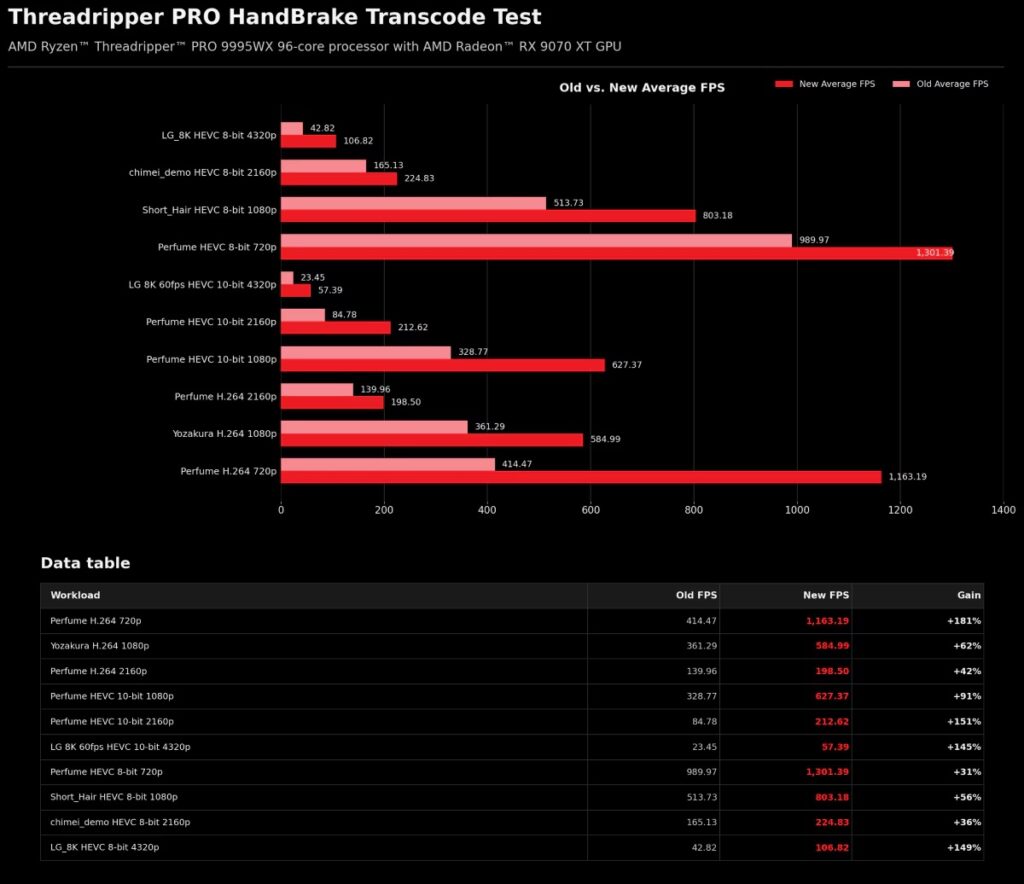
Improvements also extend to the Ryzen Threadripper PRO 9995WX, a 96-core processor aimed at professional workstations. AMD reports performance gains of up to 181%, or a 2.81x increase depending on the workload.
AMD’s published numbers show Perfume H.264 720p rising from 414.47 FPS to 1,163.19 FPS (+181%). Perfume HEVC 10-bit 2160p jumps from 84.78 FPS to 212.62 FPS (+151%). LG_8K HEVC 8-bit 4320p advances from 42.82 FPS to 106.82 FPS (+149%).
| Workload on Ryzen Threadripper PRO 9995WX | Previous FPS | New FPS | Improvement |
| Perfume H.264 720p | 414.47 | 1,163.19 | +181% |
| Yozakura H.264 1080p | 361.29 | 584.99 | +62% |
| Perfume H.264 2160p | 139.96 | 198.50 | +42% |
| Perfume HEVC 10-bit 1080p | 328.77 | 627.37 | +91% |
| Perfume HEVC 10-bit 2160p | 84.78 | 212.62 | +151% |
| LG 8K 60fps HEVC 10-bit 4320p | 23.45 | 57.39 | +145% |
| Perfume HEVC 8-bit 720p | 989.97 | 1,301.39 | +31% |
| Short_Hair HEVC 8-bit 1080p | 513.73 | 803.18 | +56% |
| chimei_demo HEVC 8-bit 2160p | 165.13 | 224.83 | +36% |
| LG_8K HEVC 8-bit 4320p | 42.82 | 106.82 | +149% |
Interestingly, the 9995WX doesn’t always outperform the 7980X, even with more cores. This may seem counterintuitive, but it’s normal in real-world software. Beyond a certain point, workloads don’t scale linearly. Coordination limits, memory bandwidth, internal dependencies, and unparallelizable parts of workflows all set boundaries.
These changes are important because they help unlock the full potential of high-core-count workstations. While not making every transcoding process perfectly scalable, they reduce friction and better utilize very expensive hardware.
Why this matters to creators, editors, and studios
For casual users, updating HandBrake might mean faster conversions. For creators and professional teams, the impact can be substantial. When transcode hundreds of videos, even small improvements in queue times translate into increased productivity.
HandBrake is used in many scenarios: reducing video size, preparing content for archiving, format conversion, generating device-compatible versions, processing 4K or 8K material, creating working copies, or automating workflows via CLI. In all these cases, if the workload utilizes CPU resources and the system has many cores, scaling improvements really matter.
| User profile | Potential benefit |
| Content creators | Shorter wait times for videos |
| Professional editors | Faster transcoding queues |
| Small studios | Better use of existing Threadripper setups |
| Media administrators | More efficient processing of large libraries |
| CLI users | Better performance without changing scripts |
| Enthusiasts | More value from high-core CPUs |
This software improvement also helps justify high-end hardware purchases. A station with Threadripper or Threadripper PRO might excel at many tasks, but if a particular app doesn’t scale, users don’t get full value from the hardware. Software updates like this unlock the performance already available physically.
CPU versus GPU: the approach doesn’t always have the same winner
HandBrake can use either CPU or GPU acceleration depending on codec, hardware, presets, and user preferences. NVIDIA’s NVENC, AMD’s VCE/VCN, and Intel’s Quick Sync Video are common options. For many users, GPU encoding offers a quick and efficient way to process video.
However, CPUs still have their place. Some users prefer CPU encoding for better control over quality, compatibility, specific presets, or workflows where GPU usage isn’t suitable. In slower modes or quality-focused settings, a high-core-count CPU can remain relevant.
| Approach | Advantage | Limitations |
| GPU encoding | Fast and efficient in many scenarios | Quality, compatibility, or preset choices vary |
| CPU encoding | Fine control and high quality in certain modes | Slower if it doesn’t scale well |
| Threadripper stations | Many cores for parallel workloads | Requires well-optimized software |
| HandBrake CLI | Automation and batch processing | Dependent on configuration and version |
| HandBrake GUI | Easy-to-use for general users | Less suited for large-scale automation |
This update doesn’t force a change in approach. AMD emphasizes that there are no new steps, presets, or configurations needed. Just using HandBrake 1.11.0 or later enables the improvements where applicable.
A win for open source software and upstream collaboration
This is also good news for open source software. AMD didn’t keep these improvements as a closed proprietary optimization; they contributed upstream to the HandBrake project, where they were accepted and integrated into the official software. This benefits end-users and highlights a positive relationship between hardware makers and software communities.
Such collaboration is especially important in professional workstations. Chipmakers can release CPUs with more cores, but applications must evolve too. Optimization isn’t limited to silicon; it extends to compilers, libraries, schedulers, drivers, codecs, frameworks, and apps.
| Actor | Role in the improvement |
| AMD | Identifies bottlenecks and proposes changes |
| HandBrake project | Reviews, accepts, and integrates updates |
| Threadripper users | Enjoy better performance through official releases |
| Open source community | Benefits from upstream enhancements | Creators and professionals | Extract more value from existing hardware |
The lesson is simple: more cores only matter if software can use them effectively. As desktop, workstation, and server CPUs grow in thread counts, such optimizations will become increasingly important.
Updating HandBrake is now particularly worthwhile for Threadripper owners
For those using Ryzen Threadripper or Threadripper PRO for transcoding, the recommendation is clear: upgrade to HandBrake 1.11.0 or later. The improvements won’t be identical across all videos or presets, but the potential gain is too significant to ignore.
It’s also important to remember that AMD compared specific versions and defined workloads. Actual results may vary based on codec, resolution, filters, storage, memory, OS, presets, and whether CPU or GPU acceleration is used. Nonetheless, the core message is consistent: two performance bottlenecks have been addressed in the main branch.
This wider perspective shows that performance isn’t only about launching new hardware. Sometimes, a software update can unlock a significant portion of already purchased capacity. In this case, HandBrake demonstrates that a high-core-count station could perform much more than some workloads previously suggested.
For creators and professionals working with video, this means less wait time. For AMD, it boosts the perceived value of their high-core CPUs. For HandBrake, it results in a version better suited for modern workstations. And for the open source ecosystem, it’s another example of how shared optimization can produce tangible benefits.
Frequently Asked Questions
What has AMD fixed in HandBrake?
AMD identified and fixed two bottlenecks related to thread management and dividing work into too small tasks, which limited performance on many-core CPUs.
Which versions include the fix?
The improvements are in HandBrake 1.11.0 and later. AMD compared HandBrake CLI 1.11.1 to HandBrake CLI 1.6.1 in their testing.
How much performance boost does it provide on Threadripper?
According to AMD, the Ryzen Threadripper 7980X can see improvements up to 215%, while the Ryzen Threadripper PRO 9995WX can reach up to 181%.
Does the update benefit all videos?
Not necessarily. The gains depend on codec, resolution, bit depth, preset, and specific workload. The most significant improvements are seen where scheduling overhead was previously highest.
Is it necessary to change settings to see benefits?
No. AMD states you don’t need to change workflows, presets, or configurations. Just update to HandBrake 1.11.0 or newer.
via: amd
