
Microsoft has warned of an increase in intrusions where attackers use Microsoft Teams to impersonate IT or helpdesk personnel and persuade employees to grant remote access to their devices. According to the company, the pattern relies on external collaboration between tenants, legitimate tools such as Quick Assist, and common management and data transfer utilities to move around the network and extract information without raising much suspicion.
The core problem isn’t a classic software vulnerability but rather the combination of social engineering, trust in a corporate channel, and abuse of legitimate tools. Microsoft emphasizes that the initial vector usually begins with an external chat in Teams, where the attacker presents as internal support, sometimes citing a account issue, spam, or a supposed security update. From there, the goal is for the victim to start a remote assistance session and hand over control of the device.
This approach aligns with a broader trend: attackers no longer rely solely on email to breach an organization. Real-time collaboration channels are becoming a new “front door” for intrusion because they blend urgency, context, and an appearance of legitimacy that often reduces user suspicion. Microsoft already warned in March that Teams calls and chats are becoming high-impact channels for impersonation and vishing attacks.
How the Attack Chain Works
In its new report, Microsoft describes a nine-phase attack chain. It all begins with initial contact via Teams from an external tenant. If the user accepts the conversation and responds to the supposed technician, the next step is usually Quick Assist or a similar remote support tool. At this point, the attacker gains legitimate interactive access to the victim’s desktop, which, from a telemetry perspective, can appear as a normal help session.
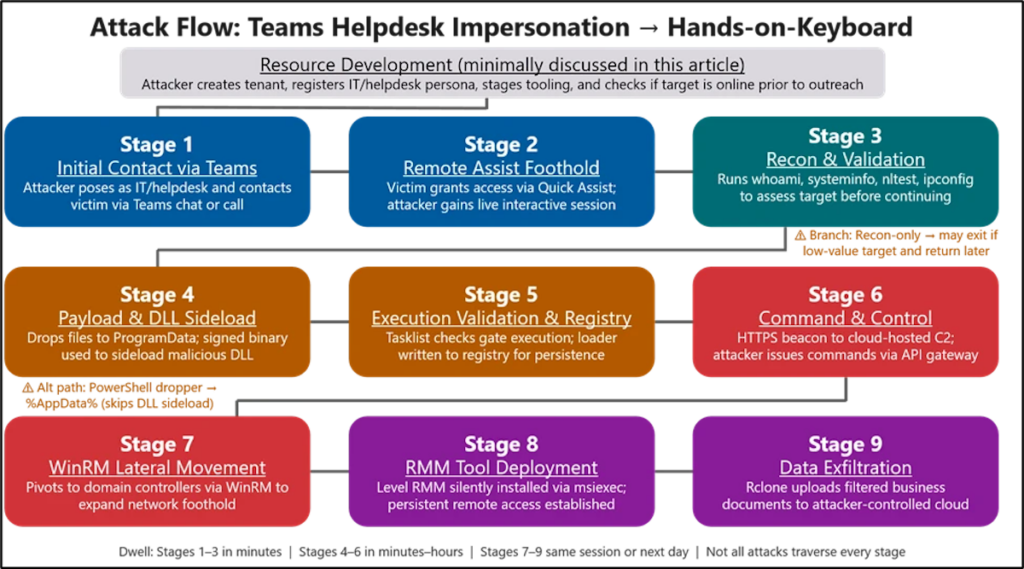
Once inside, the intruder performs quick reconnaissance using Command Prompt and PowerShell to verify privileges, domain membership, and connectivity to other systems. Then, they place a small payload in directories where the user can write, such as ProgramData, and execute it via DLL side-loading, exploiting signed and trusted applications. Microsoft cites examples like Autodesk software, Adobe Acrobat/Reader, Windows Error Reporting, or Data Loss Prevention solutions. This technique helps malicious code blend into normal processes in a corporate environment.
Communication with command and control servers typically happens over HTTPS, and persistence is maintained through registry modifications. From there, the attacker moves to a more delicate phase: lateral movement using Windows Remote Management, deploying additional remote management software on accessible systems, and exfiltrating data to external cloud storage using tools like Rclone. Microsoft also emphasizes that data exfiltration is usually filtered to extract only valuable information, reduce volume, and avoid detection.
The Real Risk: All Looks Like Normal Activity
The concerning aspect of these campaigns is that much of the activity closely resembles legitimate support work. There’s no noisy malware from the outset, no spectacular exploit, and no service outages that reveal the incident. It involves a conversation in Teams, a support session, routine administrative commands, and native Windows protocols. Therefore, Microsoft describes it as a “human-operated” intrusion, relying more on deception and trusted tools than on direct software vulnerabilities.
The company notes that Teams already displays alert signals during initial external contact: accept or block screens, labels for foreign tenants, message previews, and warnings of potential phishing or spam. According to Microsoft, these attacks succeed when users choose to ignore or overlook these warnings and continue interaction, eventually granting remote access. Thus, the threat relies less on breaking the platform and more on convincing the victim to use the platform against themselves.
What Can a Company Do to Reduce Risk
Microsoft recommends several specific measures. The first is to treat any external contact on Teams as untrusted by default, especially if the caller or sender claims to be from helpdesk or security teams. The second is to audit the use of Quick Assist and other remote management tools, restricting them to necessary systems and scenarios. The third is to limit WinRM to controlled systems and enhance SOC visibility for external call and chat activities, initial contacts, and remote support sessions.
Microsoft is further strengthening platform defenses. In March, it announced new capabilities in Defender for Teams Calling, providing SOC visibility for suspicious calls, advanced investigation, and real-time alerts when an external call appears to impersonate a known brand or entity. Additionally, the Microsoft 365 roadmap includes “Brand Impersonation Protection for Teams Calling,” enabled by default, to detect and warn of suspicious external calls.
The clear takeaway for any organization is that Teams is no longer just a collaboration tool; it’s now a potential attack surface. The more attackers’ actions mimic everyday support interactions, the more crucial it becomes to combine technical controls, telemetry, and user training. In these intrusions, the click doesn’t arrive by email—it arrives via chat or call, dressed as urgent help.
Frequently Asked Questions
Does Microsoft Teams have a vulnerability that allows these attacks?
Microsoft states that this chain of intrusions doesn’t stem from a weakness in Teams or its built-in protections, but rather from abusing legitimate external collaboration features combined with social engineering and voluntary user approval.
What tool do attackers use to take initial control of the device?
Primarily, Microsoft points to Quick Assist, although it also mentions commercial remote management and support software as part of the intrusion cycle.
How do they move around the network afterward?
According to Microsoft, after initial access, they typically use Command Prompt and PowerShell for reconnaissance, WinRM for lateral movement, DLL side-loading for executing payloads, and tools like Rclone to exfiltrate data to external cloud services.
What should a company do right now?
Review external collaboration policies in Teams, restrict the use of Quick Assist and WinRM, train employees to be suspicious of unsolicited support, and enable or monitor new protections and investigation features in Microsoft Defender for Teams.
Source: Microsoft
