
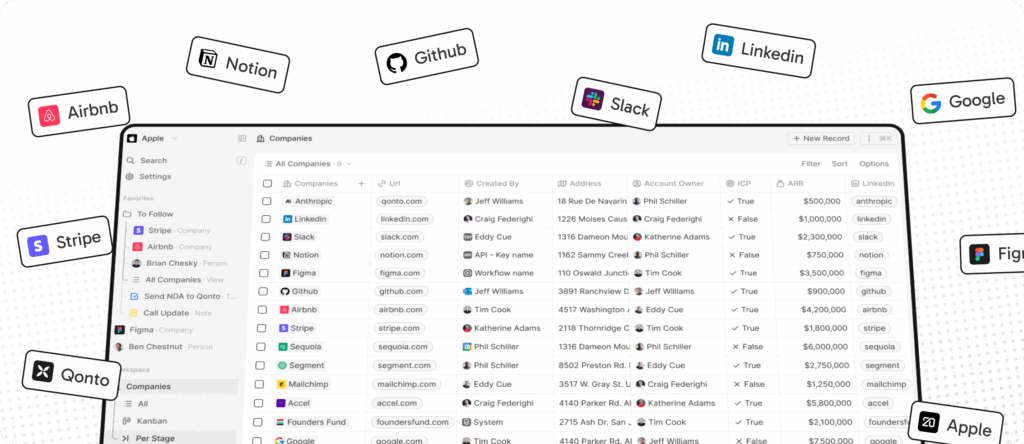
The CRM market has been dominated for years by proprietary platforms that are costly and difficult to abandon once the team’s data and processes are trapped inside them. In this context, Twenty is positioning itself as one of the most ambitious open-source proposals at the moment, with a very direct message: building a modern alternative to Salesforce, supported by the community and designed for teams seeking more control over their tool and their data. This is clearly reflected both in its official GitHub repository and its corporate website.
The project presents itself as “The #1 Open-Source CRM” and combines an interface inspired by modern tools like Notion, Airtable, or Linear with a solid technological foundation: TypeScript, NestJS, PostgreSQL, Redis, React, and Nx are part of its official stack. Therefore, it is not a small experiment but a CRM platform that aims to cover everything from object and field management to permissions, automations, emails, calendar, and files.
The proposal makes sense at a time when many small and medium-sized businesses, as well as technical teams, are looking to escape two very specific problems: the rising costs of commercial CRMs and the rigidity of their data models. Twenty addresses exactly these issues. Its official documentation explains that it allows for customizing layouts, creating views in table, kanban, filters, sorting, and grouping, as well as customizing objects and fields, managing permissions with custom roles, and automating workflows through triggers and actions.
This makes Twenty more interesting than just a “cheap CRM”. The company emphasizes that it provides the building blocks to create whatever each business needs, instead of forcing users into a closed structure. Its official guide, “What is Twenty”, summarizes it precisely as: an open-source CRM that gives users the building blocks to create exactly the system their business requires.
Operationally, the platform also seeks to serve two very different profiles. On one side, the end-user who wants to use a modern CRM with a cleaner and more flexible interface. On the other, the technical team looking to self-host, extend, and customize it. Twenty’s developer documentation clearly separates these routes: Extend, Self-Host, and Contribute. This means they not only want people to use it but also to build upon it.
What does Twenty offer today?
| Area | Key Features |
|---|---|
| Data Management | Custom objects and fields |
| Views | Table, kanban, filters, sorting, grouping |
| Security | Custom roles and permissions |
| Automation | Triggers and actions |
| Sales Activity | Emails, calendar events, files, and more |
| Analytics | Dashboards, currently in beta |
One of the features most appealing to teams coming from more traditional tools is precisely this combination of CRM and data system builder. Twenty goes beyond simple contacts, accounts, and opportunities in a rigid format, emphasizing the ability to adapt the object model to each use case. This brings it closer to a configurable CRM platform rather than just a simplified sales dashboard.
There are also signs of maturity in its recent evolution. On GitHub, the project already shows regular public releases, and at the time of writing, version 1.12.0 appears in the official releases list. Moreover, its documentation now covers areas such as self-hosting, local setup, migration from other CRMs, dashboards, and configuration in single-workspace or multi-workspace mode. This indicates the platform aims to support both individual use and broader deployments.
Self-hosting and data control
One of Twenty’s strongest selling points is its self-hosting capability. Its official self-hosting documentation explains that, by default, Twenty operates in single-workspace mode. This mode is designed for most self-hosted deployments where an organization wants a single, dedicated CRM instance. This makes it especially attractive for companies prioritizing data sovereignty, infrastructure control, or simply more predictable costs compared to traditional SaaS solutions.
This aspect is important because often the value of open source in CRM isn’t just about saving on licenses but also avoiding the classic lock-in problem. Twenty explicitly mentions this in its README: CRMs are too expensive and tend to trap users, and this dependency is one of the reasons they decided to build the product.
Migrating from another CRM — one of the biggest challenges
A critical point for any new CRM is not just what it promises but what it enables users to transfer from their previous system. Twenty already offers an official guide for migrating from other CRMs, explaining that the process involves auditing existing data, preparing the workspace, exporting, cleaning, and mapping information before importing it. It’s not magic nor intended as a turnkey solution, but it shows that the project is considering users transitioning from legacy platforms, not just fresh installations.
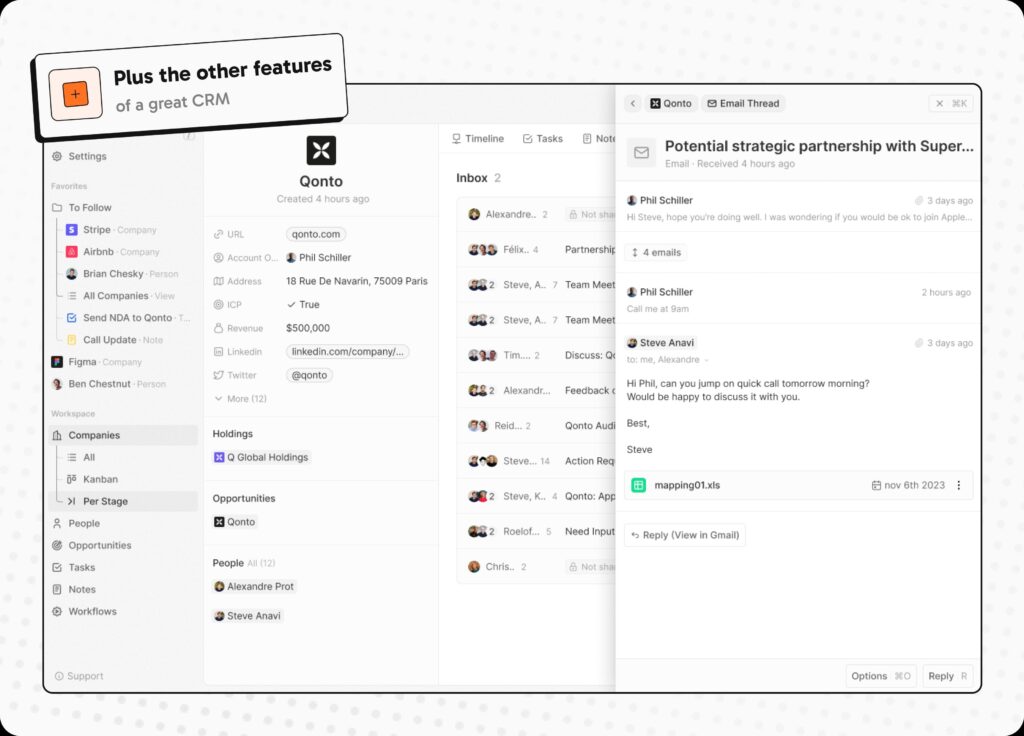
This is relevant because the true competitor of any CRM is often not another new product, but the inertia of the already-installed system. The clearer the migration path, the more likely an open-source alternative will be seriously considered by real companies.
An ambitious ecosystem-oriented CRM
An additional interesting aspect of Twenty is its focus on community and extensibility. The team makes it clear that they see the open-source and community-driven model as a foundation for future growth around the product. Their developer documentation also emphasizes APIs, webhooks, self-hosting, and code contribution areas.
This doesn’t mean Twenty is finished or ready to compete on equal footing with Salesforce across all fronts. But it does show that it’s moved past the stage of mere visual promises and is working towards a more comprehensive offering: a configurable, self-hostable CRM with automation, roles, dashboards, and serious documentation for technical teams.
What can Twenty add compared to a traditional CRM?
| Focus | Closed, Traditional CRM | Twenty |
|---|---|---|
| Data Model | More rigid | More configurable |
| Cost | Recurring subscription | Open source, with self-hosting option |
| Data Control | Dependent on provider | Greater control if self-hosted |
| Technical Extensibility | Limited to provider’s ecosystem | Documentation for extension, self-hosting, and contribution |
| User Experience | Often inherited from outdated designs | Inspired by modern tools like Notion or Airtable |
The above comparison is a reasoned inference based on Twenty’s official positioning and documented capabilities.
In summary, Twenty is not just “another open-source CRM”. What it aims to build is a modern response to a category long dominated by expensive, closed, and heavyweight products. While it still needs to prove how well it scales in complex enterprise environments, it already offers something many rivals do not: a clear value proposition, a coherent underlying technology, and a community actively pushing it beyond mere experimentation.
Frequently Asked Questions
What exactly is Twenty?
Twenty is an open-source CRM that presents itself as a modern alternative to Salesforce, focusing on customization, community, and data control.
Can it be self-hosted?
Yes. The official documentation includes a dedicated section on self-hosting and explains that it operates in single-workspace mode by default for most on-premises deployments.
What features are included today?
Among others, table and kanban views, filters, sorting, grouping, custom objects and fields, roles, permissions, workflows, emails, calendar, files, and dashboards in beta.
Is it only for sales teams?
Not necessarily. Due to its flexibility with objects, fields, and views, it can adapt to different customer relationship and operational processes. This is a reasonable inference based on the official product documentation.
Does it support data migration from other CRMs?
Yes. Twenty already provides official guidance for migrating from other CRMs, including steps for auditing, preparing, and importing data.
