
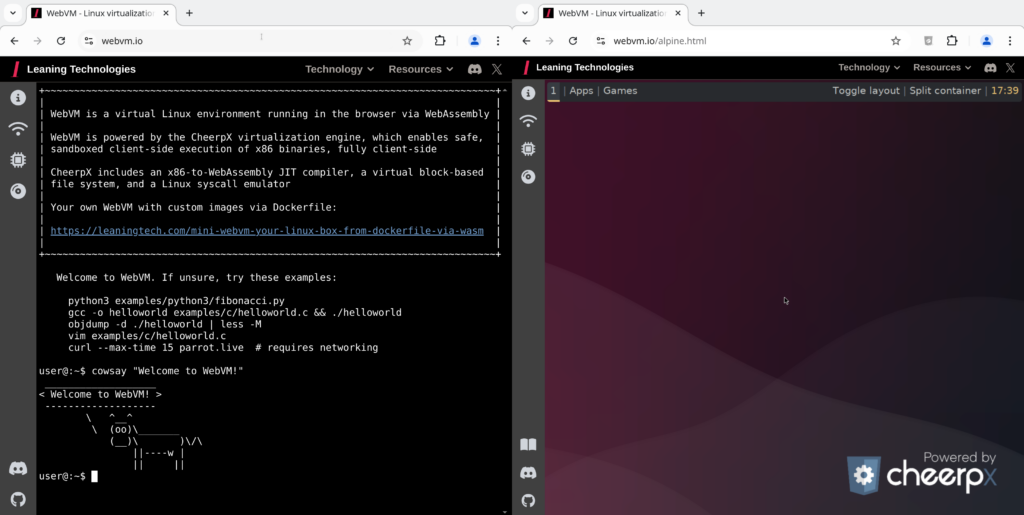
Running a complete Linux virtual machine right in the browser, without installing anything locally and without relying on a traditional server, still sounds like an experiment. However, WebVM has been proving for some time that this idea is indeed feasible and that it can be useful for more than just a tech demo. The project by Leaning Technologies, available as open-source software on GitHub, allows launching a Linux environment directly in the browser using WebAssembly and x86 virtualization on the client side.
The proposition has a clear hook: a “Linux virtual machine in your browser” that works server-less, meaning without running the virtual machine on a remote backend. In its official README, the project explains that WebVM runs entirely on the client and is designed to be compatible with the Linux ABI, to the extent of running a Debian distribution unchanged, along with native development tools. It also offers a variant based on Alpine / Xorg / i3 for those seeking a more desktop-like experience.
A Linux VM in the browser, powered by CheerpX
The core technology behind WebVM is CheerpX, Leaning Technologies’ x86 virtualization solution. CheerpX’s official documentation describes it as a solution for running x86 binaries and operating systems entirely on the client side, within the browser. In practice, this combines a JIT compiler translating x86 to WebAssembly, a virtual filesystem, and an emulation layer for Linux syscalls.
That is one of the key aspects of the project: WebVM doesn’t just simulate a toy terminal or a simplified container; it aims to provide a usable Linux experience from a web tab. Leaning Technologies has extended this with support for graphical environments, customized images, and easy deployment via GitHub Pages—something the company highlighted during its WebVM 2.0 presentation.
Networking remains the biggest obstacle, and Tailscale is the chosen solution
The main technical limitation of any VM in the browser is less about running Linux itself and more about connecting it to the network. Modern browsers do not expose direct APIs for arbitrary TCP or UDP, which prevents using normal networking like a traditional VM would. The WebVM team explained this challenge in detail when introducing connectivity via Tailscale, leveraging WebSockets and the private network infrastructure to avoid setting up a custom backend.
This means WebVM can connect to other devices, but not arbitrarily. Its README specifies that network access depends on logging into Tailscale from the side panel, and to reach the public internet, an exit node must be announced on another device within the network. So, the “server-less” aspect is largely true for the execution model but does not eliminate all external dependencies if real outside connectivity is needed.
Open source, but with conditions for certain use cases
WebVM is distributed under the Apache 2.0 license and its repository already boasts over 16,400 stars on GitHub, indicating significant interest from developers and enthusiasts in WebAssembly. However, an important nuance is worth noting: while WebVM’s repository is open source, the CheerpX layer is not licensed identically for all scenarios. The README clarifies that public deployment of CheerpX is free for exploration, testing, and individual use, but other uses by organizations—including nonprofits, academia, and government entities—require a license. It also notes that hosting a build of CheerpX on other platforms without a commercial license is not permitted.
This legal point is important as it prevents a simplistic interpretation. WebVM is indeed an open, modifiable, and deployable project, but the virtualization engine running in the browser has a commercial licensing model around it. In other words: as a technological showcase, it’s very powerful; but as a basis for products or organizational deployments, it’s necessary to carefully review the licensing conditions.
WebVM isn’t expected to replace traditional virtualization or conventional cloud instances tomorrow. But it demonstrates something that seemed out of reach a few years ago: that Linux can run within the browser in a useful way, with isolation, real toolchains, and a surprisingly high degree of portability. For education, demos, labs, ephemeral environments, or embedded tools, this opens up a much more serious avenue than it might appear at first glance.
Frequently Asked Questions
Does WebVM run Linux on a remote server or in the browser?
It runs primarily in the browser. The project defines itself as a “fully client-side” Linux environment based on WebAssembly and CheerpX, not as a traditional VM running on a remote backend.
Can WebVM use a real network?
Yes, but only via Tailscale. For public internet access, the project states that an exit node within the user’s Tailscale network is also required.
Is WebVM completely open source without restrictions?
The repository is under Apache 2.0, but the README clarifies that public deployment of CheerpX has different licensing conditions for organizations and for commercial or self-hosted uses.
What environments does WebVM offer besides Debian?
In addition to the Debian image, the project links to a variant based on Alpine Linux with Xorg and i3 for a more complete graphical experience within the browser.
