
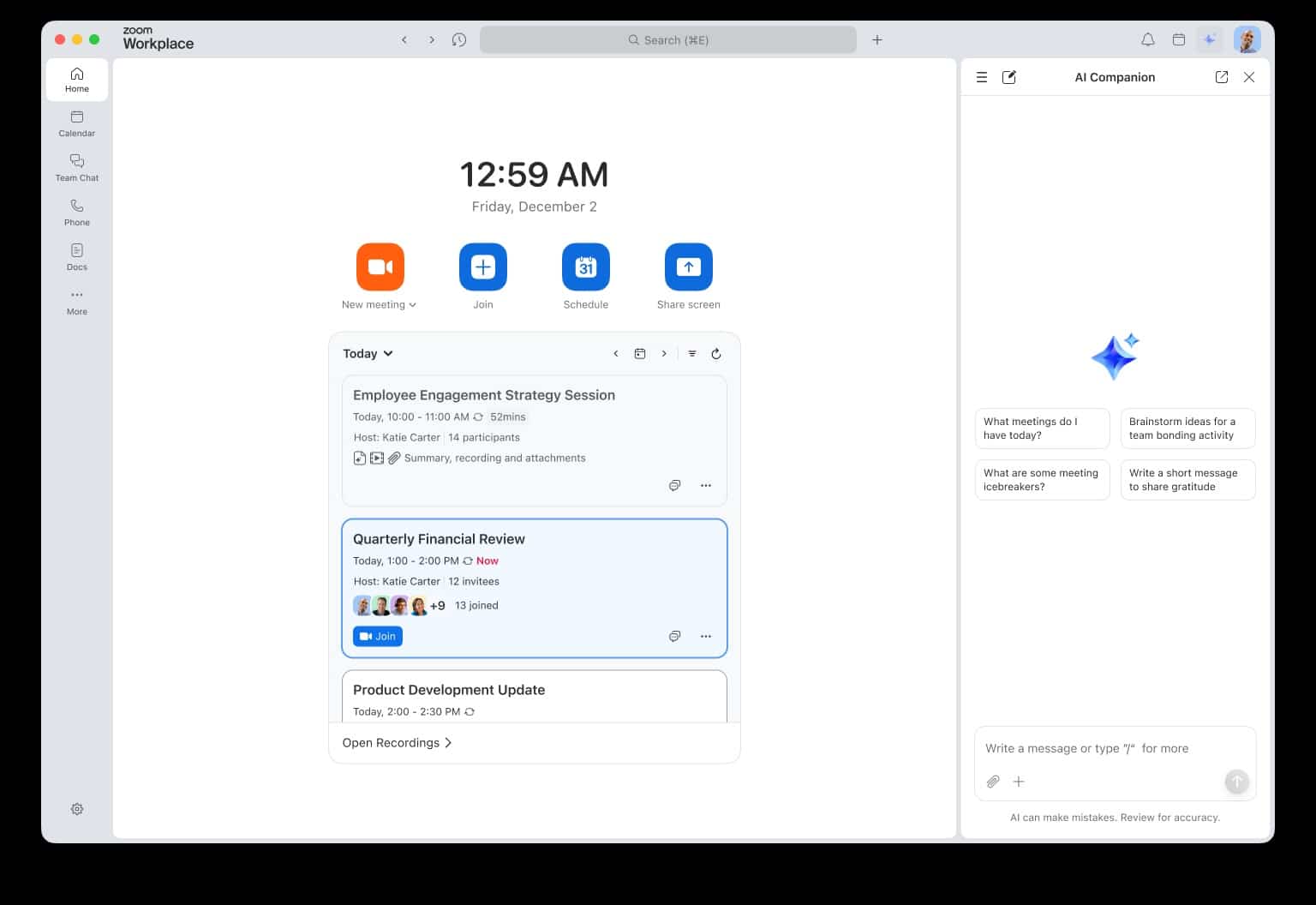
Zoom has launched a new facelift for Zoom Workplace with a simple idea: to make daily activities within the app more straightforward, faster, and less cluttered. The company announced a cleaner and simplified interface for its main products — Zoom Meetings, Zoom Team Chat, and Zoom Whiteboard— along with a new experience of AI Companion 3.0 available on the web and in Zoom Docs.
The move comes at a time when collaboration suites are competing not only for stable video calls but also to become the “desktop” where tasks, conversations, documents, and decisions are managed. Zoom aims to address a common problem: too many functions, menus, and clicks needed to perform repetitive daily actions.
According to Zoom, the goal of this redesign isn’t solely aesthetic. The company aims to improve functionality and control, especially to enable users to move more seamlessly between meetings, chat, and documents, and to give administrators more tools to tailor the experience.
A simpler interface for Meetings, Chat, and Whiteboard
The redesign results in visible changes across various parts of the ecosystem:
- Zoom Workplace (app): the app now has a more “lightweight” look, designed for easier navigation, switching between tabs, and controlling the interface layout.
- Zoom Meetings: the in-meeting experience is simplified with a more organized toolbar, streamlined user settings, and better-organized host tools, focusing on consistency between mobile and desktop.
- Zoom Team Chat: the chat features a more uniform design across desktop, mobile, and web, aiming for users not to have to “relearn” depending on the device.
- Zoom Whiteboard: now offers a more direct web experience, accessible from the browser without installation, and the ability to purchase and use Whiteboard independently of the Workplace suite. This signals that Zoom wants Whiteboard to be a competitive standalone tool for browser users.
- Zoom Events: users of Webinars Plus and Events will experience a more guided setup flow. The idea is to start with essentials and add extras —such as lobbies or ticketing— only when needed, enabling quicker access to the live content.
Zoom Hub, the “control center” now activated by default
One of the most strategic points is Zoom Hub, which Zoom describes as a single place to access and manage content within the Zoom Workplace environment. This Hub will be enabled by default for online users, and the company plans to expand that to all users by February 2026.
Here, the “AI-first” promise comes into play: Zoom indicates that, with AI Companion features, the Hub will enable users to collect insights, extract information from Zoom files and third-party assets, and even generate content based on that data. In practice, Zoom aims for users not just to “find” information but to convert it into decisions and actions with fewer steps.
AI Companion 3.0: more automation and fewer overlooked follow-up tasks
The announcement emphasizes features that tackle a major pain point in modern work: follow-up. Meetings and calls often leave agreements that get lost amidst chats, documents, and inboxes. Zoom wants its AI to turn that noise into actionable items.
Among the new features announced:
- Voice commands in Zoom Rooms: enhance room controls with the invocation “Hey Zoomie,” designed to initiate meetings, adjust room settings, or control cameras and audio hands-free. Zoom expects this to be available by late December 2025.
- Zoom Phone to Tasks: automatically create tasks from calls and voicemails. AI Companion analyzes call summaries and voicemails, suggests follow-ups, and generates tasks so that nothing gets left undone.
- Zoom Docs with synthesis and structuring tools: users will be able to compile multiple meeting summaries into a table to track progress and decisions, as well as use AI to identify risks, extract insights, and categorize feedback. It also includes aids for digesting complex documents through summaries, overviews, and visual mind maps.
Connections and workflows: calls, SMS, and delegated scheduling
Zoom is also pushing features designed for organizations with support roles (assistants, receptionists, shared teams) where coordination is part of the workflow:
- AI Concierge Dial by Name: quickly directing calls by saying the person’s or team’s name, reducing friction at switchboards and reception.
- SMS Delegation: sending and receiving SMS on behalf of others using their Zoom Phone number, aimed at executives, assistants, or teams with shared coverage. It is said to be available with PowerPack.
- Scheduler Delegation: delegating calendar management to others for booking, rescheduling, and communication, while maintaining control over the owner’s calendar without sharing credentials.
A shift in focus: less “software,” more flow
Beyond the list of features, Zoom’s message is that collaboration shouldn’t feel like “managing tools,” but rather about keeping the work rhythm. The redesign aims for users to spend less time navigating menus and more time executing: meeting, deciding, documenting, and following up.
Whether this shift succeeds or not depends on a key detail Zoom knows well: in collaboration, success isn’t just about promising features, but about what reduces friction consistently, every day.
Frequently Asked Questions
What exactly changes in the Zoom Workplace redesign?
A cleaner, simplified interface with more direct navigation between sections, visual consistency across devices, and reorganized settings to reduce clicks in meetings, chat, and core tools.
What is Zoom Hub and why is it important?
It’s a central space to manage content within Zoom Workplace. It will be enabled by default for online users and is envisioned as a “command center” where AI helps extract information and generate content.
What can AI Companion 3.0 do in Zoom Docs?
Organize meeting summaries into tables, extract insights, identify risks, categorize feedback, and summarize documents, including views and mind maps for quick understanding of complex material.
When will the “Hey Zoomie” commands be available in Zoom Rooms?
Zoom expects them to be available by late December 2025, as part of the voice command enhancements for rooms.
via: news.zoom
