
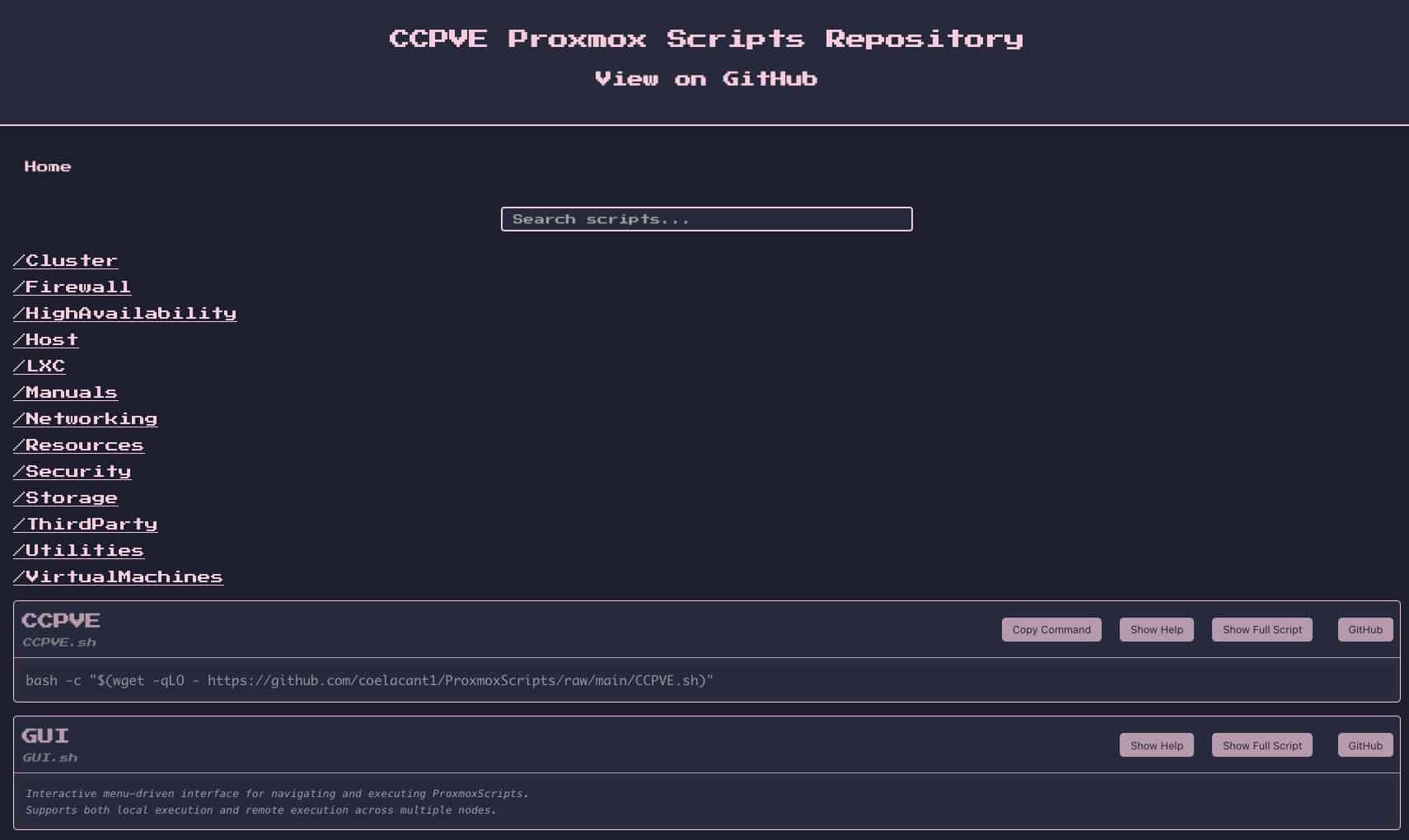
Managing Proxmox VE seriously — with multiple nodes, dozens of repetitive tasks, and changes that don’t always fit neatly into the GUI — often ends up in the same place: a collection of commands, notes, shortcuts, and small homegrown scripts that work… until they stop working. In this space, the repository ProxmoxScripts (CCPVE), published on GitHub by coelacant1, is gaining recognition as an ambitious proposal: an automation library for Proxmox with text-based interface, local or remote execution, and a clear effort to standardize how scripts behave so it doesn’t become a “wild west” that’s hard to maintain.
The idea is not minor. In environments where Proxmox is used beyond the home lab — such as clusters, internal services, providers, campuses, or branches — the problem shifts from “how to create a VM” to how to operate daily with consistency: quick diagnostics, bulk actions (VM/LXC), host adjustments, storage, networking, high availability, and security. CCPVE presents itself as a practical answer to this operational layer.
From a script repository to an attempt at a “product” for sysadmins
The project’s own page clearly defines its focus: scripts for system administrators and DevOps profiles looking to streamline operations in Proxmox VE. The centerpiece is GUI.sh, an interactive terminal menu that allows navigating categories and executing tasks with built-in help; and, for those who want to run a specific command, there is CCPVE.sh, a “launcher” that facilitates both interactive mode and direct execution of a particular script.
The repository emphasizes a key feature that often makes a difference in tools like this: remote execution. This means managing one or several nodes from a workstation, without SSH access to each server. Practically, this allows an admin to prepare an operation and deploy it in batch on a cluster, with logs and error control that are more consistent than traditional copy-paste methods.
The major refactoring: version 2.0 and the move to an internal “framework”
The project significantly shifted with version 2.0, which its creator describes as a major refactor to strengthen backend utilities, improve remote management, and establish a testing and quality control framework. According to the README and tag notes, the repository incorporated common utilities for standardizing behavior (argument parsing, bulk operations, API operation wrapping), along with a logging system and a package for validation and automated testing.
This approach is important because it tackles a common Achilles’ heel in many script repositories: as they grow, each script ends up “its own thing,” with different flags, inconsistent output, and hard-to-trace errors. CCPVE attempts to prevent this by enforcing conventions: common argument parsing, more uniform error handling, and internal tools that act as shared “libraries.”
v2.1.6: Practical improvements for real-world use (SSH users, dependencies, validation)
In the v2.1.6 tag, dated November 25, 2025, practical changes focus on field needs: support for configuring SSH user per node (not always assuming root), dependency checks before remote execution (e.g., jq and sshpass when applicable), and an extra layer of syntax validation with bash -n to prevent structural errors from slipping into scripts and breaking runs.
Though small on the surface, these improvements are very meaningful for ensuring the tool doesn’t stay “works on my server,” but rather withstands heterogeneous scenarios: nodes with different policies, key-based authentication, non-privileged users, or environments where version and dependency consistency is the fine line between useful automation and a long night.
The sensitive point: powerful automation means serious responsibility
The repository emphasizes a warning often left unspoken: Read and understand before executing, keep a local copy for review, validate every script, and test outside production first. The caution is not for rhetoric: these tools can touch clusters, storage, networks, or perform bulk VM/LXC operations. A mistake, misunderstood parameter, or execution on the wrong node can escalate into serious incidents.
There’s also an implicit debate many administrators will recognize immediately: the “one-liners” to run scripts from the internet. CCPVE offers quick calls to explore and launch scripts, but simultaneously recommends that for production use, it’s wise to clone the repository, review scripts, and operate offline, using the local GUI. This balances convenience with control.
An ecosystem where it doesn’t stand alone
The Proxmox scene has been enriched with community repositories aimed at simplifying deployments and maintenance. Alongside CCPVE, popular initiatives like the Proxmox VE Helper-Scripts (Community Edition) focus on “one-click installs” and automation tailored to services and containers. In this landscape, CCPVE seems geared towards those managing existing Proxmox infrastructure who want tools for operations, diagnostics, and repeatable changes—including remote multi-node management.
In any case, the core message remains: Proxmox VE has evolved from “a virtualization interface” to a platform where daily operations demand automation, consistency, and traceability. CCPVE aims to address exactly that.
Frequently Asked Questions
What is CCPVE (ProxmoxScripts) and what is its purpose in Proxmox VE?
It’s a repository of scripts and tools designed to automate management tasks in Proxmox VE, featuring a terminal menu and options for executing commands locally or on remote nodes.
Is it safe to run quick commands from the internet on a production Proxmox environment?
For production, the project recommends cloning the repository, reviewing scripts, and testing in non-production environments before applying changes, avoiding reliance on ephemeral, uncontrolled executions.
What does remote execution in CCPVE add compared to managing nodes via SSH?
It enables executing tasks on one or multiple nodes from a single point, with logs and more uniform behavior, reducing manual repetition across servers.
What practical updates does CCPVE v2.x bring for cluster management?
Version 2.x introduces standardization of arguments and errors, testing frameworks, and improvements in remote execution; v2.1.6 adds SSH user configuration per node, dependency checks, and basic syntax validation.
